
fajota
Known Participant
October 26, 2020
Answered

Control the Opacity delay with Slider control

  • October 26, 2020
  • 1 reply
  • 911 views

Hello!

I have used the expression bellow to control the position with delay:

var P=thisComp.layer(index-1).transform.position;
var D=thisComp.layer("Adjustment Layer 1").effect("Slider Control")("Slider")*thisComp.frameDuration;
P.valueAtTime(time-D)

I'd like the same to control the Opacity. I tried the following expression, but don't work:

var T=thisComp.layer(index-1).transform.opacity;

var D=thisComp.layer("Null 1").effect("Slider Control")("Slider")*thisComp.frameDuration;

T.valueAtTime(time-D)

 
How can I control de Opacity Delay with Slider Control?
This topic has been closed for replies.
Correct answer Rick Gerard

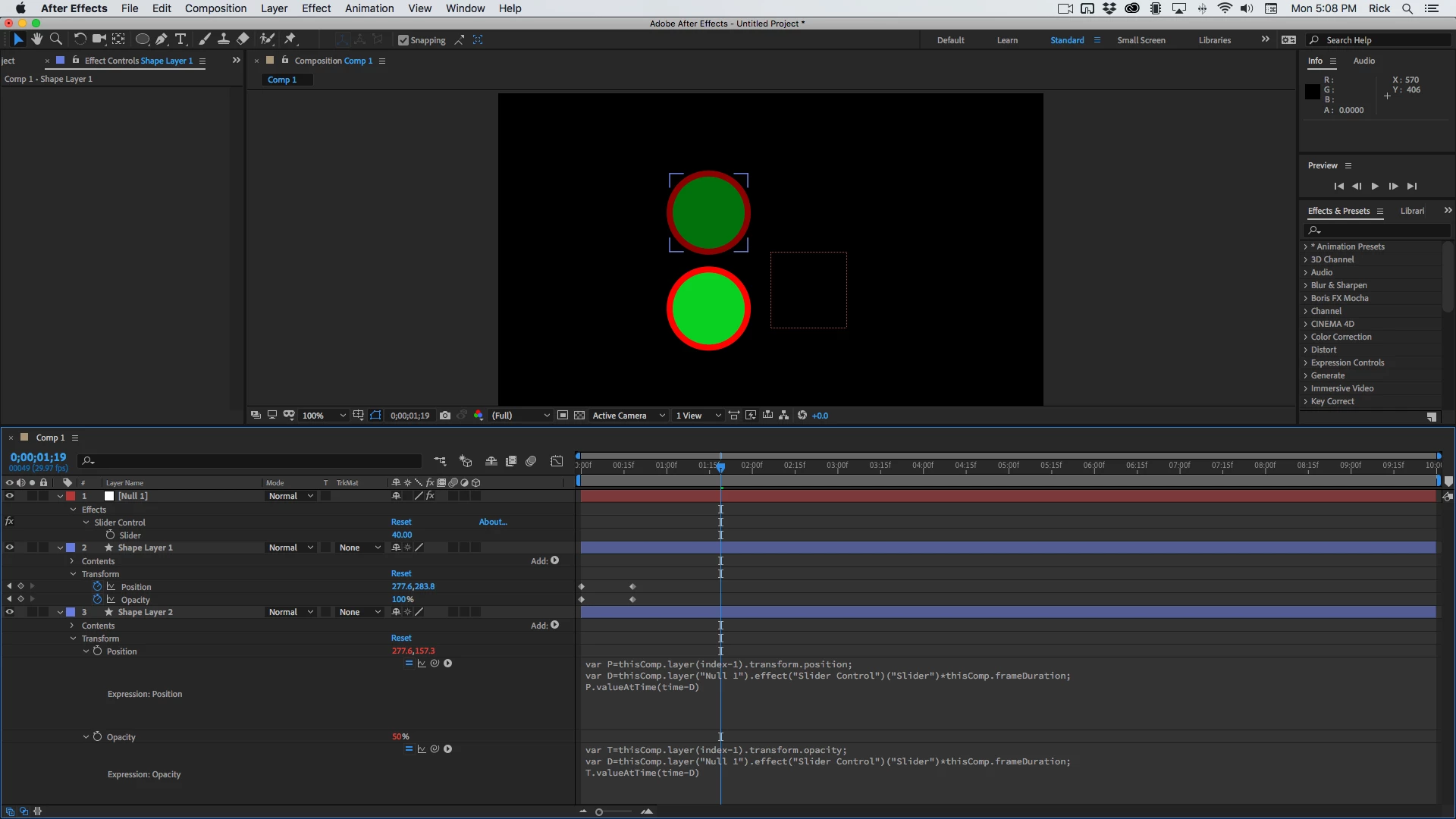
What is the error? If you are pointing to the same slider then the name is wrong on one of the expressions. I would not put expression controls on an Adjustment layer, I would put them on a Null.  I've got Layer 3 following Layer 2 by 40 frames using only 1 slider:


If you use a little more descriptive language in declaring your variables you can get auto-complete to fill in the blanks and you can leave off the var. I would have written expressions like this:

// Position
frameDelay = thisComp.layer("Null 1").effect("Delay in frames")("Slider") * thisComp.frameDuration;
mstrLyr = thisComp.layer(index - 1);
mstrLyr.position.valueAtTime(time - frameDelay)

//Opacity
frameDelay = thisComp.layer("Null 1").effect("Delay in frames")("Slider") * thisComp.frameDuration;
mstrLyr = thisComp.layer(index - 1);
mstrLyr.opacity.valueAtTime(time - frameDelay)

I always name my sliders, and if you write like this all you have to do is copy the position expression, paste it to opacity, then double-click opacity and start typing. when you get to op "opacity" will pop up and you can just hit return.

1 reply

Rick GerardCommunity ExpertCorrect answer
Community Expert
October 27, 2020

What is the error? If you are pointing to the same slider then the name is wrong on one of the expressions. I would not put expression controls on an Adjustment layer, I would put them on a Null.  I've got Layer 3 following Layer 2 by 40 frames using only 1 slider:


If you use a little more descriptive language in declaring your variables you can get auto-complete to fill in the blanks and you can leave off the var. I would have written expressions like this:

// Position
frameDelay = thisComp.layer("Null 1").effect("Delay in frames")("Slider") * thisComp.frameDuration;
mstrLyr = thisComp.layer(index - 1);
mstrLyr.position.valueAtTime(time - frameDelay)

//Opacity
frameDelay = thisComp.layer("Null 1").effect("Delay in frames")("Slider") * thisComp.frameDuration;
mstrLyr = thisComp.layer(index - 1);
mstrLyr.opacity.valueAtTime(time - frameDelay)

I always name my sliders, and if you write like this all you have to do is copy the position expression, paste it to opacity, then double-click opacity and start typing. when you get to op "opacity" will pop up and you can just hit return.