
didier_31
Participant
March 23, 2024
Answered

Erreur script

  • March 23, 2024
  • 1 reply
  • 448 views

Bonjour,

J'ai créé un script avec Chat GPT pour ajouter une propriété Réduire les tracés (TrimPath), mais cela ne fonctionne pas.

J'obtiens un message :
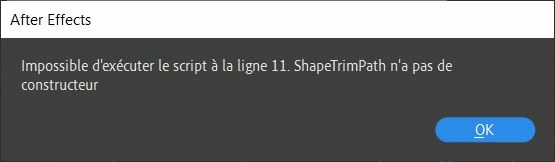
 

Voici le code :

// Check if a shape layer is selected
if (app.project.activeItem instanceof CompItem && app.project.activeItem.selectedLayers.length > 0) {
    var selectedLayer = app.project.activeItem.selectedLayers[0];
    
    // Check if the selected layer is a shape layer
    if (selectedLayer instanceof ShapeLayer) {
        // Create a new shape
        var newShape = new Shape();
        
        // Create a trim path
        var trimPath = new ShapeTrimPath();
        
        // Add trim path to the shape
        newShape.property("ADBE Root Vectors Group").addProperty("ADBE Vector Shape - Group").addProperty(trimPath);
        
        // Add the shape to the layer
        selectedLayer.property("ADBE Root Vectors Group").addProperty(newShape);
        
        alert("Trim Paths property added to the selected shape layer.");
    } else {
        alert("Please select a shape layer.");
    }
} else {
    alert("Please select a composition and a shape layer.");
}


La ligne 11 correspondrait à : var trimPath = new ShapeTrimPath();


Comme je ne connais rien à ce langage, je ne vois pas enquoi consiste l'erreur.

Quelle serait la bonne syntaxe ?

Merci.

This topic has been closed for replies.
Correct answer didier_31

Là, tu peux sélectionner un ou plusieurs groupes :

var proj = app.project;
var thisComp = proj.activeItem;

if (thisComp instanceof CompItem && thisComp.selectedLayers.length > 0) {
  var selectedLayer = thisComp.selectedLayers[0];
  var selectedProperties = selectedLayer.selectedProperties;
  if (selectedLayer instanceof ShapeLayer) {
    app.beginUndoGroup("Undo");
    for (var i = 0; i < selectedProperties.length; i++) {
      var shapeGroup = selectedProperties[i]("ADBE Vectors Group");
      // ajout trim path
      shapeGroup.addProperty("ADBE Vector Filter - Trim");
      // ajout d'images clés sur la propriété Fin
      shapeGroup.property("ADBE Vector Filter - Trim").property("ADBE Vector Trim End").setValueAtTime(0, 0);
      shapeGroup.property("ADBE Vector Filter - Trim").property("ADBE Vector Trim End").setValueAtTime(thisComp.duration, 0);
    }
    app.endUndoGroup();
  }
}


Parfait !

Je vais gagner beaucoup de temps.

Merci beaucoup.

1 reply

Legend
March 23, 2024

Pour ajouter une propriété trim path à un calque de forme, il faut faire comme ça:


var proj = app.project;
var thisComp = proj.activeItem;

if (thisComp instanceof CompItem && thisComp.selectedLayers.length > 0) {
  var selectedLayer = thisComp.selectedLayers[0];
  if (selectedLayer instanceof ShapeLayer) {
    var shapeGroup = selectedLayer.property("ADBE Root Vectors Group");
// ajout trim path
    shapeGroup.addProperty("ADBE Vector Filter - Trim");
// ajout d'images clés sur la propriété Fin
    shapeGroup.property("ADBE Vector Filter - Trim").property("ADBE Vector Trim End").setValueAtTime(0, 0);
    shapeGroup.property("ADBE Vector Filter - Trim").property("ADBE Vector Trim End").setValueAtTime(thisComp.duration, 0);
  }
}


didier_31
didier_31Author
Participant
March 24, 2024

Super ! Cela fonctionne, mais cela créé le Trim path au niveau du calque entier.
Selon les projets, j'ai des calques principaux avec environ 50 à 100 formes par calque.

J'aimerai que le script s'applique à la seule forme sélectionnée dans le calque actif.

Merci.


Legend
March 24, 2024

Là, tu peux sélectionner un ou plusieurs groupes :

var proj = app.project;
var thisComp = proj.activeItem;

if (thisComp instanceof CompItem && thisComp.selectedLayers.length > 0) {
  var selectedLayer = thisComp.selectedLayers[0];
  var selectedProperties = selectedLayer.selectedProperties;
  if (selectedLayer instanceof ShapeLayer) {
    app.beginUndoGroup("Undo");
    for (var i = 0; i < selectedProperties.length; i++) {
      var shapeGroup = selectedProperties[i]("ADBE Vectors Group");
      // ajout trim path
      shapeGroup.addProperty("ADBE Vector Filter - Trim");
      // ajout d'images clés sur la propriété Fin
      shapeGroup.property("ADBE Vector Filter - Trim").property("ADBE Vector Trim End").setValueAtTime(0, 0);
      shapeGroup.property("ADBE Vector Filter - Trim").property("ADBE Vector Trim End").setValueAtTime(thisComp.duration, 0);
    }
    app.endUndoGroup();
  }
}