



GPU Effects Error
Here's the story:
I'm editing a minute long reel type video in Premiere - I've color corrected and added a LUT with Lumitri color. The client asked for me to blur some faces. I decided to send the entire timeline to After Effects with Dynamic Link. I did a bunch of work without any problems, everything looked decent in AE, even though it was running a bit slow, which I assumed was because of the 4k files I was using. Recently though, my computer is now giving me a GPU error and won't display any of the footage in the composition, unless all effects are turned off on the footage. In fact, it won't even let me render the project in Premiere. Is this a hardware issue? Or a workflow issue? Below Is an image of the error I'm getting.
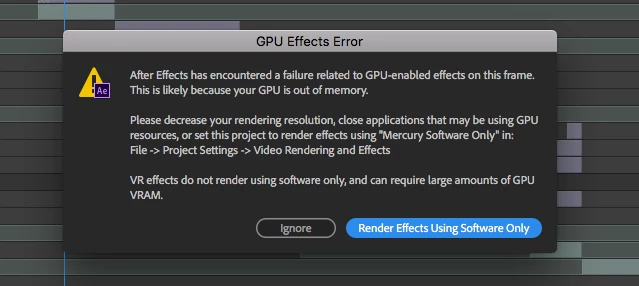
Here are my specs:
MAC Pro Ver 10.13.6
3 GHz - 8 Core
Memory: 64GB 1866 MHz
Graphics: AMD FirePro D700 6144 MB
Footage: Shot with a Panasonic GH5
Unfortunately, changing the Video rendering settings gives me a checkered pattern on the composition, which doesn't help me play with the footage at all.
 AdChoices