New Participant
September 3, 2021
Answered

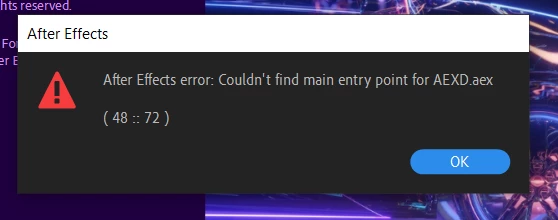
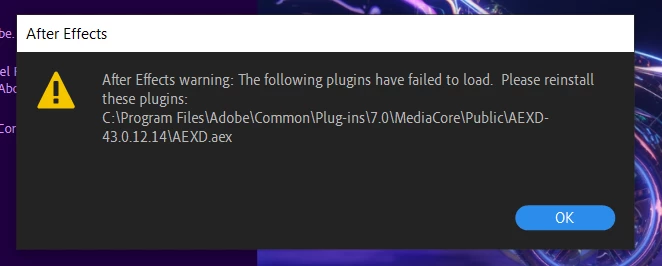
How to fix AEXD plugin failure and error (48::72) ?
  • September 3, 2021
  • 8 replies
  • 38307 views


I have these popups when I turn on After Effects. May I know are there anywhere I can reinstall the plugins? How can I fix the "Couldn't find main entry point for AEXD.aex (48::72)" error? Any help would be much appreciated. 


Correct answer pranavm61935688

It happened after installation of Adobe XD for me. I think it's a bridge script between XD and After Effects, however it does not work. XD has no issue for me, except After Effects bridge. And this is really annoying because everytime when I run the After Effects, I'm waiting for this two error message pop-up...


C:\Program Files\Adobe\Common\Plug-ins\7.0/MediaCore

rename MediaCore to MediaCore-old


8 replies

New Participant
June 25, 2022

Copy and replace the driver file "OpenCL.dll " to the catalog:

C:\Windows\System32

The problem of errors in Adobe After Effects CC 2015-2022 like "Couldn't find main entry point for Pro X-Element.aex ( 48 :: 72 )" solved. Checked only on Windows 10.

New Participant
October 19, 2022
Where do I get that file to copy and replace?
Participating Frequently
November 25, 2021

FIXED....


Hi there..!

I too faced the similar scenario having those warning and error pop-ups while launching After Effects 2019.


Scenario:- 

On my laptop

- I had already installed and updated Adobe XD to it's latest version.

- I have then installed Adobe After Effects 2019


Trial 1:- 

- I have uninstalled Adobe XD completely via Creative Cloud application.

(in the background that specific file from "C:\Program Files\Adobe\Common\Plug-ins\7.0\MediaCore\Public\AEXD-45.1.62.3\AEXD.aex" was removed....Obviously😄)

- I then launched Adobe After Effects 2019, it got launched perfectly WITHOUT those warning and error pop-ups.


I WAS HAPPY 🎉


Trial 2:- 

- I then installed back Adobe XD via the same Creative Cloud application.

- I then again launched Adobe After Effects 2019, it got launched perfectly WITH  WITH  WITHHHHHH those warning and error pop-ups


WELL...THEN I KNEW HOW TO BE HAPPY AGAIN...! 🤔 🤔


I then completely uninstalled Adobe XD, because currently there was no requirement for me to export from Adobe XD >> Adobe After Effects 2019


BBBBBBUUTTTT..........


If you wish to have Adobe XD, on your machine, I would suggest that you can rename that AEXD.aex plugin with some aplhabetical file extension, like AEXD.aex.xy, then Adobe After Effects 2019 will open WITHOUT those warning and error pop-ups....anddd.......you can use Adobe XD seamlessly for your UX or any other work.


Also I have noticed that Adobe XD, irrespective of having that renamed plugin file back from imaginary file extension to AEXD.aex form, and re-launching Adobe XDAdobe After Effects 2019 nor Adobe After Effects 2021, exporting to After Effects option inside Adobe XD shows an error, even if it is a line/path. Basically I can't export from Adobe XD >> Adobe After Effects 2021 (and also there was no requirement for me to EXPORT from XD>>AE)


-----

Hope I helped in some way 🙂

Thank you

-----

New Participant
September 25, 2021

Hey!


Removing the plugin created by the new XD update worked for me! 

go to - "C:\Program Files\Adobe\Common\Plug-ins\7.0\MediaCore\Public\"AEXD-44.0.12.7"

and remove "AEXD-44.0.12.7"


Just keep a copy elsewhere and test it out! hope this works for you.

Elizabeth

lollozip
Known Participant
October 18, 2021

Thanks a lot Elizabeth, it worked for me as well!

Just to add infos, the problem occurred me only with AE 16.1.3 (AE 2019), not with AE 2020.

New Participant
October 18, 2021

Amazing! Good luck 😊

nishu_kush
Community Manager
Community Manager
September 6, 2021

This plug-in is installed with the Adobe XD. I don't think it'll cause any issue other then preventing you from exporting Adobe XD files to After Effects.

Could you try doing a clean installation on After Effects and XD using the Adobe Cleaner tool.

Let us know how it goes.


Thanks,

Nishu

New Participant
September 6, 2021

Same problem here

New Participant
September 6, 2021

Also, can't export project form XD into AE - I suppose these problems are connected

New Participant
September 22, 2021

Did you solve this issue?

kai5C32Author
New Participant
September 6, 2021

I am not sure where can I get the plug-in, or is there no harm in leaving it like this. There has been no replies for a few days.

DryreL
Known Participant
September 6, 2021

Hi there, I'm also having same problem. Does anyone know how to fix?


New Participant
September 22, 2021

Hi sir. Did you solve that issue?

DryreL
Known Participant
September 23, 2021

No, I'm still having this issue

nishu_kush
Community Manager
Community Manager
September 3, 2021

Hi kai5C32,


Welcome to the community and sorry for your issue.

How do you launch After Effects - by double-clicking a project file or by clicking its icon? What's the exact version of After Effects you're using? Also, have you tried running After Effects as administrator (right click its icon > Run as administrator)

Let us know if it helps.


Thanks,

Nishu

kai5C32Author
New Participant
September 4, 2021

Hi nishu_kush,


Thank you for replying.

I am currently using the After Effects 2020, version 17.0.0. The popups will still pop out even if I launch the program by double-clicking the icon or a project file. I have also tried running the program as Administrator, but it does not seem to work. Are there any links to download the plugins?