faizankhan619
Participant
August 4, 2017
Question

I am not able to render video with transparent background in after effect cs6 :(

  • August 4, 2017
  • 3 replies
  • 834 views

I'm facing a wired problem. Problem is that i'm not able make background transparent even though i'm doing everything right. I followed all the steps.

1. Make sure your background is transparent.

2. Add your composition to the render queue.

3. Click the output module: “Lossless”

4. Set the video output to RGB + Alpha.

5. Render

What can be the issue? I need help. I have been searching for solution for 2 hours

This topic has been closed for replies.

3 replies

Kevin-Monahan
Community Manager
Community Manager
August 15, 2017

Hi Faizankhan,

Sorry for this issue. Did you ever find a solution? Please let us know if you have or if you still need help.

Thanks,

Kevin

Kevin Monahan - Sr. Community & Engagement Strategist – Pro Video and Audio
Dave_LaRonde
Inspiring
August 4, 2017

...and you may not be rendering to a codec that supports alpha channels, too.

faizankhan619
Participant
August 4, 2017

Dave actually i'm absolute beginner on after effects. TBH i'm using after effects for the first time. I just completely followed the tutorial as i mention above. How can i render to a codec that supports alpha channels?

Inspiring
August 4, 2017

Choosing the Lossless output module will pick a codec that supports Alpha. Just to be sure that you're not changing anything, do you have a Lossless with Alpha option above or below the Lossless option? Also, what codec is being picked? It will say on the right of the dropdown where you chose RGB + Alpha.

P.M.B
Legend
August 4, 2017

Maybe the media player you are using to view the video does not support alpha channels.

~Gutterfish
Inspiring
August 4, 2017

Also, transparency in video is often shown as black, so what are you seeing? As Gutter-Fish​ said, your player might not support alphas, but provide a little more information, as well as a screenshot of what you are seeing and we can be more specific.

faizankhan619
Participant
August 4, 2017

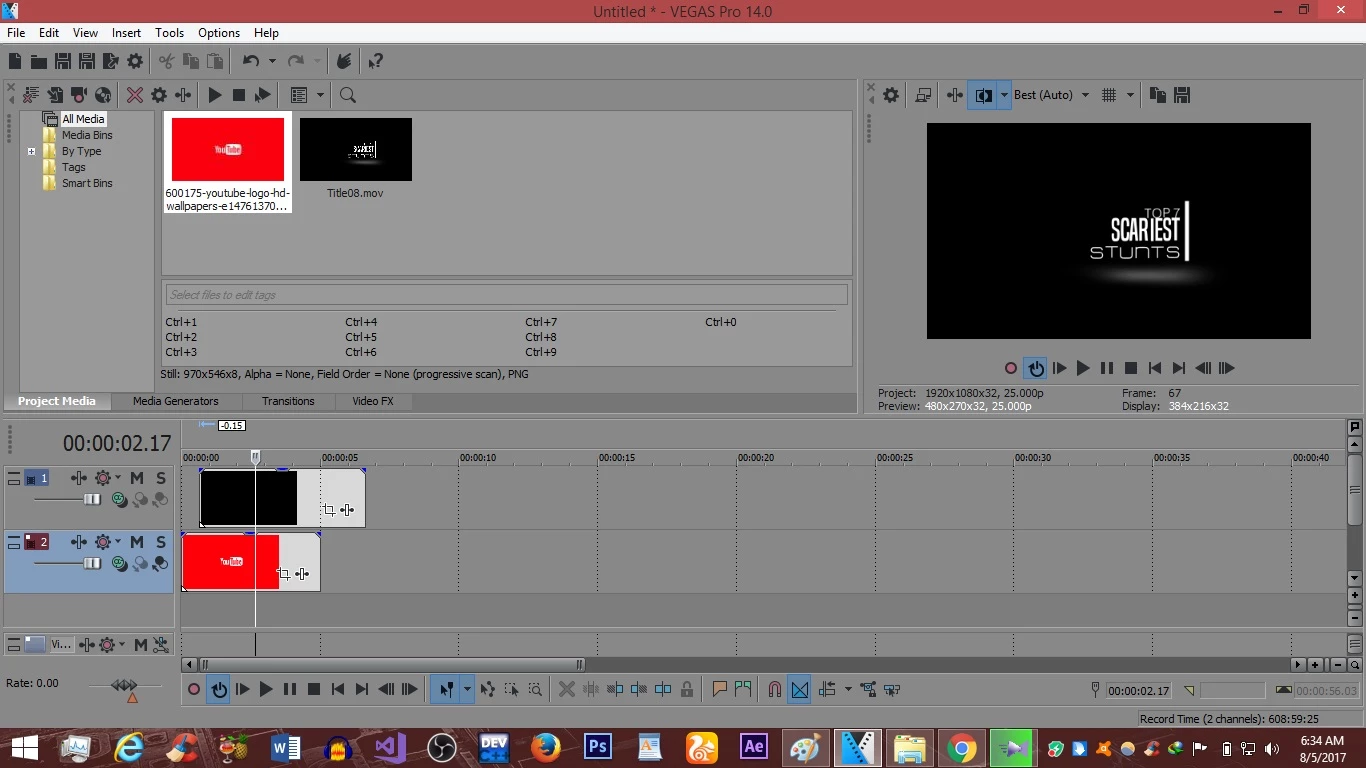
Yeah you are right the transparency in media player is often shown as black but when i try to use this video clip in sony vegas pro 14, It still shows the black background. You can see that MOV clip is above the picture layer.