



Answered
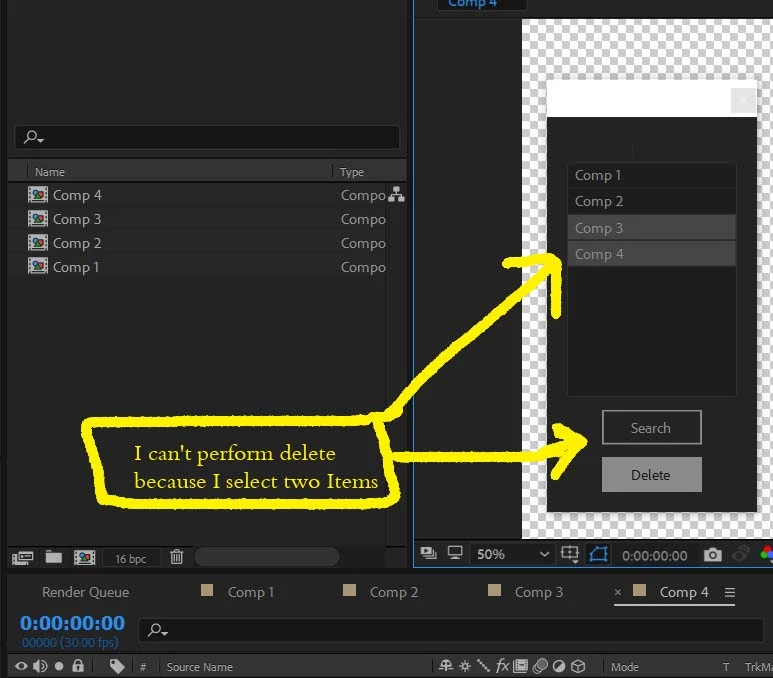
listbox script can't perform multiple delete for CompItem
Hi,
This is my second post about the Listbox script. I am new here, so please bear me more. In the first post justintaylor help me a lot and I am very grateful to him and all the professionals in the community for their support. I ask the professionals to develop and correct my script to learn more from you.
(function(){
    $.win = new Window("palette");
    var win = $.win;
    win.text = "Link";
    win.orientation = "column";
    win.alignChildren = ["center", "top"];
    win.spacing = 10;
    win.margins = 16;
    var listbox1 = win.add("listbox", undefined, undefined, { name: "listbox1", multiselect: true, columnTitles: "Max", showHeaders: true });
    listbox1.preferredSize.width = 136;
    listbox1.preferredSize.height = 208;
    var button1 = win.add("button", undefined, undefined, { name: "button1" });
    button1.text = "Search";
    var button2 = win.add("button", undefined, undefined, { name: "button2" });
    button2.text = "Delete";
    win.show();
    var myNewArray = [];
    button1.onClick = function Search() {
        var compsArray = new Array();
        var myProj = app.project;
        myNewArray = [];
        listbox1.removeAll();
        for (var i = 1; i <= myProj.numItems; i++) {
            if (myProj.item(i) instanceof CompItem) {
                myNewArray = compsArray[compsArray.length] = myProj.item(i);
                listbox1.add("item", myNewArray.name);
            }
        }
    }
    button2.onClick = function deletecomps() {
            if (listbox1.selection.text = myNewArray.name) {
            myNewArray.remove();
        }
    }
})();
This a screenshot of the script in AE.
 AdChoices