
Participant
February 8, 2021
Answered

loopOut is not a function

  • February 8, 2021
  • 4 replies
  • 20772 views

When I use expression loopOut() I always see error "loopOut() is not a function". I tried to use different variants of syntaxes but it didn't help.

I saw some advices here but they didn't work too.
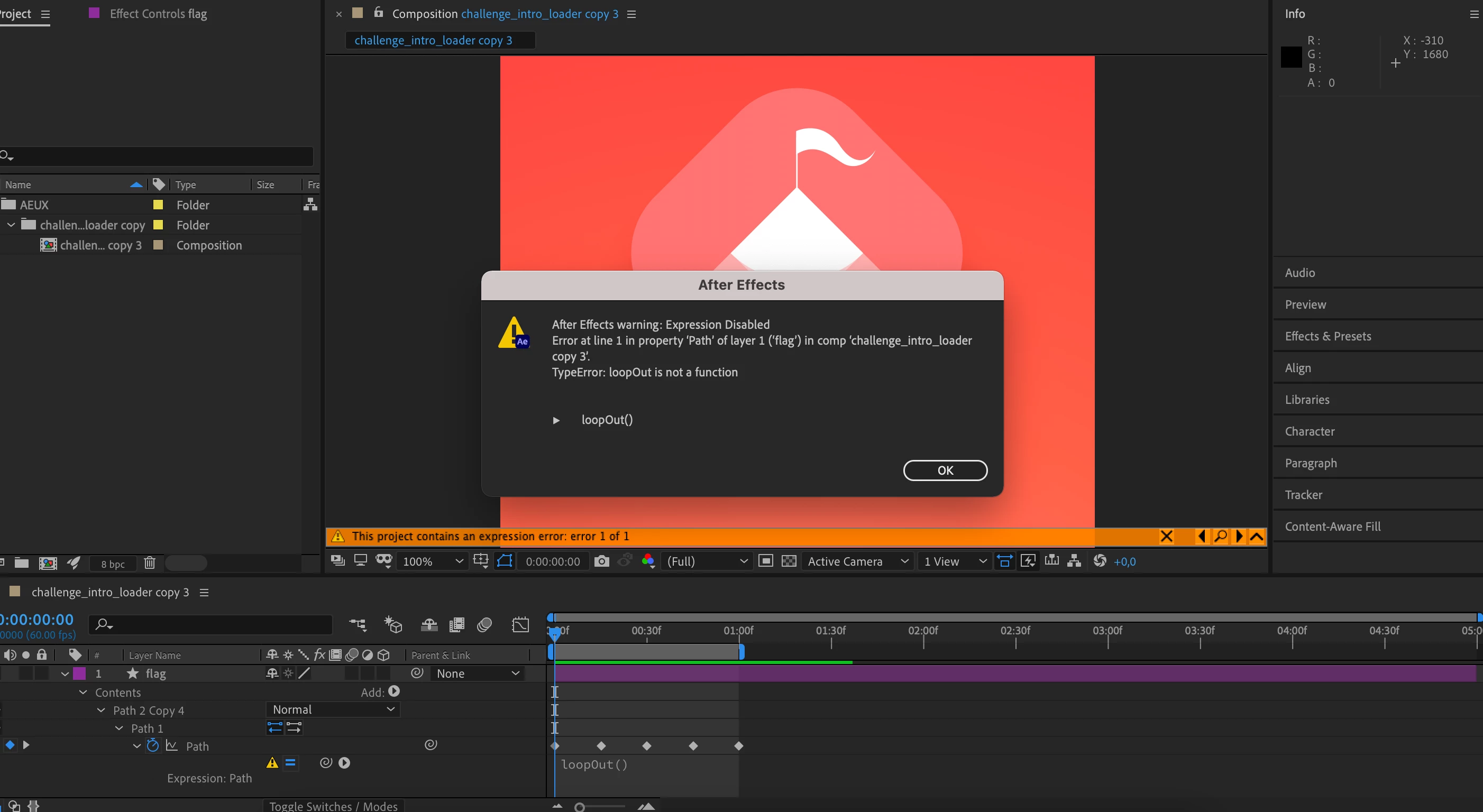
 

I use Mac OS Big Sur 11 and 17.6.0 After Effects

Correct answer Cidietrich_

I Had the same problem today and I realised you have to use de entire expression not just "LoopOut("offset")" like some tutorials tells us to do. You Have to use like this:

loopOutDuration(type = "offset", duration = 0)


4 replies

Cidietrich_Correct answer
Participant
March 12, 2024

I Had the same problem today and I realised you have to use de entire expression not just "LoopOut("offset")" like some tutorials tells us to do. You Have to use like this:

loopOutDuration(type = "offset", duration = 0)


Participating Frequently
August 1, 2021

Any chance there's a way to trick things into working like loopOut("pingpong")? 🙂

Dan Ebberts
Community Expert
Community Expert
August 1, 2021

That would be like this:

if (numKeys > 1 && time > key(numKeys).time){
  t1 = key(1).time;
  t2 = key(numKeys).time;
  span = t2 - t1;
  delta = time - t2;
  seg = Math.floor(delta/span);
  t = delta%span;
  valueAtTime((seg%2) ? (t1 + t) : (t2 - t));
}else
  value
Participant
September 28, 2022

Hi,

I am wondering how do I target this only on specific keyframe(s), like how the in and out under loop function and numKeyframes are doing? Thanks!

Really apprciate your contribution of that code

Community Expert
February 8, 2021

The loopOut() function works on properties that have a numeric value. The values can be in an array. Vector paths require a different approach.


The approach is to look at the number of keyframes and then use valueAtTime()


For a simple seamless loop, the first and last keyframes must be identical so copy the first keyframe and paste it at the end. This is the simplest approach to that problem:


valueAtTime(time % key(numKeys).time)

Edit: Just saw Dan's solution. It's a lot more typing and it has the advantage of not throwing an error if there is only one keyframe.

Dan Ebberts
Community Expert
Community Expert
February 8, 2021

loopOut() doesn't work for paths. Try this workaround:

if (numKeys > 1 && time > key(numKeys).time){
  t1 = key(1).time;
  t2 = key(numKeys).time;
  span = t2 - t1;
  delta = time - t2;
  t = delta%span;
  valueAtTime(t1 + t);
}else
  value
July 28, 2021

It works flawlessly 😄