


Inspiring
January 29, 2026
Answered

On MacOS, I can't open After Effects files created in Windows

  • January 29, 2026
  • 2 replies
  • 20 views

Hello, 

I created some After Effects files on Windows one year ago with After Effects 2025 or maybe 2024. 

In november, my Windows computer crashed, as well as my old Macbook Pro 2019 Intel (!).

So I had to buy a new Macbook M4Max.

But I can’t open any old After Effects files on this new Macbook : it crashes.
As far as I remember, I could open these files on my old Macbook Intel.

Here is what After effects tells me :
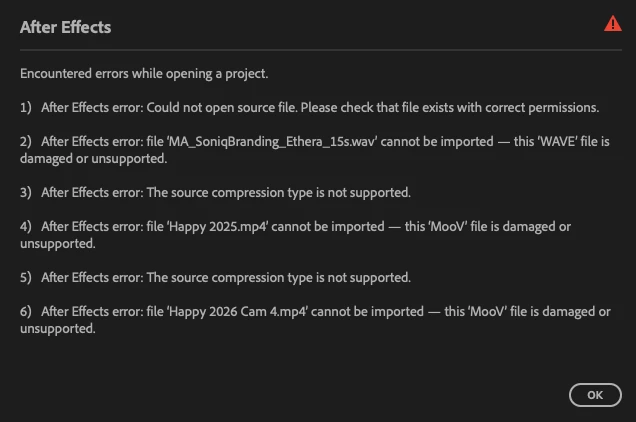
Can someone help me on this ?

Thanks

PS : I checked “enable Logging” in the help menu to see some log issues, and now I cannot uncheck it…. is there a way to stop logging ?

    Correct answer Alesclandre

    Ok, so after having contacted Adobe Support, trying to change preferences, and some file names, I asked Gemini.
    I suggested Gemini to show the crash log, I copied the first 15 lines of the crash log, and it found the solution : it was a driver that panicked while mac was trying to interpret the 3D datas of Windows. 
    The driver was 3DConnexion, because I own a mouse from them. 

    The solution: uninstall 3DConnexion driver, save your AE file, and then reinstall 3DConnexion driver if you want.

    2 replies

    nishu_kush
    Community Manager
    Community Manager
    January 29, 2026

    That’s great! Glad to hear that you found the fix. Thanks for sharing and updating the thread.

    Feel free to reach out if anything else comes up.


    Thanks,

    Nishu

    AlesclandreAuthorCorrect answer
    Inspiring
    January 29, 2026

    Ok, so after having contacted Adobe Support, trying to change preferences, and some file names, I asked Gemini.
    I suggested Gemini to show the crash log, I copied the first 15 lines of the crash log, and it found the solution : it was a driver that panicked while mac was trying to interpret the 3D datas of Windows. 
    The driver was 3DConnexion, because I own a mouse from them. 

    The solution: uninstall 3DConnexion driver, save your AE file, and then reinstall 3DConnexion driver if you want.