


Participating Frequently
January 15, 2020
Question

On shortcut "O" (Go to the latest out point of selected layers) indicator stops in wrong frame

  • January 15, 2020
  • 1 reply
  • 707 views

Hi. After the latest update the indicator stops in some commands in wrong position. In the past it worked fine.
On shortcut "O" (Go to the latest out point of selected layers) indicator stops a frame before end.
(is moving on red line of the screenshot)
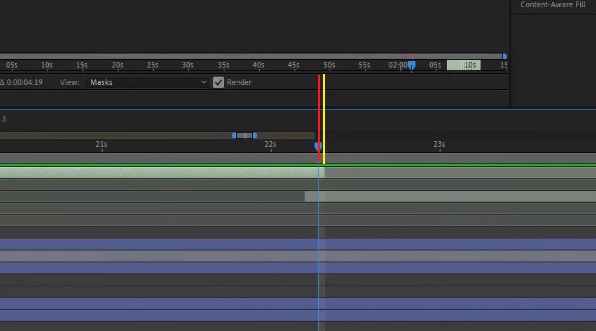
 

Also on shortcut "N" (command: set work end area") work area is cropping a frame after indicator.
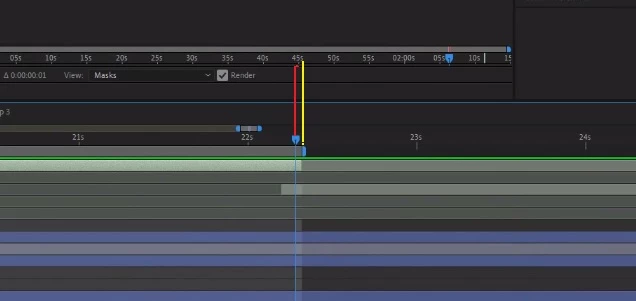


Any suggestions?

This topic has been closed for replies.

1 reply

Community Expert
January 15, 2020

The Current Time Indicator aligns with the left edge of the frame.  


The Work Area End aligns with the right edge of the frame.


Each shows correctly in your screen shots.


Also, the light grey virtical highlight repressents the length of the frame in the Timeline.  (It also appears correctly.)


If you were to press Page Down to go to the Next Frame, you'll be on the 1st empty frame of the trimmed layer and one frame past the end of your work area.


anosdAuthor
Participating Frequently
January 15, 2020

I see, but in older versions i didn't meet that problem. I would like to avoid pressing a second shortcut for a simple command. Also the "N" shortcut stops to the next frame and that seems meaningless to me... Is there any way to change it? 

Community Expert
January 15, 2020

The N shorctut aligns with the right edge correctly in your screen shot and in the one that I added to my post.


This has been more or less the same since Cosa After Effects version 1.5.