Vincent.
Inspiring
September 29, 2017
Question

RGB+Alpha rendering the color green as white

  • September 29, 2017
  • 1 reply
  • 2517 views

Hey

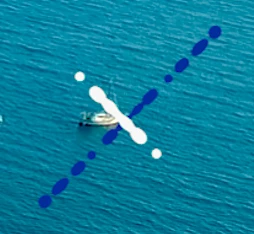
Am I missing something about how rgb+alpha treats colors and solids once AE renders my video file? I have my before and after below.

Before:

After:
This topic has been closed for replies.

1 reply

Community Expert
September 29, 2017

Sorry there is absolutely no way to tell what you have done to create this problem because we can't see the modified properties of the layers involved, your render settings or anything else. If you rendered using the default Lossless With Alpha and there is nothing funky going on in your composition like guide layers or color corrections then you should get colors. The default Lossless with Alpha is for Premultiplied with alpha color mode and most apps prefer straight alpha but changing this setting would only effect the pixels on the edges. If you comp background color is black the pixels would be a little less gray. If your Comp background color was green the edge pixels would be slightly darker if you put the footage over something with a green background. That setting would have nothing to do with removing the green.

Vincent.
Vincent.Author
Inspiring
September 29, 2017

My bad.

So the first photo was taken in after effects. It's a frame of my animation to show the colors that I want in the video that I render out in RGB+alpha. I want to put a bunch of these clips over some drone footage i.e. the second photo. I do the rgb+alpha feature in my video render out to have a transparent background, makes layering easier in premiere pro. But as you can see, when i do import the footage in premiere, my light green is now white. I have another version of the splatter that has red and blue colors which carried over correctly. So I'm a little confused as to what happened in my render from after effects. There's nothing going on in the after effects properties that I'm concerned with.

Community Expert
September 29, 2017

The only thing I can think of is blend modes. If you solo the layer do you see green? Premultiplied or straight alpha should look identical unless you zoom way in on the edges. Unless you missed some kind of switch or had blend mode set up when you applied the overlay the color should be there.

if you can export frame as a Photoshop file in AE, save it as a PNG with a transparent BG or just save the PSD and try to put that in Premiere to see what happens. The exported PSD should look the same as your lossless movie with alpha.
