This topic has been closed for replies.

4 replies

Mo Moolla
Legend
November 24, 2018

As Rick and imeiilfix have pointed out there are several ways to achieve this. From simple plugins to complex mocap workflows.

They both have hit the nail on the head in terms of what you would need.

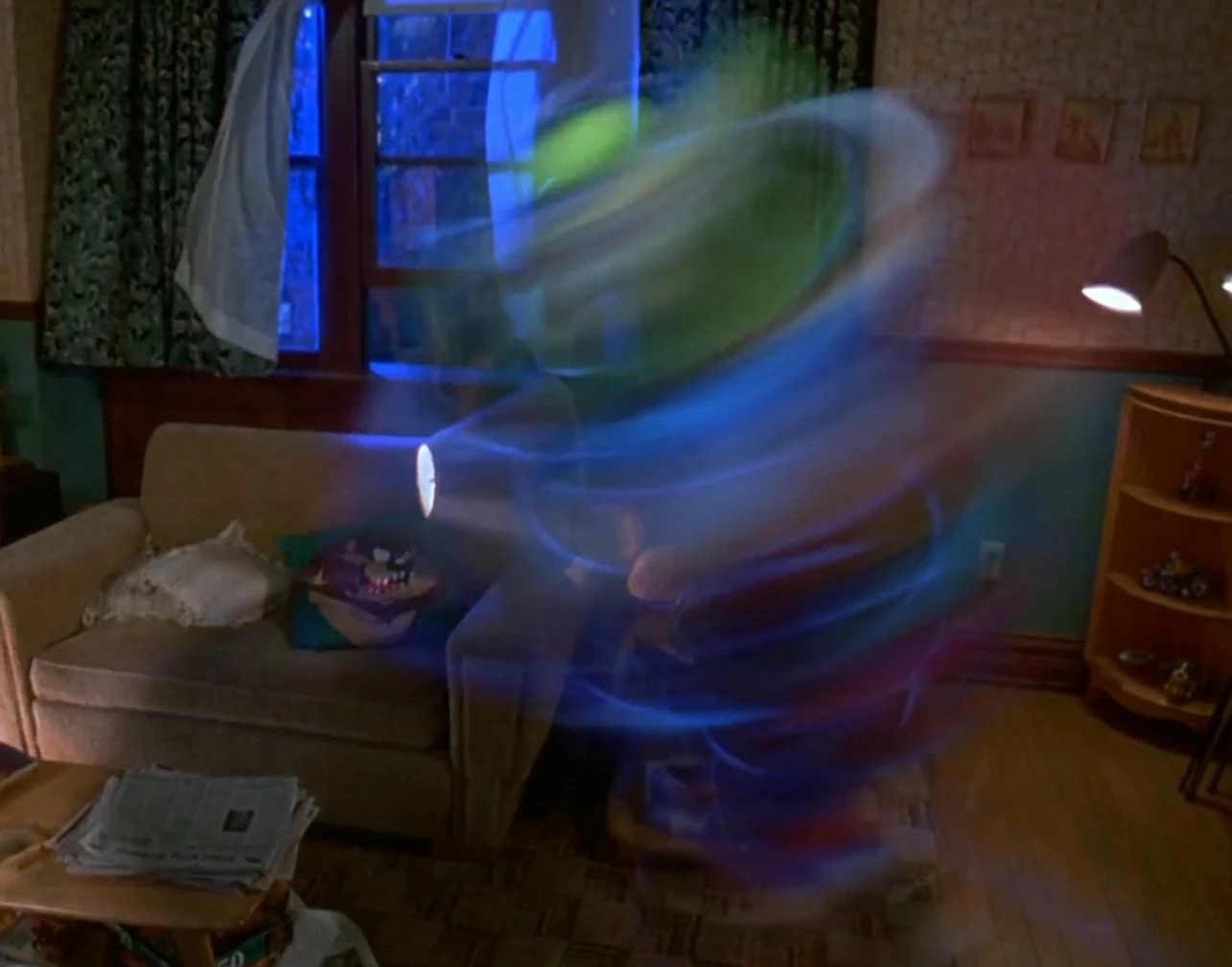
In the MASK movie shot it is not just a simple Echo and trail effect added.

They have created the object in 3D space with camera movement tracked by using tracking markers which get keyed out.

In the movie you will notice the vortex wraps around Jim Carey which means 3D and particle work is involved.

For you to achieve an almost exact output you would need to use software like Maya, C4D or something that allows 3D mapping.

I think that is a thread on its own.

For now, as a beginner in the vfx world make use of plugins that will help you. Also make use of Motion Blur give it more realism.

imeilfx and Rick Gerard

imeilfx
Inspiring
November 24, 2018

Mo Moolla

You are right that what was made in Mask movie was pro cgi work that is why if if we would even start to think about comming close to that we should star with great shots on profesional green screen - and here we don't have that.

And if we would have that good GS shots we could think about pro 3D work. I'm sure even that we could achieve all of that with AE (+Particular/Stardust) starting with good footage but here we have:

- low quality gs scenes

- person that - i guess - just started with AE 

And I guess that is why we are not goin to 3D sofware or even to particular/stardust and other 3rd party plugins that are universe on its own but we are trying to find easiest and fastest way with easiest of tools and tricks to achieve the task.

Mo Moolla
Legend
November 24, 2018

imeilfx​ yup agreed. Finding the easiest solution with built in effects would be best. Its very easy to make someone become a "plugin addict" who can't even understand a track matte (lol Ive seen this many many times)

So yours and Ricks advice is on the money,

I wonder if OP understands the 3D workflow in AE. A camera could be a valuable asset given his footage.

angie_taylor
Legend
November 24, 2018

Use the Echo Filter on the keyed footage to get this result. You can play around with the number of echoes, time offset and blending modes to achieve this :-)

seeyo76Author
Inspiring
November 24, 2018

I did use echo for the spins.

But not getting those blurry circles around at all

imeilfx
Inspiring
November 24, 2018

You can do that in severa ways.
1. easiest way would be to put some glowy markers on person spinning before you recorded him - but I guess you can't redo that scene
2. tweak glow and color plugins to highlite parts of your recording
3.  in precoposition where you have your keyed out footage put some random glowy colorful shapes - make them 3D anchor to null object and spin them around the same way that your model is spinning, turn on motion blur and after little bit of tweaking you should see desirable result.

Community Expert
November 22, 2018

The first thing you need is a clean plate and a layer that contains just the object you want to spin.

If you already have the footage and the camera is locked down, and the actor you want to spin around moves into position, you can sometimes create the clean plate by exporting a single frame from the movie to place behind the actor. You get the actor in front of the clean plate by rotoscoping. If the scene was shot with roto in mind then you may be able to use RotoBrush to automate the process. Once you separate the actor from the background, fix the area behind the actor by adding a clean plate, you put the anchor point right at the center of rotation for the actor and animate rotation. Then you could add CC Force Motion Blur and jack the values way up, or add Radial blur set to Spin and jack the values way up, or experiment with things like echo and compositing modes to get the look you want.

If the camera is moving then you have to throw in Motion Stabilize, Tracking, maybe some corner pin tracking, and probably some track mattes and maybe even some cloning.

The way they did those shots for the movie was to Shoot the scene without the object (character) they wanted to spin, use motion control to control moving cameras so they can get repeatable moves or make sure the scene could be properly tracked, and then shoot or create the object on greenscreen or create the character in a 3D app that could use the camera movement data from the original footage. In other words, dozens of people spend hours or days planning, setting up, and executing the shots and elements required to make a believable composite.

If you showed us the footage you are working with and described what you wanted to do in detail we could probably point you in the right direction. If you just grabbed the camera and shot a handheld shot of a friend walking into a room you are probably in trouble.

imeilfx
Inspiring
November 22, 2018

That screen is from movie MASK and that is the result that he wish to accomplish. He have footahe of a guy spinning on a green screen as a source.

imeilfx
Inspiring
November 22, 2018

All depends on how the footage was shot, how that person is lit but first step could be in AE effects called Motion Trails and many some Glow.

seeyo76Author
Inspiring
November 22, 2018

The shot is shot at home on a green screen, a bit amateur, just for a test.

I'll try motion trails, thank you !