


Inspiring
January 31, 2020
Answered

Treating a Layer as a Single Object with Puppet Tool

  • January 31, 2020
  • 3 replies
  • 4503 views

Hi,

I'm trying to rig a layer in After Effects with the Puppet Tool to give it a bouncy movement

However, the puppet tool interprets each segment of this layer as a different object, shown here:
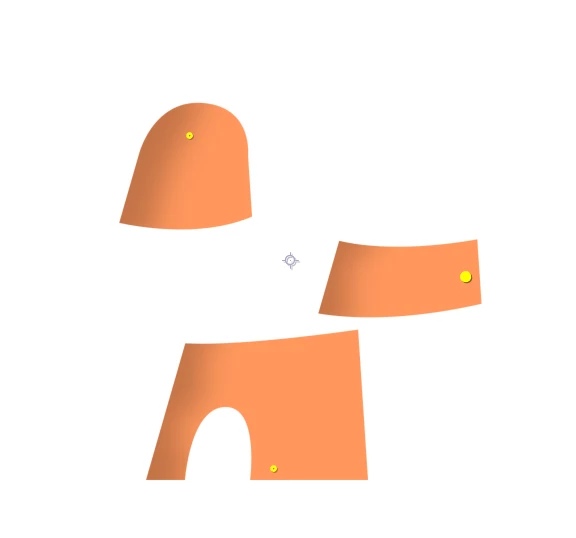
I want the layer to be treated as a single object by the puppet tool. How can I do that, if possible? I tried this both with a pre-comp and rendering it out as a PNG image. Both cases treated the segments separately.

 

This topic has been closed for replies.
Correct answer Ko.Maruyama
  1. Make a New Comp of your PNG file only (named "PNG_precomp")
  2. Add a comp-sized solid to the PNG_precomp and place it at the bottom
  3. Make a New Comp ("MAIN_comp")
  4. Place your PNG_precomp into that MAIN_comp
  5. Apply puppet pin to that layer
  6. Puppet Animation
  7. Double Click (open) the PNG_precomp
  8. Turn off Solid at the bottom
  9. Return to MAIN_comp.

3 replies

New Participant
July 6, 2021

After looking through the comments, I found a slightly modified solution that works best for me:

1. Create completely empty PNG with transperancy with the same size of your precomp

2. Precomp your graphics

3. Add the PNG below

4. Apply Puppet tool on the precomp

5. The image doesn't break into elements ! 🙂


Cheers!

Ko.Maruyama
Ko.MaruyamaCorrect answer
Community Expert
February 3, 2020
  1. Make a New Comp of your PNG file only (named "PNG_precomp")
  2. Add a comp-sized solid to the PNG_precomp and place it at the bottom
  3. Make a New Comp ("MAIN_comp")
  4. Place your PNG_precomp into that MAIN_comp
  5. Apply puppet pin to that layer
  6. Puppet Animation
  7. Double Click (open) the PNG_precomp
  8. Turn off Solid at the bottom
  9. Return to MAIN_comp.
WP275Author
Inspiring
February 4, 2020

The directions couldn't be clearer. Thank you for your help.

Szalam
Community Expert
January 31, 2020

Put a solid layer or a shape layer that's roughly the shape of this behind it solid green inside a precomp with those shapes.

Apply Puppet Pin to the precomp. Key out the green with something like Color Key.

Ko.Maruyama
Community Expert
January 31, 2020

After you apply the puppet pin, you can just turn off the solid layer in the precomp. (unless you like keying stuff) 😉 

Szalam
Community Expert
January 31, 2020

Well, I do! 😛