ericp7906
Participant
November 21, 2017
Answered

Wheel of fortune

  • November 21, 2017
  • 3 replies
  • 2314 views

I'm trying to make a "wheel of fortune" type wheel in after effects.  I have the wheel and everything I need on it.  I know how to make it rotate.  What I don't know how to do is make it start fast and slowly come to a stop.  Not without doing a tone of keyframes.  Using the code time*.  Not sure if there is anything I can add to that to make it slow down until it stops.  Only needs to be about 10 seconds long.  Thanks in advance!
    This topic has been closed for replies.
    Correct answer Rick Gerard

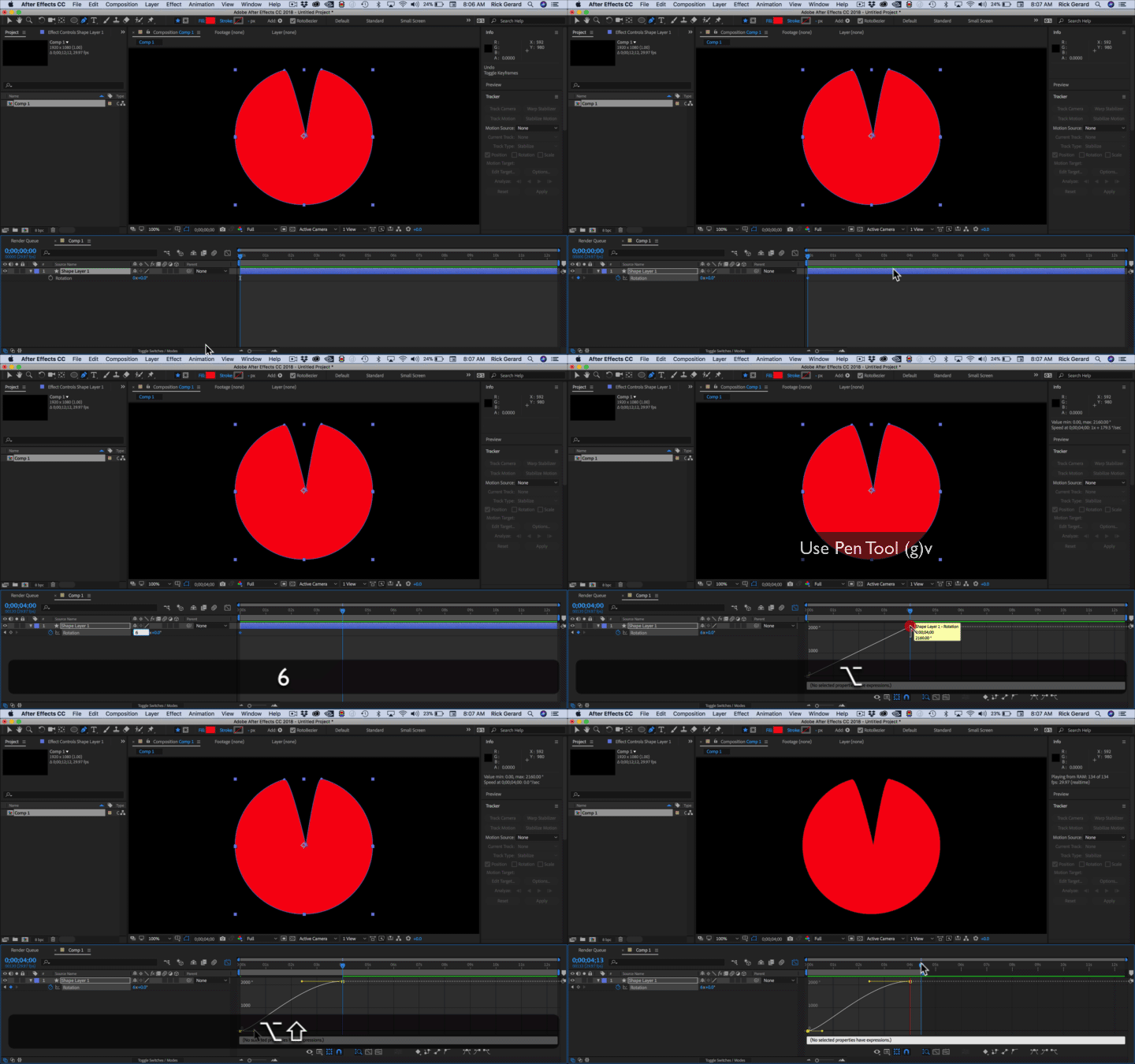
    Two rotation keyframes, graph editor, value graph, pen tool, 15 seconds and you're done.

    Just make sure you use the alt/option and the shift key when you drag out the bezier handles.

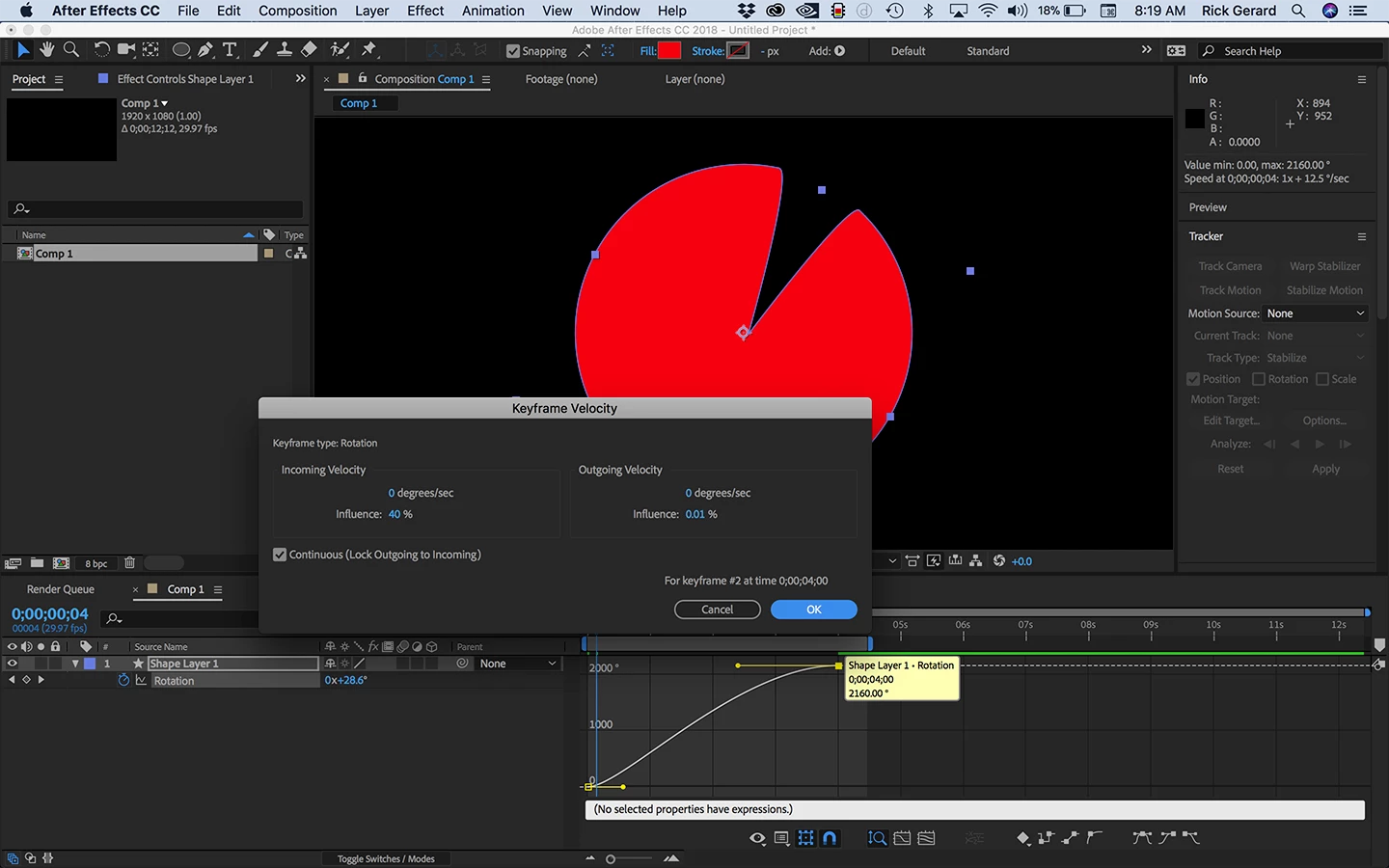
    Or you can right click on the last keyframe and select Keyframe Velocity:

    Same result but mathematically accurate. You can do the same for the first keyframe to set initial acceleration.

    On motionscript.com, our friend Dan Ebberts has lots of expressions that control speed ready for you, but for something as simple as this the graph editor, editing the value graph, and the pen tool and shift + Alt/Option-drag is about as simple as it can get.

    3 replies

    P.M.B
    Legend
    November 21, 2017

    I would try with four keyframes on two layers.

    Sometime applying ease to a single keyframe is tricky.  The deceleration is too quick or the stop is too abrupt.

    Sometimes it's easier and faster to some secondary rotation using a null.

    The wheel layer would have a start keyframe on rotation and an end keyframe.  The end of keyframe would quite a bit of ease applied so the wheel comes to a gradual stop.  But this probably wont be enough so I would also create a null right on the anchor point of the wheel layer and then parent the wheel layer to the null.  I would set the same keyframes on the nulls (a start at the same place as the layers start and an end with heavy ease) rotation except that it would be rotating much slower and the "ending keyfram" would come awhile after

    the layers.   Ultimately youd have to adjust the position and rotations of the nulls rotation so that the point where the wheel layers rotations stops and the null layer's rotation continues is smooth and unnoticeable.

    ~Gutterfish
    Rick GerardCommunity ExpertCorrect answer
    Community Expert
    November 21, 2017

    Two rotation keyframes, graph editor, value graph, pen tool, 15 seconds and you're done.

    Just make sure you use the alt/option and the shift key when you drag out the bezier handles.

    Or you can right click on the last keyframe and select Keyframe Velocity:

    Same result but mathematically accurate. You can do the same for the first keyframe to set initial acceleration.

    On motionscript.com, our friend Dan Ebberts has lots of expressions that control speed ready for you, but for something as simple as this the graph editor, editing the value graph, and the pen tool and shift + Alt/Option-drag is about as simple as it can get.

    ericp7906
    ericp7906Author
    Participant
    November 21, 2017

    Rick Gerard Perfect.  You are awesome!  Thank you!

    DigitalSpatula
    Inspiring
    November 21, 2017

    Hey Eric

    Sorry Mylenium's post is so negative and filled with very little actual info. We all started somewhere on our quest to master AE.

    For your needs, you can look up a tutorial on keyframe easing which allows you to slow down the out or in of a keyframe. Once you apply easing, you can adjust the curve to make it even more pronounced.

    Also, there quite a bit of scripts that give even more control and can be found at aescripts.com

    Hope this helps,

    Steve

    Mylenium
    Legend
    November 21, 2017

    Simply use keyframes. Why try to solve something that simple in a complicated manner? I mean, what would even the point of an expression when it would need to have some keyframeable parameter itself most likely because you need the weel to stop at a specific position? You have a wrong idea about how expressions work and what they do. And no, you don't need "tons of keyframes", just two or three. Perhaps you should get to it and read the help or watch a tutorial. In all honesty, this is basic stuff.

    Mylenium

    ericp7906
    ericp7906Author
    Participant
    November 21, 2017

    Mylenium Thank you for your arrogance.  I appreciate it.  Super helpful. This is not something I do everyday so I didn't know if there was a simple expression that already existed to make it work and save myself a little time.

    DigitalSpatula​ Thank you I appreciate it.  I'll dig a little more.

    Mylenium
    Legend
    November 21, 2017

    Mylenium  Thank you for your arrogance.  I appreciate it.  Super helpful. This is not something I do everyday so I didn't know if there was a simple expression that already existed to make it work and save myself a little time.

    Fair enough.

    Mylenium