


chrisd11592954
Inspiring
May 8, 2024 8:45 AM UTC
Question

AE Beta crashes and cannot open

I updated AE Beta to the last version a few weeks ago and it simply crashes everytime I launch it.

(System Apple m2 max, last OS version.)


Every time the same crash message :
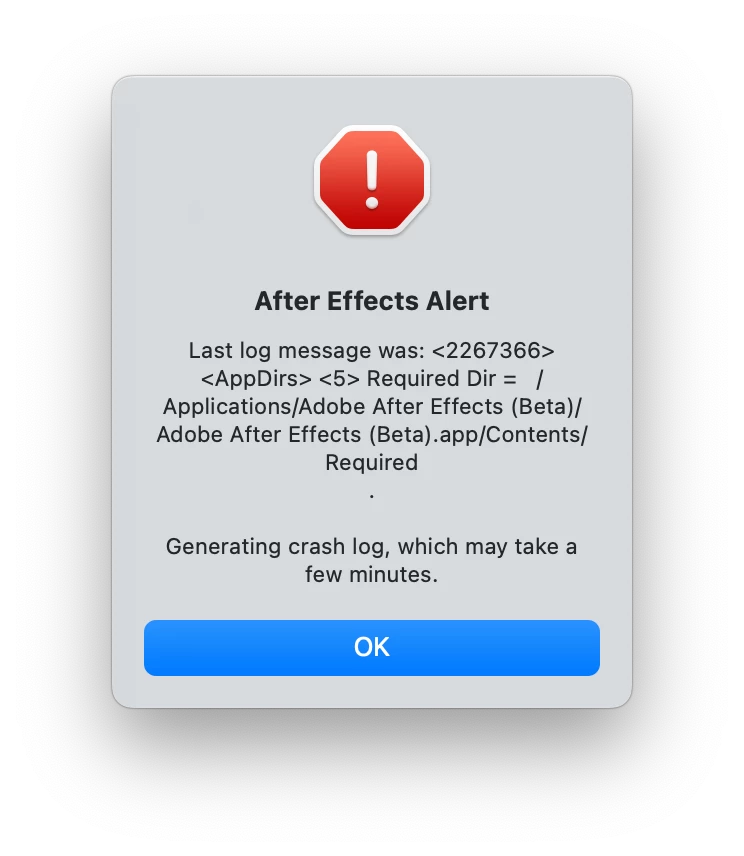
 

 I avoid updating AE regular to the last version, cause if this happens too I won't be able to work anymore...

31 replies

JohnColombo17100380
Community Manager
Community Manager
Dec 16, 2024 6:11 PM UTC

@chrisd11592954, thank you for checking. This doesn't appear to be a general bug with After Effects, but something that would be better handled by 1:1 support from our Support team. Tagging @nishu_kush for visibility.

Translate
chrisd11592954
Inspiring
Dec 17, 2024 10:45 AM UTC

Hi @JohnColombo17100380, thanks.

@nishu_kush If you could help solve this problem, that would be super welcome, as I would love to use AE Beta and AE 25.

Would you need any further information ?

Translate
nishu_kush
Legend
Dec 17, 2024 8:00 PM UTC

@chrisd11592954, sorry to hear about the crash. I see that you're getting the same issue with the official release version as well. While we try to troubleshoot, you can install the 24.X version separately.

Here's what you can try next:

Provide full disk access to After Effects 25 and Beta.

If that doesn't work, create a fresh user account with admin for testing and see if After Effects works in it. This will help us understand if it's user account-related.

Looking forward to your response.


Thanks,

Nishu


Translate
chrisd11592954
Inspiring
Dec 16, 2024 8:24 AM UTC

Hi @JohnColombo17100380,


I have a macbook pro max m2, so it's that model GPU.

The OS is Sequoia 15.1.1


Even when I start AE Beta without any other software open, and even when starting in Safe Mode and disabling 3rd party plugins, it crashes the same way...

Translate
Known Participant
Dec 15, 2024 11:34 PM UTC

Hey @JohnColombo17100380, sorry I'm replying just now but it has been a busy week.


I don't have any plug-in for import, at least not any that I can think of, especially AVI-related. Is there a way to check for them? 


EDIT: nevermind, guess what it was? The damn ff_vfw.dll. Had to delete it from System 32. Now everything works as usual. 


Translate
JohnColombo17100380
Community Manager
Community Manager
Dec 13, 2024 7:46 PM UTC

@chrisd11592954 Thank you for the screenshots as well. The large number of plug-ins installed definitely increases the chance that one of them is causing the issue, but the log indicates something may be going wrong with the GPU. What specific version of macOS are you running and what is the GPU info for your machine? Are any other applications running that might utilizing the GPU?


Thanks for any further info,

- John, After Effects Engineering Team 

Translate
chrisd11592954
Inspiring
Dec 11, 2024 2:35 PM UTC

Hi John,


I have a lot of third party plugins...But they all work without problem in AE 24.2.1


I will send you screenshots of the common plugins folder and AE Beta 25.2 plugins folder in PM.

Translate
JohnColombo17100380
Community Manager
Community Manager
Dec 10, 2024 3:35 PM UTC

@chrisd11592954 Yes, I received your log, thank you! The failure does look slightly different than the one @lukeripa is experiencing.

Regarding the plug-ins, do you have any third-party plug-ins in either of those folders? A screenshot of the folder contents may be helpful if you aren't sure.


- John

Translate
chrisd11592954
Inspiring
Dec 10, 2024 8:39 AM UTC

I've checked in mediacore, in AE Beta and AE 25 plugins folder, there are no insta360 or Gopro plugins.


Did you get my log files in PM ?

Translate
JohnColombo17100380
Community Manager
Community Manager
Dec 9, 2024 5:44 PM UTC

@chrisd11592954 Go to /Library/Application Support/Adobe/Common/Plug-ins/7.0/MediaCore directory and delete any GoPro folder or Insta360 folder. That's the most common plug-in install location on macOS, but there also might be additional plug-ins in /Applications/Adobe After Effects 2025/Plug-ins that may need to be removed.


Cheers,

- John, After Effects Engineering Team 

Translate
chrisd11592954
Inspiring
Dec 9, 2024 10:10 AM UTC

Hi John,


where exactly should I remove the plugins (like Gopro or Insta360) for AE 25 or AE Beta ?

Translate
JohnColombo17100380
Community Manager
Community Manager
Dec 7, 2024 12:37 AM UTC

@lukeripa Thank you for that log file! It appears that an AVI-related codec plug-in is causing the crash during startup. Do you have any additional import plug-in or codec installed that you could remove? (e.g. GoPro or Insta360).


@chrisd11592954 This may apply to you as well, especially since your prior crashes in Premiere were being caused by the Insta360 plug-in.


Let me know if this helps or what plug-ins might be installed,

- John, After Effects Engineering Team 

Translate