


TeresaDemel
Community Manager
Community Manager
March 10, 2021
Question

Multi-Frame Rendering is here! (AKA The multithreading you’ve been asking for)

  • March 10, 2021
  • 147 replies
  • 167361 views

Multi-frame Rendering is here for After Effects beta users. Right now, you will have access to Multi-Frame Rendering for export only. Keep your eye on this forum, as we will be rolling out new features until we launch.


Internally, we have been testing a representative sample of projects with a suite of hardware configurations, and we are excited to finally put this feature in your hands and get your feedback. Test your unique projects on your own hardware so we can ensure that our performance updates benefit all of our customers and meet speed and quality metrics before we launch.


Beta testing of Multi-Frame Rendering will last a little longer than some of our other features because we currently do not support Multi-Frame Rendering in Preview, Motion Graphics templates, Dynamic Link, Adobe Media Encoder and AERender Command Line Interface.


Check out the blog and FAQ post to learn the following:

  • What is Multi-Frame Rendering?
  • What factors influence performance?
  • Which effects have been optimized for Multi-Frame Rendering?


Start Testing!
We want to hear from you! Share your thoughts and ideas in this forum.

  • How much faster is Multi-Frame Rendering compared to Single-Frame Rendering with your comps on your machine?
  • Does our benchmark project perform at the expected speed on your system?
  • If you run into specific speed or quality issues with your project, share your project with us at mfrbeta@adobe.com.


Test Your Comps
Test your comps in Multi-Frame Render mode vs. Single-Frame Render

  • Use Ae Render Queue to export your comp in Multi-Frame mode.
  • Purge both the disk and memory cache, then
  • Use Ae Render Queue to export your project in Single-Frame mode. Note: Use the same output module for Single-Frame and Multi-Frame mode. Go to Preferences -> Memory and Performance -> Enable Multi-Frame Rendering (beta) and uncheck the box to use Single-Frame Rendering Mode


Leave a comment and the following information in this forum:

  • Your hardware specs: # cores in your CPU, GB of memory, GPU model and amount of VRAM
  • Single-Frame render speed (Use “Render Time” noted in your status bar)
  • Multi-Frame render speed


If you detect any problems with render speed or quality, submit your projects

  • Open your After Effects project
  • File -> Dependencies -> Collect Files -> Collect -> Save As (Name Your Folder)
  • After Effects will store your .aep file, footage, and text report (file log)
  • Zip up your project and send it to us at mfrbeta@adobe.com (or send a link to it hosted on your creative cloud storage if it’s too large to email).


Share the following information in your comment:

  • Your hardware specs: # cores in your CPU, GB of memory, GPU model and amount of VRAM
  • Single-Frame render speed (Use “Render Time” noted in your status bar)
  • Multi-Frame render speed
  • Mercury CPU or GPU Mode used


Test our benchmark project and see how your hardware compares
We would love to know how your hardware compares to the results we have gathered from our test suite:
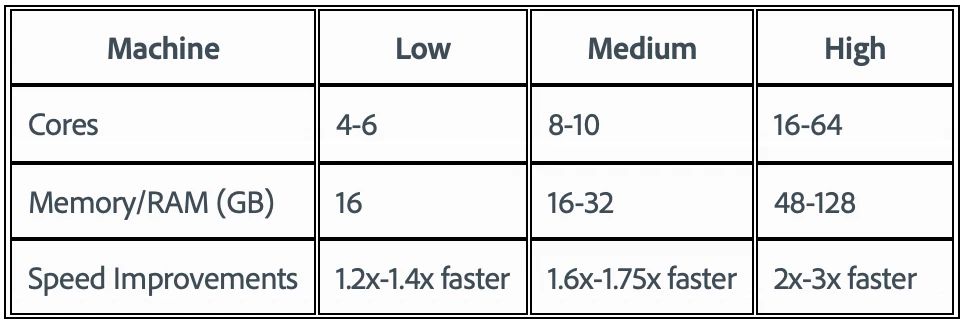
 

To test the benchmark project on your machine:

  • Download the benchmark project
  • Use Ae Render Queue to export the benchmark project in Multi-Frame mode.
  • Purge both the disk and memory cache, then
  • Go to Preferences -> Memory and Performance -> Enable Multi-Frame Rendering (beta) and uncheck the box to use Single-Frame Rendering Mode
  • Use Ae Render Queue to export the benchmark project in Single-Frame mode. Note: Use the same output module for Single-Frame and Multi-Frame mode.


Share the following information in this forum:

  • Your hardware specs: # cores in your CPU, GB of memory, GPU model and amount of VRAM
  • Single-Frame render speed
  • Multi-Frame render speed

147 replies

Participating Frequently
March 19, 2021

I can't find anything that specifically states it (since it's not in the "effects list"), but is the puppet tool supported by MFR? Also, sending all my love and support your guises' way - I'm absolutely overjoyed that this is finally happening! ❤

Jenkmeister
March 19, 2021

It's not supported by MFR just yet. But it's on our internal list to get migrated, we have a test project in place so we don't forget and can track the improvement as we get it done. 

Participating Frequently
March 20, 2021

Awesome, glad to hear! And thank you for the reply - very much appreciated!

Jenkmeister
March 18, 2021

Mulit-Frame Rendering - March 18th Beta Update

Multi-Frame Rendering has been in public beta for a week now and it’s time to give you a short update on how things are going, the issues you’ve reported, bugs we’ve fixed, etc. Our goal is to do update you every 1-2 weeks as the MFR beta continues, though we will also remain active responding to posts and answering your questions day to day. 


Let’s start with some MFR stats for the first week: 

  • Total MFR RQ Exports: 5354
  • Unique Projects Exported: 1926
  • Number of times the Benchmark Project has been exported: 431
  • Fastest benchmark project export time (with empty caches): 3m 17s
  • Largest (by frame) project exported with MFR: 23852 frames


Suffice to say we’ve been blown away by all of you trying this out, reporting your results, and spreading the word about MFR through social media posts, YouTube videos, blogs, etc. It’s been so exciting for the team to see. 


A number of people have reported projects that don’t complete rendering or are slower than expected. For those of you who have been able to send us your project, we send you a big THANK YOU! It’s incredibly useful for us to be able to reproduce the issues ourselves and identify what in the code is broken. If you have projects that won’t render or are slower, please send them to us at mfrbeta@adobe.com


Changes in MFR this week:

  • For those of you having issues with renders not completing or pausing mid-render for a while, we believe we’ve identified the core issues causing that and have implemented fixes. Please download the latest beta build and try your projects again.
  • When using Mercury GPU mode for rendering, we’ve made the initial number of concurrent rendering frames a little bit more conservative. This is in response to more people reporting GPU out of memory errors. For a 1920x1080 composition, expect to see one frame rendering per 1GB VRAM, up to a maximum of half your CPU Cores, capped at 8. As comp resolution goes up or down, expect to see the number of concurrent frames shift. 
    • This change doesn’t affect Mercury Software rendering modes. The initial concurrent rendering frames remains at up-to half your CPU Cores, but currently capped at 8. 
    • In the coming weeks, we’ll be introducing dynamic composition analysis that will allow the MFR engine to adjust the number of concurrent rendering threads based on the complexity of the frames being rendered. This will allow performance to scale to higher-end machines and avoid over-committing lower-end machines.
    • Moving past the maximum frame rendering count of 8 is planned but requires completing the work that will remove the startup overhead you currently see when starting an export. We are working on that for a future update.
  • While exporting, it was possible for the rendering stage of a frame to complete much faster than the write-to-disk stage (especially if frames are cached). In the worse-case, this meant AE was having to use additional memory to hold those frames that could be used for rendering frames more efficiently. We’ve made changes to address this issue and it should result in overall better performance. 
  • Auto Color, Set Channels, Shift Channels, Key Cleaner, Median (Legacy) and Dust & Scratches are now supported by MFR. 
    • I’m sure some of you are wondering why these and not others you might use. The primary reason is that some effects use features in After Effects that aren’t yet ready for MFR support. Until the core code is fixed, we can’t make the effects support MFR. The other main reason is time, it just takes a lot of it to migrate 290 effects. We are continuing to work on the effects and our goal remains 100% of AE’s built-in effects will be MFR supported by launch.
  • Variable Frame Rate Footage, Footage with Alpha Channels
    • There have been some edge cases identified with VFR and Alpha Layers in footage when used with MFR. These should now be fixed. If you see any issues with incorrect or green frames, please let us know.


Keep those rendering reports, bugs and issues coming. Thanks!!!

adam s
Known Participant
March 19, 2021

Running a personal project and the Beta locks up once it hits the first red giant plugin. I cant do anything but force quit. 

18.1.0 Build 30

windows 10

nvidia 2080ti  (461.92)

Jenkmeister
March 19, 2021

Could you Enable Logging (Help -> Logging), render the personal project until it locks up, Restart AE, then grab the After Effects Log.txt file that should come up when choosing Help -> Reveal Log Files. Send that to us at mfrbeta@adobe.com and we'll take a look at what's going on. Thanks!

Inspiring
March 18, 2021

iMac Pro (2017)

Catalina 10.15.7

3.2 GHz 8-Core Intel Xeon W

128 GB 2666 MHz DDR4

Radeon Pro Vega 64 16 GB


TLDR; I encountered an issue when attempting to use multithreaded rendering. AE was building a HUGE cache during rendering, filling my drive and leading to the render coming to a standstill.


I tried rendering a project I am currently working on, which resulted in the render progress coming to a standstill about midway through. AE didn't actually freeze or crash, it appeared to be working but the progress bar never moved and didn't respond when I tried to pause or cancel the render. Eventually I force quit AE. After the first attempt any attempts to start a render resulted in a similar situation immediately, AE appeared to be starting the render but no frames were ever completed.

I then noticed that I had very little space on my drive, after clearing some space I was able to start a render, but eventually ended up stalled out once again. I found what was causing the issue when purging AEs cache, I discovered the cache was 500GB in size which is why I had so little room on my drive (1 TB SSD). It seems that when rendering with multithreaded, AE was not clearing the cache properly, resulting in a HUGE cache and eventually rendering froze when there was no space left on the drive.

I sent the crash reports, but I'm not sure they would reveal what was happening with the storage.

Jenkmeister
March 18, 2021

Thank you for the details. Definitely something there for us to look at futher.


Do you know which build of AE you were on that caused this? 

Inspiring
March 18, 2021
Yes, AE (Beta) 18.1.0 (Build 22)
jimhowells
Participant
March 18, 2021

Been waiting for this for so long! Thanks Adobe. The new Render Queue looks great and gives all info at a glance.


Rendering to Quicktime ProRess 422 HQ: 


  • AMD Ryzen Threadripper 3960X 24 Cores, 64GB RAM, GTX 1080Ti 11GB VRAM
  • Single Frame 12:05
  • Mulit Frame 04:11
hellopaul4
Inspiring
March 17, 2021

Would there be any way for AE to automatically temporarily disable MFR when doing a Composition > Save Frame As > File? By definition, it's only ever one frame, and it takes AE a while to start rendering when in MFR mode - even though it's only one frame.

Jenkmeister
March 17, 2021

Let's see if we can fix that for you. Eventually that startup will be gone, but if we are just rendering one frame, we don't really need to prepare to multi-frame the render. 🙂 

skilled_friend0D44
Participant
March 22, 2021

Installed the Beta update and made sure Windows Low power mode was off and now I'm getting better numbers:

Here's the result of the benchmark (export is pro res 422 HQ):

  • AMD Ryzen Threadripper 3970x / 128gb ram / rtx3090 - 24gb vram / Windows 10 64bit
  • Single frame : 11:50
  • Multi-Frame : 3:50


skilled_friend0D44
Participant
March 17, 2021

Here's the result of the benchmark (export is pro res 422 HQ):

  • AMD Ryzen Threadripper 3970x / 128gb ram / rtx3090 - 24gb vram / Windows 10 64bit
  • Single frame : 23:55
  • Multi-Frame : 4:21


lots of open tabs in chrome too might have slowed down the single frame?

donbarrum
Inspiring
March 17, 2021

That's extremely slow (more than twice my number on single core), considering we have an almost identical system. Do you have proper cooling to let your CPU turboboost when it can? tabs should not cause such an extreme lag. 

skilled_friend0D44
Participant
March 17, 2021

hmmm...I'm going to have to look into that. It's a prebuilt PC and I come from a mac background so know nothing about PCs. I just clicked on performancetest and it informed me I'm running on low power saver mode so that might have been it. I'll run the test again without chrome open too, to see if that improves anything. 

donbarrum
Inspiring
March 17, 2021

Oh wow, exciting times. Finally multicore rendering, I can't believe it! Getting this in the previewer as well will be a gamechanger for the working experience.

Hardware: 32 Core  (AMD 3970x), 128gb memory (3600 MhZ), Nvidia RTX 3090 24gb VRAM
Single Frame render speeds: 11min 44Sec
Multi Frame render speeds: 3min 26sec

(that's actually more than 3x faster 😉 )

Known Participant
March 16, 2021

Mac Pro 2019

AE BETA - 18.1.0 Build 28

16 core

1x AMD Radeon Pro Vega II (32gbRAM)

192gb Ram

Mac OS 11.2.3


software only 

Multiframe: 5min 25sec

gpu acceleration (metal) 

Multiframe: 4min 50sec


Singleframe (with Metal): 12min 11sec 


Incredible results. I tried a live project i'm on at the moment. In public release of fully upto date AE an export takes over a 1hour 10mins. This in BETA stopped at 69%. Not sure why, but it just couldn't complete.

Jenkmeister
March 16, 2021

If you have time, please turn on logging (Help -> Enable Logging), run the render that fails. Once you've recovered from the failure, use Help -> Reveal Logging Files and then find the After Effects log.txt file. If you can send that to mfrbeta@adobe.com we'd love to take a look at the log file to see what is happening. We know of a couple of scenarios that are causing hangs which we are actively working on fixing, so it'd be great to know if this is one of those or something new. Thanks!

Known Participant
March 18, 2021

Submitted a few yesterday. Hopefully helpful 🙂 

Participant
March 16, 2021

Here are my results:

CPU:  Ryzen 9 3900XT 3.8GHz 12 Core 24 Thread Processor

RAM: 32GB

GPU:  GeForce RTX 2070 8GB

OS: Win 10 64-bit

Multi Frame: 6 min 40 sec

Single-Frame: 13 min 8 sec

Inspiring
March 16, 2021

Should we not all be exporting to the same codec and posting OS and GPU driver versions for more consistent results to compare?


Anyway, here are my results:


Spec:

OS: Windows 10 Pro 64 [Version: 20H2 Build: 19042.867]

CPU: Intel Core i9-7940X [Stock 3.1GHz - turbo averages 3.8GHz]

MEMORY: 64GB 2666Mhz [4 x 16GB - XMP Enabled]

OS SSD: Samsung 970 EVO 500GB

AE CACHE SSD: Samsung 970 PRO 1TB

GPU: NVIDIA GeForce GTX 1080Ti 11GB


Results:


Single Frame - Software: 14m 22s

Starts immediately

Appears to use all cores at an average of 50% utilisation

GPU idle for majority of test

90% memory usage reached at approx. 40% of render time

Both SSD's pretty much idle throghout


Multi Frame - Software: 6m 12s

Takes a little while to start

Appears to use all cores at 100%

GPU idle for majority of test

88% memory usage reached at approx. 50% of render time

Both SSD's pretty much idle throghout


Single Frame - CUDA: 13m 57s

Starts immediately

Appears to use all cores at an average of 50% utilisation

Very little GPU usage, max 30%

Both SSD's pretty much idle throghout


Multi Frame - CUDA: 5m 32s

Starts immediately

Appears to use all cores at 100%

Very little GPU usage, max 30%

Both SSD's pretty much idle throghout


*Notes:

Based on Quicktime - ProRes 422

Performed on a clean boot of Windows. Only one other program open (Outlook)

Inspiring
March 16, 2021

Throughout*

GPU Driver: 461.72 DCH