



TeresaDemel
Community Manager
Community Manager
March 10, 2021
Question

Multi-Frame Rendering is here! (AKA The multithreading you’ve been asking for)

  • March 10, 2021
  • 147 replies
  • 167361 views

Multi-frame Rendering is here for After Effects beta users. Right now, you will have access to Multi-Frame Rendering for export only. Keep your eye on this forum, as we will be rolling out new features until we launch.


Internally, we have been testing a representative sample of projects with a suite of hardware configurations, and we are excited to finally put this feature in your hands and get your feedback. Test your unique projects on your own hardware so we can ensure that our performance updates benefit all of our customers and meet speed and quality metrics before we launch.


Beta testing of Multi-Frame Rendering will last a little longer than some of our other features because we currently do not support Multi-Frame Rendering in Preview, Motion Graphics templates, Dynamic Link, Adobe Media Encoder and AERender Command Line Interface.


Check out the blog and FAQ post to learn the following:

  • What is Multi-Frame Rendering?
  • What factors influence performance?
  • Which effects have been optimized for Multi-Frame Rendering?


Start Testing!
We want to hear from you! Share your thoughts and ideas in this forum.

  • How much faster is Multi-Frame Rendering compared to Single-Frame Rendering with your comps on your machine?
  • Does our benchmark project perform at the expected speed on your system?
  • If you run into specific speed or quality issues with your project, share your project with us at mfrbeta@adobe.com.


Test Your Comps
Test your comps in Multi-Frame Render mode vs. Single-Frame Render

  • Use Ae Render Queue to export your comp in Multi-Frame mode.
  • Purge both the disk and memory cache, then
  • Use Ae Render Queue to export your project in Single-Frame mode. Note: Use the same output module for Single-Frame and Multi-Frame mode. Go to Preferences -> Memory and Performance -> Enable Multi-Frame Rendering (beta) and uncheck the box to use Single-Frame Rendering Mode


Leave a comment and the following information in this forum:

  • Your hardware specs: # cores in your CPU, GB of memory, GPU model and amount of VRAM
  • Single-Frame render speed (Use “Render Time” noted in your status bar)
  • Multi-Frame render speed


If you detect any problems with render speed or quality, submit your projects

  • Open your After Effects project
  • File -> Dependencies -> Collect Files -> Collect -> Save As (Name Your Folder)
  • After Effects will store your .aep file, footage, and text report (file log)
  • Zip up your project and send it to us at mfrbeta@adobe.com (or send a link to it hosted on your creative cloud storage if it’s too large to email).


Share the following information in your comment:

  • Your hardware specs: # cores in your CPU, GB of memory, GPU model and amount of VRAM
  • Single-Frame render speed (Use “Render Time” noted in your status bar)
  • Multi-Frame render speed
  • Mercury CPU or GPU Mode used


Test our benchmark project and see how your hardware compares
We would love to know how your hardware compares to the results we have gathered from our test suite:
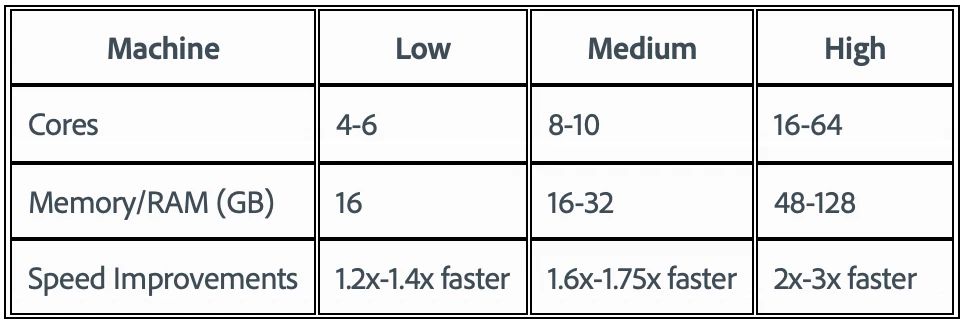
 

To test the benchmark project on your machine:

  • Download the benchmark project
  • Use Ae Render Queue to export the benchmark project in Multi-Frame mode.
  • Purge both the disk and memory cache, then
  • Go to Preferences -> Memory and Performance -> Enable Multi-Frame Rendering (beta) and uncheck the box to use Single-Frame Rendering Mode
  • Use Ae Render Queue to export the benchmark project in Single-Frame mode. Note: Use the same output module for Single-Frame and Multi-Frame mode.


Share the following information in this forum:

  • Your hardware specs: # cores in your CPU, GB of memory, GPU model and amount of VRAM
  • Single-Frame render speed
  • Multi-Frame render speed

147 replies

Participant
April 6, 2021

Dear all,

here are my specs:

AMD RYZEN 7 5800X 8-core - 3800Mhz

64 Gb

Nvidia GTX 1060 6Gb

Multi-frame: 7:33

Single-frame: 26:21

Participant
April 5, 2021

Hi!


Great update!


Intel(R) Core(TM) i9-10980XE CPU @ 3.00GHz – 18 CORES

256Gb RAM – 3000MHz

RTX 3090 STRIX ROG – 24GO Vram

Windows 10 64Bit Pro

SSD Samsung 970 Evo Plus

Render : Quicktime Animation

AE2021 - V18.0.1 : Single Frame Mercury Software : 15m43

AE2021 - V18.0.1 :Single Frame CUDA : 12m14

AE BETA : Multi-Frame Mercury Software : 05m

AE BETA : Multi-Frame CUDA : 04m35

Participating Frequently
April 3, 2021


So this is the cores/logical processors usage on a Double Xeon Workstation.

This is with multiframe render enabled.

It is clearly visible that AfterEffects is using only one physical CPU, and it does not know how to use the second CPU.


This is less important, but result for multi is 6:23 and single is 20:37.


If it could use both CPUs and all 96 logical processors instead of only 48 the render time would probably drop significantly.


2 x Xeon(R) Platinum 8260M CPU @ 2.30GHz

64gb RAM

3090RTX & 2080tiRTX

WIN10pro latest update


Jenkmeister
April 5, 2021

Yep, this is on our backlog to work on. It requires new code to handle and allocate threads across the different processor groups but we'd definitely like to get this working. 

Participating Frequently
April 7, 2021

Cool! Great work guys, can't wait to see the beast unleashed.

Participant
April 3, 2021

I am planning to create a new workstation in September.


I see that AMD CPUs, Ryzen and Threadrippers seem to be taking advantage of the brand ne MFR feature.


However I recall several cases where users mentioned how Adobe software is coded in Macs, then ported on Windows then patched for AMD CPUs, whereas the software didn't need any patching for Intel architecture.


Is this still the case? Since I only upgrde every 8 years or so, I'd hate to purchase a $15,000 workstation only to find out that day-today usage is buggy/slow, just because I bought an AMD CPU.


Any thoughts on this?

Jenkmeister
April 3, 2021

Not the case these days. The development team all have Windows and Macs to develop on and all features need to be developed for both platforms from the start. I can tell a good portion of the AE team is also using AMD threadripper based machines every day. Our test labs also contain a mix of Intel and AMD machines. 

Jenkmeister
April 1, 2021

Mulit-Frame Rendering - April 1st (no April Fools here!) Beta Update

Time for another update. No tricks or funny stories here, it's all serious business. lol. 


Thank you again to everyone for sending results, sending projects, sending bugs, sending excitement. We are amazed and thrilled by your on-going support and involvement in this beta with us. A reminder that if you have projects that won’t render or are slower than expected, please send them to us at mfrbeta@adobe.com.


And now, on to the updates...


MFR Improvements & Bug Fixes (builds 18.1x32 - 18.2x11)

  • Just about everyone who has used MFR has commented on the time taken to start up an export in the Render Queue. While we are still working on removing that start up time completely, we've made an optimization that gets frames rendering sooner and should lessen the occurance of "stuck at 0% rendering" issues. 
  • Pseudo effects, missing effects or effects that weren't active may have shown a warning icon and message indicating they weren't optimized for MFR. That wasn't right, so it's been fixed.
  • Levels and Auto-Color are now using a new thread-safe caching system and should have improved performance. 


That's all? What have you been doing??? 😉 

  • One thing everyone wants is their favorite third-party plugins and effects supporting MFR. Yesterday we released a major update to the After Effects SDK that developers will use to finalize their support of MFR. So look out for your favorite third-party plugins supporting MFR soon! If you're interested in learning more about the SDK update, visit https://ae-plugins.docsforadobe.dev/intro/whats-new.html to learn more.
  • Continued work on removing the startup time for MFR. This is a critical piece to unlocking Timeline previews and making MFR exports for smaller comps faster than SFR. 
  • Continued work on our dynamic composition analysis. If MFR is going to work well on every computer configuration, we need to make sure we are analyzing composition complexity and hardware usage and scaling MFR accordingly.
  • You may have missed it, but we've made a couple of quiet mentions of native Render Queue notifications coming with MFR. We are busily hooking up AE to the Creative Cloud notification backend so you can be alerted when exports complete.
  • There are other open bugs that you, our beta testers have reported. We are still working on fixing them. We'll update you as those fixes roll out. If you're still waiting on something from us, we haven't forgotten you!


Puget Systems Q&A - MFR Edition

We were invited to spend time with Puget Systems last Friday to talk about MFR. You can check out the whole interview at https://www.youtube.com/watch?v=ffFwvBjNiFI (yep, that's me they are talking to). 


Thanks again for all your contributions to making MFR awesome!

Sean

Known Participant
April 1, 2021

I only intended to scan through the video - alas i watched the whole thing. Very inciteful. Amaing work to you and the team for getting us all to this incredible point. The improvements in performance are really, just fantastic.


I actually worked on and delivered 3 live projects last week, going to the beta to render the projects, because the improvement was so valuable to me, on a very tight turnaround, and very real deadline. 

Participating Frequently
March 31, 2021

Hi,

i5-6500 4 cores / 32gb ram / Intel HD Graphics 530 / Windows 10 1909

Far from the high-end system that I've seen here :0


I was testing with projects that we work here. They are kind of peculiar, as you can see on the picture.


The most part of them is just transparent frames, without any layer being rendered. Because of that I thought AE would render those 'gaps' faster on MFR, but not. It renders about 30 frames per second on single and multi frame render. When rendering I can see that concurrent frame render is always 1 in both single and multi render.


Should I expect an improvement on performance on the kind of project we have?


Thank!


Rafa

Jenkmeister
April 1, 2021

For 4 cores and the Intel card, I would suggest, if you aren't already, to use Mercury Software mode. The GPU is probably fairly limited in available memory and if that's the case, or you're working at a resolution like 4K, then MFR will currently be conservative and only spin up 1 frame at a time. 

Participating Frequently
April 1, 2021

Thanks for your reply. Just correcting myself, I'm seing 0 concurrent frames rendering when AE renders those blanks frames.

I'm exporting 1080p ProRes 4444 with alpha. Also, I'm using Mercury Sofware mode.

Since those gaps don't have any thing (effects etc, just alpha channel 255), is there any configuration that I could set on AE to copy these frames over instead of render them each time? Something like the ffmpeg 'stream_loop'.

I'm sorry if it is the wrong place to ask this. Thank you very much for the assistance.


Rafa

Known Participant
March 31, 2021

Re-run the test to see if any more inporvements.

Mac Pro 2019

AE BETA - 18.2.0 - Build10

16 core

1x AMD Radeon Pro Vega II (32gbRAM)

192gb Ram

Mac OS 11.2.3


gpu acceleration (metal) 

Multiframe: 4min 40sec (10 seconds faster)


Singleframe (with Metal): 12min 30sec  (slightly slower)

Participant
March 31, 2021

Your hardware specs: # cores in your CPU, GB of memory, GPU model and amount of VRAM

Mac Pro (2019) macOS Big Sur 11.2.3

3.5GHz 8-Core Intel Xeon W

112GB 2666MHz RAM

AMD Radeon Pro W5700X 16GB


Single-Frame render speed: 19 Min, 46 Sec

Multi-Frame render speed: 12 Min, 57 Sec


Wow! Really impressed, look forward to this making it's way into AE! 🙂 

Joost van der Hoeven
Community Expert
Community Expert
March 31, 2021

What surprises me more is that my i9 MacBook Pro 16” has the same scores as your Mac Pro with Xeons. 

Participant
March 31, 2021

I'm not surprised, I believe the i9 in your MacBook Pro can go up to 5.0GHz! I'd not recommend the 8-core Xeon to anyone 😞 

Participant
March 31, 2021

Hi,

8700K i7 6/12 @ 5GHz / 64 GB DDR4 3200MHz / Radeon Vega 64 8GB HBM2 / macOS 10.14.6 / Ae 18.2.0 (Build 10)

First i tryed to render into ProRes 422 HQ with clean render cache:

Single-Frame: 14min, 15sec

Multi-Frame: 09min, 43sec


Then i switched to pure Animationwith clean render cache:

Single-Frame: 0min, 40sec

Multi-Frame: 0min, 17sec


I thought that couldn`t be true, but i checked both rendered clips and everything is there.

Strange…


hellopaul4
Inspiring
March 31, 2021

I suspect you didn't do Edit > Purge > All Memory & Disk Cache... between renders.

Roei Tzoref
Legend
March 28, 2021

Intel(R) Core(TM) i9-10900K CPU @ 3.70GHz 3.70 GHz
128 GB RAM
RTX 3080 10GB VRAM

this is a VR360 project, using a lot of native VR effects that are part of the VR Comp Editor workflow. also 3rd party plugins mostly deep glow and stardust. guess it's not optimized for MFR, that's why I am getting only 1 concurrent frame rendering. especially at the begnining where it is calculating. 


on other types of projects I have seen good results, but I want this to work in practice. 

I am missing the information about what operations are being rendered like in the old render queue. I would like to have more information in the render queue. 

Jenkmeister
March 29, 2021

I am missing the information about what operations are being rendered like in the old render queue. I would like to have more information in the render queue. 


Can you let us know which information you want back and what you were using it for?

Roei Tzoref
Legend
March 29, 2021

the information in previous render queue gives you in detail the operations that are being rendered, this would help me see what causes a bottleneck. I wouldn't want to lose that. now you just get the frame that is being rendered with no idea what's being calculated. there should be specific information on what the render is doing, this would help optimize projects, also since we are dealing with MFR, further information is required - how many CPU's are being used, how much the GPU is being used, how much RAM, VRAM per frame etc...

here's an example of the previous render queue: