


TeresaDemel
Community Manager
Community Manager
March 10, 2021
Question

Multi-Frame Rendering is here! (AKA The multithreading you’ve been asking for)

  • March 10, 2021
  • 147 replies
  • 167361 views

Multi-frame Rendering is here for After Effects beta users. Right now, you will have access to Multi-Frame Rendering for export only. Keep your eye on this forum, as we will be rolling out new features until we launch.


Internally, we have been testing a representative sample of projects with a suite of hardware configurations, and we are excited to finally put this feature in your hands and get your feedback. Test your unique projects on your own hardware so we can ensure that our performance updates benefit all of our customers and meet speed and quality metrics before we launch.


Beta testing of Multi-Frame Rendering will last a little longer than some of our other features because we currently do not support Multi-Frame Rendering in Preview, Motion Graphics templates, Dynamic Link, Adobe Media Encoder and AERender Command Line Interface.


Check out the blog and FAQ post to learn the following:

  • What is Multi-Frame Rendering?
  • What factors influence performance?
  • Which effects have been optimized for Multi-Frame Rendering?


Start Testing!
We want to hear from you! Share your thoughts and ideas in this forum.

  • How much faster is Multi-Frame Rendering compared to Single-Frame Rendering with your comps on your machine?
  • Does our benchmark project perform at the expected speed on your system?
  • If you run into specific speed or quality issues with your project, share your project with us at mfrbeta@adobe.com.


Test Your Comps
Test your comps in Multi-Frame Render mode vs. Single-Frame Render

  • Use Ae Render Queue to export your comp in Multi-Frame mode.
  • Purge both the disk and memory cache, then
  • Use Ae Render Queue to export your project in Single-Frame mode. Note: Use the same output module for Single-Frame and Multi-Frame mode. Go to Preferences -> Memory and Performance -> Enable Multi-Frame Rendering (beta) and uncheck the box to use Single-Frame Rendering Mode


Leave a comment and the following information in this forum:

  • Your hardware specs: # cores in your CPU, GB of memory, GPU model and amount of VRAM
  • Single-Frame render speed (Use “Render Time” noted in your status bar)
  • Multi-Frame render speed


If you detect any problems with render speed or quality, submit your projects

  • Open your After Effects project
  • File -> Dependencies -> Collect Files -> Collect -> Save As (Name Your Folder)
  • After Effects will store your .aep file, footage, and text report (file log)
  • Zip up your project and send it to us at mfrbeta@adobe.com (or send a link to it hosted on your creative cloud storage if it’s too large to email).


Share the following information in your comment:

  • Your hardware specs: # cores in your CPU, GB of memory, GPU model and amount of VRAM
  • Single-Frame render speed (Use “Render Time” noted in your status bar)
  • Multi-Frame render speed
  • Mercury CPU or GPU Mode used


Test our benchmark project and see how your hardware compares
We would love to know how your hardware compares to the results we have gathered from our test suite:
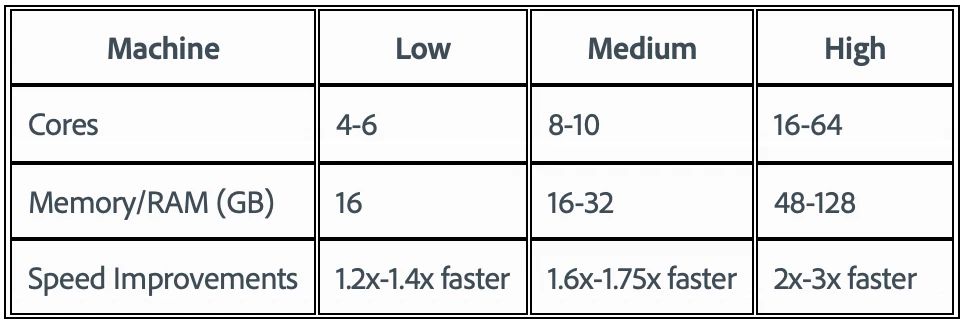
 

To test the benchmark project on your machine:

  • Download the benchmark project
  • Use Ae Render Queue to export the benchmark project in Multi-Frame mode.
  • Purge both the disk and memory cache, then
  • Go to Preferences -> Memory and Performance -> Enable Multi-Frame Rendering (beta) and uncheck the box to use Single-Frame Rendering Mode
  • Use Ae Render Queue to export the benchmark project in Single-Frame mode. Note: Use the same output module for Single-Frame and Multi-Frame mode.


Share the following information in this forum:

  • Your hardware specs: # cores in your CPU, GB of memory, GPU model and amount of VRAM
  • Single-Frame render speed
  • Multi-Frame render speed

147 replies

Ronny K
Participant
March 27, 2021

Did another render on another workstation:

Intel i9-10900K CPU, 10 cores/20 threads, 128GB RAM, RTX3070 with 8GB VRAM

Single-Frame render speed: 12:43

Multi-Frame render speed: 7:23


Multi-Frame with GPU acceleration enabled: 6:36


So this shows that a higher core count is now the key, instead of single core frequency.

I have to buy some stocks in AMD 😉

Ronny K
Participant
March 27, 2021

Rendered as Quicktime using GoPro codec on one of our newest AE workstations:

Hardware specs: AMD Ryzen 9 5950X, 16 cores/32 threads, 128GB RAM, RTX 3080 with 10GB VRAM

Single-Frame render speed: 10:53
Multi-Frame render speed: 4:35 🙂 🙂


Also tried Multi-Frame with Mercury GPU Acceleration enabled, and then the render speed was 4:22 (all cache purged before each render).

I noticed that it used a high percentage of the CPU, which is very good. Also didn't use much of the GPU until I tested with GPU acceleration, then it used around 6-7GB of the VRAM.

I will also test on an almost similar workstation, but with Intel 10900K and RTX3070

Participant
March 26, 2021
  • Mac Mini — macOS 10.15.7 Catalina
  • 3.6 GHz 4-core Intel i3
    64 GB RAM
    Intel UHD Graphics 630 (2536 MB)
  • Single-Frame render speed: 41:04
  • Multi-Frame render speed: 36:35
    11% less time
hellopaul4
Inspiring
March 25, 2021

Are people finding that their GPU's VRAM is the limiting factor in many multi-frame render projects (not necessarily the Adobe benchmark one)? I've found that if I'm using large source material (4K, 8K), my VRAM usage shoots up well over 8GB (I have 11GB) and only one or two frames are rendered simultaneously, presumably because there's just no more available VRAM to hold more than a couple of frames or something. I have 64GB RAM, and AE is (on my current render) using 26GB of that, so there's plenty to space if AE needed it.

On my next system, I'm hoping to get a 24GB RTX3090, when they actually come into existence. I've seen a few users here have that card - have you taken a look at the VRAM usage while AE is rendering? Does it shoot up when using large source material, but you can still render quite a few frames simultaneously?

hellopaul4
Inspiring
March 26, 2021

Interestingly, the same thing happens when using the latest Beta (18.1.0 Build 34) even when I'm using low res. source material. When MFR was first launched, my systemn would render 6 frames at a time (with its 6 cores). Now I rarely even get 2 frames rendering simultaneously. But the AE Benchmark project still renders happily with all my 6 cores.

Jenkmeister
March 26, 2021

The benchmark project is in Mercury Software mode by default, so in that case, MFR isn't checking the GPU VRAM to determine concurrent frame limits. When using Mercury GPU mode, MFR is performing some rough calculations on composition resolution versus GPU VRAM in an attempt to avoid GPU OOM errors but it's still pretty rough. We are working on analyzing individual frames and looking at ways we can increase the number of concurrent frames when using Mercury GPU modes. 

motionben
Known Participant
March 23, 2021

AMD Threadripper 3990X 64-Core / 256GB RAM / RTX 3090 24GB (x2) / Windows 10 64 (20H2):

  • Multi-frame Mercury GPU (CUDA), Lossless AVI : 4 Min 5 Sec
  • Multi-frame Mercury Software Only, Lossless AVI : 4 Min 26 Sec
  • Single-frame Mercury GPU (CUDA), Lossless AVI : 12 Min 29 Sec
  • Single-frame Mercury Software Only, Lossless AVI : 13 Min, 5 Sec


Very exciting results using MFR. Would love to see the other half of those cores being utilized someday :D.

Participant
March 23, 2021

Can't wait for the official version of this update!


Here are my results:
AMD Ryzen 9 3950X 16 core 

128 GB RAM

Nvidia RTX 2080 TI 11GB Vram


Single core: 14:02

Multy core: 6:08


Community Manager
March 25, 2021

Thanks for taking out time to test Multi-Frame rendering and sharing your results.

Participant
March 23, 2021

Here are my results:

CPU: AMD Ryzen 9 5950X 16-Core Processor 3.40 GHz

RAM: 64GB

GPU: GeForce RTX3080 10GB

OS: Win 10(20H2) 64-bit


Multi-Frame: 4 min 05 sec

Single Frame: 9 min 13 sec

Participant
March 23, 2021

I'm really impressed about the speed gain of the Ryzen CPU's between the two architectures of ZEN2 and ZEN3 !

Very impressive. Should have done my build with a ZEN3 Chip.


Joost van der Hoeven
Community Expert
Community Expert
March 21, 2021

Very happy to add my results to this long list:

  • System: MacBookPro (16", 2019), 8 Core i9, 2,3GHz, 32 GB RAM, Radeon Pro 5500M 8GB vRAM
  • Render speed in Ae 18.0: 20m40s
  • Single-Frame render speed in 18.1.0#28 (beta): 19m43s
  • Multi-Frame render speed in 18.1.0#28 (beta): 13m26s


So MF is 32% faster on my system in the Beta (on this project, on a single test)

Mohamed Ali Ben Thaier
Inspiring
March 21, 2021

Windows PC
R9 3900X 12 Cores - 24 Threads | RTX 3070 8GB | 32 GB RAM | 3500MB Read / 3000MB Write NVMe SSD

AE Benchmark Single Frame: 17:18

AE Benchmark Multi Frame:  07:05 ~ 2.5x Faster


Personal Project Single Frame: 12:39

Personal Project Multi Frame:  04:21 ~ 3x Faster 


2015 MacBook Pro 15"

i7-4980HQ 4 Cores / 8 Threads | AMD R9 M370 | 16GB RAM | 1600MB Read / 500MB Write SSD


AE Benchmark Single Frame: 32:10

AE Benchmark Multi Frame:  27:01 ~ 16% Faster (I might be experiencing some thermal throttling tho, I will redo the benchmark after repasting the CPU)


You have no idea how satisfying it felt seeing AE utilizing 98% of my 3900X Aaahhhh that felt awesome!

Participant
March 19, 2021

Really thrilled about this new feature. I tried it out, but can't get it to work properly. If I enable CUDA, I get this error:

with Mercury Software, I get this error:

Here's my system specifications

CPU: AMD Ryzen 9 5900X 12-Core

64GB RAM

GPU: Nvidia GeForce GTX 2080 Ti


Would love to get some help on this!

Jenkmeister
March 20, 2021

The 10007 error should have been fixed in build x30. If you're on x30 or above and still seeing it, can you enabled Logging (Help -> Enable Logging), make the error happen, then use Help -> Reveal Log Files and email the After Effects Log.txt file to mfrbeta@adobe.com. We'd love to take a look at it.


If by chance you are able to send us the project to that same email address, we'd love to take a look at it for the software OOM as well. Thanks!