



Theresa Rostek
Community Manager
Community Manager
May 17, 2024
Question

Now in Beta: Per-character Text and Paragraph Styling in Expressions

  • May 17, 2024
  • 15 replies
  • 15787 views

Hi everyone! 


We're excited to announce that starting in version 24.5.0x41 of After Effects Beta introduces support for per-character control of text and paragraph styling in Expressions. 


This long-requested addition to Expressions builds on recent per-character scripting API updates to unlock powerful text styling capabilities that are able to respond to changes in text content and can be saved and shared as presets. These new options can also streamline template design by making it possible to configure alignment and paragraph styling in a single layer rather than turning on and off multiple synced copies of a layer. 


A benefit of per-character control is automatic reflowing of text such as when scaling letters, using superscript, and using a different font, just as you would expect from using substring styling from the Character panel. 
 

Getting Started 


Make sure you have your expression engine set to Javascript. 


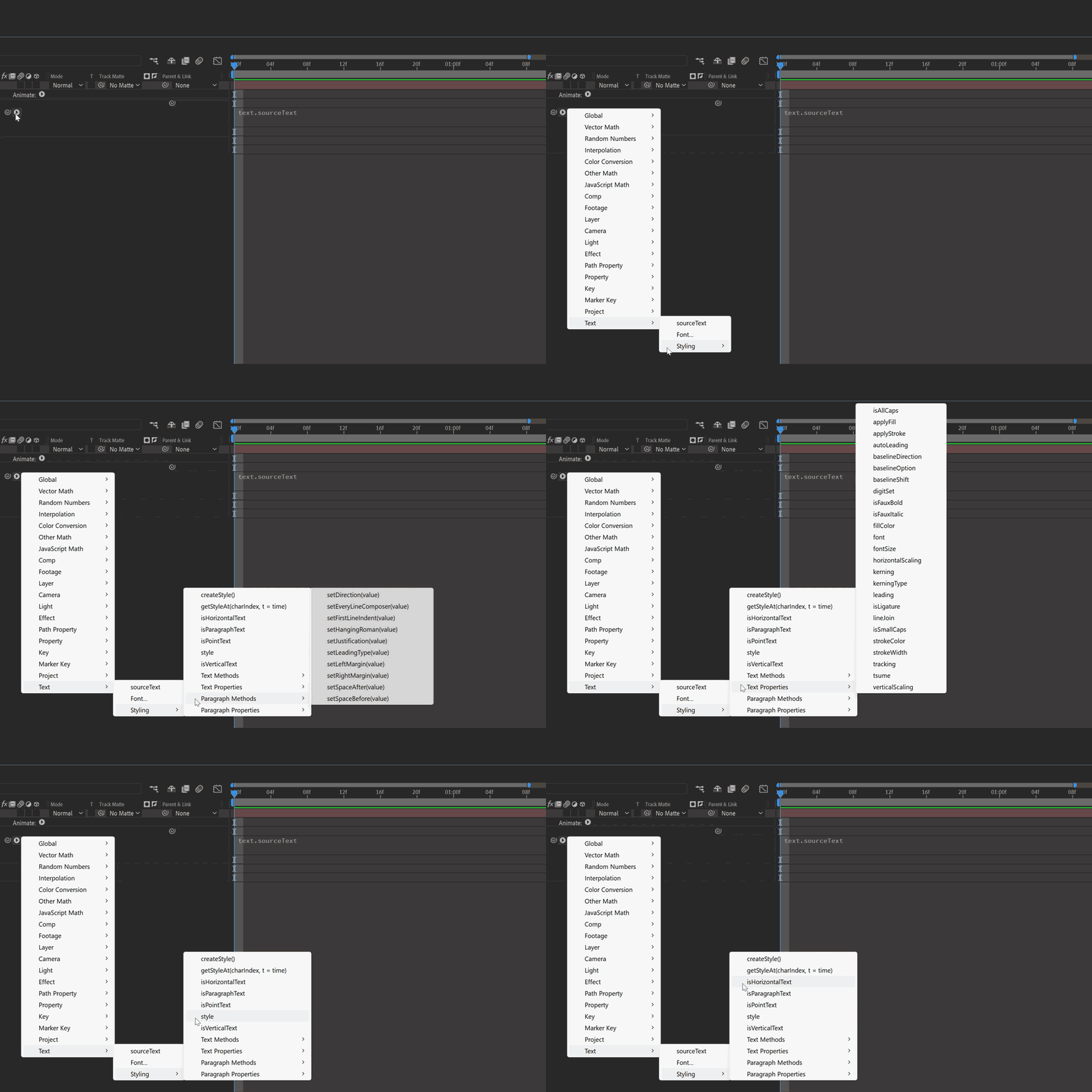
The Expression reference flyout menu provides an overview of available methods in the updated Text > Styling submenu; see the attached document for the full API. 
 

Sample Expressions 


Change the font for certain words 

 

Using the string: “Change the fonts of some words” apply the following to the Source Text


text.sourceText.style
.setFont("Montserrat-Light") 
.setFont("Gigantic", 0, 6).setFont("Gigantic", 10, 6).setFont("Gigantic", 20) 


To customize this for yourself, change the font from the Text Expression flyout menu, and target the character index and amount of characters to make a different font. 


Set the first line of a text layer to bold and make it larger 


Using the string: “Change the first line of text to bold and make it larger”
 apply the following to the Source Text


 text.sourceText.style.setFontSize(100, 0, 30).setFauxBold(true, 0, 30) 


 Set superscript for characters 

 

Using the string: “1st and 2nd Place”  apply the following to the Source Text


text.sourceText.style.setBaselineOption("superscript",1,2).setBaselineOption("superscript", 9, 2) 


Try passing character index values and character amounts to expression sliders and using keyframes to create animation! 


Known Issues 
 

  1. There is a difference in behavior when using .setJustification between Left to Right text and Right to Left text. To justify text to the left when using RTL, use .setJustification("alignRight"), and to justify to the right, use .setJustification("alignLeft"). 
  2. When exporting a mogrt, using .setFontSize() and enabling Font Size adjustment in Font Properties causes unexpected behavior in Premiere Pro. It’s recommended to use one or the other, but not both together. 


Limitations  

The style object always returns the first character's style information, not the characters' individual substyles. Therefore, when reading the style of a Text layer containing multiple styles, you must use getStyleAt() with a character index to specify which character's style you need. 


We've built an example AEP with the above expressions and few extras to get you started. Please give all of these new expressions a try and let us know how they’re working for you!

15 replies

Participant
May 27, 2024

Having a lot of fun playing with this so far - I also somewhat second that these would be really effective if they could be treated as text animators are - primarily because "word" index is much easier to use than "character" index for many uses. If you're trying to do things more dynamically. Having to parse and split and such to determine a words start/end point within a character index is somewhat laborious (in my particular implementations)


Volition74au
Inspiring
May 28, 2024

Some expressions that could help with laborious long expressions. Now you just need to fill in laborious Arrays!
3 expressions for those to play with. Note You may not have the same fonts installed as me. SO adjust your font arrays as neccesary. AE uses the Postript Name for Fonts in expressions.
1. Random Font Per Character
2. Set Multi Attributes in an array order split per word/line/delimiter
3. Set Multi Attributes in Radnom order split per line/word/delimiter

Numbers 2 and 3 should help you out @Jesse27755342iou7 

// code for AE Beta 24.5 Per character styling
// https://be.net/volition - 2024
// Random Fonts per Character
//
// BEWARE as this is a very slow expression due to the nature of it.
// Could be made slightly more optimal by looking for whitespaces and character returns and grouping them within the iteration, even then i'm not confident in that. 

// posterizeTime(0); // uncomment line and changeRate to 0 if you don't want the font changing over time - it should help with processing optimisation

var changeRate = 50; // change every x frames (I recomend adding )
var frequency = changeRate*thisComp.frameDuration;
var timeIndex = changeRate ? Math.floor(time/frequency) : 0;

var regularFontArray = ["KaushanScript-Regular", "Lato-Regular", "VT323-Regular", "GreatVibes-Regular", "FiraMono-Regular", "Exo2-Regular", "Raleway-Regular", "OpenSans-Regular", "Ubuntu-Regular", "Muli-Regular", "PlayfairDisplay-Regular", "Heebo-Regular", "CutiveMono-Regular", "BarlowCondensed-Regular", "ROGFontsv1.6-Regular", "NotoSansJP-Regular", "ArchivoNarrow-Regular", "PTMono-Regular", "FjallaOne-Regular", "JuliusSansOne-Regular", "Satisfy-Regular", "RobotoMono-Regular", "SourceSansPro-Regular", "Domine-Regular"];

var sourceText = text.sourceText.value; // Get the text value as a string

var startIndex = 0;
var expression = "text.sourceText.style"; // Initialize the expression
for (var i = 0; i < sourceText.length; i++) {
    var charLength = 1;
	seedRandom(index+i+timeIndex*sourceText.length,true);
	var randomFont = regularFontArray[Math.floor(Math.random() * regularFontArray.length)];
	expression += `.setFont("${randomFont}", ${startIndex}, ${charLength})`;
    startIndex += 1;
}
expression += ";"

// Output the final expression
eval(expression)


Ok Now for Number 2 

// code for AE Beta 24.5 Per character styling
// https://be.net/volition - 2024
// CHANGES TEXT ATTRIBUTES EVERY WORD/LINE/ OTHER DEPENDING ON DELIMITER ACCORDING TO THE ARRAY ORDERS
// quick guide for those not as familiar with expressions
// choose your delimiter variable [" "] will change per word ["\n","\r"] will change per line you can also use any other delimiters you want
// textProperties & textPropertyValues you can set how ever many or few text attributes and the trange of values it that attribute will cycle through.
// If you don't want the array to cycle through over the animation. you can remove the 3 lines from changeRate on and remove ",index+timeIndex" from output

// WARNING these expressions can slow your system way down if elaborate and lots of text

// posterizeTime(0); // use if not wanting ongoing change of attributes over time also uncomment this line
function getIndicesOf(text, chars) {
    var indices = [];
    for (var i = 0; i < text.length; i++) {
        if (chars.indexOf(text[i]) !== -1) {
            indices.push(i);
        }
    }
    return indices;
}

function setTextPerPropsDelimiterArrayOrder(sourceText, delimiter, textProperties, textPropertyValues, indexOffset) {
    var delimitIndices = getIndicesOf(sourceText, delimiter);
    delimitIndices.push(sourceText.length);

    var expression = "text.sourceText.style"; // Initialize the expression  
    var startIndex = 0;

    for (var i = 0; i < textProperties.length; i++) { // step through the attributes
        startIndex = 0;
        for (var j = 0; j < delimitIndices.length; j++) { // step through the elements for each attribute
            var endIndex = delimitIndices[j];
            var wordLength = endIndex - startIndex;
            if (wordLength > 0) {
                var setAttribute = textProperties[i];
                var setAttributeValue = textPropertyValues[i][(j+indexOffset)%textPropertyValues[i].length]; // cycle back
				if (Array.isArray(setAttributeValue)) { // check if element has more then 1 value it needs to be applied as an array with square brackets
					expression += `.${setAttribute}([${setAttributeValue}], ${startIndex}, ${wordLength})`;
				} else {
					expression += `.${setAttribute}("${setAttributeValue}", ${startIndex}, ${wordLength})`;
				}
            }
            startIndex = endIndex + 1; // Move to next word
        }
    }
    return expression += ";"
}

var sourceText = text.sourceText.value;
var delimiter = [" "];
var textProperties = ["setApplyStroke","setStrokeColor","setStrokeWidth","setFont"];
var textPropertyValues =   [[1,1,0,1,1,0],
                        [[1.0, 0.0, 0.0],[0.0, 1.0, 0.0],[0.0, 0.0, 1.0],[1.0, 1.0, 0.0],[1.0, 0.0, 1.0],[0.0, 1.0, 1.0]],
                        [1,1.5,2,3,0.5,1,],
						["Lato-Regular", "VT323-Regular", "GreatVibes-Regular", "FiraMono-Regular", "Exo2-Regular", "Raleway-Regular", "OpenSans-Regular", "Ubuntu-Regular", "Muli-Regular", "PlayfairDisplay-Regular", "Heebo-Regular", "CutiveMono-Regular", "BarlowCondensed-Regular", "ROGFontsv1.6-Regular", "NotoSansJP-Regular", "ArchivoNarrow-Regular", "PTMono-Regular", "FjallaOne-Regular", "JuliusSansOne-Regular", "Satisfy-Regular", "RobotoMono-Regular", "SourceSansPro-Regular", "Domine-Regular"]
                        ]

var changeRate = 50; // change every x frames (I recomend adding )
var frequency = changeRate*thisComp.frameDuration;
var timeIndex = changeRate ? Math.floor(time/frequency) : 0;

output = setTextPerPropsDelimiterArrayOrder(sourceText, delimiter,textProperties,textPropertyValues,index+timeIndex);

// evaluate the expression string
eval(output)


Last one  Hope they help someone

// code for AE Beta 24.5 Per character styling
// https://be.net/volition - 2024
// CHANGES TEXT ATTRIBUTES EVERY WORD/LINE/ OTHER DEPENDING ON DELIMITER DOES SO RANDOMNLY
// quick guide for those not as familiar with expressions
// choose your delimiter variable [" "] will change per word ["\n","\r"] will change per line you can also use any other delimiters you want
// textProperties & textPropertyValues you can set how ever many or few text attributes and the trange of values it that attribute will cycle through.
// If you don't want the array to cycle through over the animation. you can remove the 3 lines from changeRate on and remove ",index+timeIndex" from output

// WARNING these expressions can slow your system way down if elaborate and lots of text

// posterizeTime(0); // use if not wanting ongoing change of attributes over time also uncomment this line

function getIndicesOf(text, chars) {
    var indices = [];
    for (var i = 0; i < text.length; i++) {
        if (chars.indexOf(text[i]) !== -1) {
            indices.push(i);
        }
    }
    return indices;
}

function setTextPerPropsDelimiterRandomOrder(sourceText, delimiter, textProperties, textPropertyValues, textSeed = 0) {
    var delimitIndices = getIndicesOf(sourceText, delimiter);
    delimitIndices.push(sourceText.length);

    var expression = "text.sourceText.style"; // Initialize the expression  
    var startIndex = 0;

    for (var i = 0; i < textProperties.length; i++) { // step through the attributes
        startIndex = 0;
        for (var j = 0; j < delimitIndices.length; j++) { // step through the elements for each attribute
            var endIndex = delimitIndices[j];
            var wordLength = endIndex - startIndex;
            if (wordLength > 0) {
                var setAttribute = textProperties[i];
				seedRandom(index+i+j+textSeed*sourceText.length,true);
                var setAttributeValue = textPropertyValues[i][Math.floor(Math.random() * textPropertyValues[i].length)]; // cycle back
				if (Array.isArray(setAttributeValue)) { // check if element has more then 1 value it needs to be applied as an array with square brackets
					expression += `.${setAttribute}([${setAttributeValue}], ${startIndex}, ${wordLength})`;
				} else {
					expression += `.${setAttribute}("${setAttributeValue}", ${startIndex}, ${wordLength})`;
				}
            }
            startIndex = endIndex + 1; // Move to next word
        }
    }
    return expression += ";"
}

var sourceText = text.sourceText.value;
var delimiter = [" "];
var textProperties = ["setApplyStroke","setStrokeColor","setStrokeWidth","setFont","setApplyFill"];
var textPropertyValues =   [[1,0],
						[[1.0, 0.0, 0.0],[0.0, 1.0, 0.0],[0.0, 0.5, 1.0],[1.0, 1.0, 0.0],[1.0, 0.0, 1.0],[0.0, 1.0, 1.0],[0.7, 0.5, 1.0],[0.8, 0.5, 0.6]],
                        [1,1.5,2,3,0.5,1,6],
						["Lato-Regular", "VT323-Regular", "GreatVibes-Regular", "FiraMono-Regular", "Exo2-Regular", "Raleway-Regular", "OpenSans-Regular", "Ubuntu-Regular", "Muli-Regular", "PlayfairDisplay-Regular", "Heebo-Regular", "CutiveMono-Regular", "BarlowCondensed-Regular", "ROGFontsv1.6-Regular", "NotoSansJP-Regular", "ArchivoNarrow-Regular", "PTMono-Regular", "FjallaOne-Regular", "JuliusSansOne-Regular", "Satisfy-Regular", "RobotoMono-Regular", "SourceSansPro-Regular", "Domine-Regular"],
						[1,1,1,1,1,1,1,1,1,0],
						[[1.0, 0.0, 0.0],[0.0, 1.0, 0.0],[0.0, 0.5, 1.0],[1.0, 1.0, 0.0],[1.0, 0.0, 1.0],[0.0, 1.0, 1.0],[0.7, 0.5, 1.0],[0.8, 0.5, 0.6]]
                        ]

var changeRate = 50; // change every x frames (I recomend adding )
var frequency = changeRate*thisComp.frameDuration;
var timeIndex = changeRate ? Math.floor(time/frequency) : 0;

output = setTextPerPropsDelimiterRandomOrder(sourceText, delimiter,textProperties,textPropertyValues,index+timeIndex);

// evaluate the expression string
eval(output)


Roland Kahlenberg
Legend
June 3, 2024

 @Volition74au  Thanks for sharing these. Do these delimiters in your code work with multi-lined texts including Point Text and Paragraph Text layers? 

One thing I've struggled with is to get delimiters to work on multi-lined text and I was thinking perhaps the AE Team could provide an Expression function to handle this.

Very Advanced After Effects Training | Adaptive &amp; Responsive Toolkits | Intelligent Design Assets (IDAs) | MoGraph Design System DEV
Dan Ebberts
Community Expert
Community Expert
May 26, 2024

In playing around with this wonderful new capability, it seems like there should be an easy way to copy another layer's text and all of its per-character styling, but it's not jumping out at me how you would do that. Am I missing something, and if so, can you provide an example?

Volition74au
Inspiring
May 26, 2024

Yes I was hoping this code would just duplicate the text layer and all its per character styling then turn off any fills and just do stroke the text as I hya number of templates that are setup to work that way with the old methods.


const otherLayer = layer("text");
const strokeWPercent = 3; //stroke is percentage of fontsize so that stroke scales with fontsize
const sourceTxt = otherLayer.text.sourceText.value;

const { fillColor, fontSize } = otherLayer.text.sourceText.style
const strokeW = (strokeWPercent/100)*fontSize
const origLayerStyle = otherLayer.text.sourceText.style; 
origLayerStyle.setApplyFill(false).setApplyStroke(true).setStrokeColor(fillColor).setStrokeWidth(strokeW).setText(sourceTxt);


This for me would be the ideal solution as it means I don't need to change up my methods too much but others with better expression skills might see a problem with this implementation.

Volition74au
Inspiring
May 22, 2024

Ah Fantastic. Looking forward to having a play.

Roland Kahlenberg
Legend
May 17, 2024

I think there's a typo here - 

Using the string: “Change the fonts of some words” apply the following to the Source Text


text.sourceText.style
.setFont("Montserrat-Light") 
.setFont("Gigantic", 0, 6).setFont("Gigantic", 10, 6).setFont("Gigantic", 20) 


------------------------ 

Very Advanced After Effects Training | Adaptive &amp; Responsive Toolkits | Intelligent Design Assets (IDAs) | MoGraph Design System DEV
Roland Kahlenberg
Legend
May 17, 2024

Excellent work on the API PDF. 

I'm trying to think how the Range Definition can be made dynamic, to cater to dynamic Text Inputs? 

I was hoping Text/Font Styling would go into the Text Animator Section where it's more feasible to code for such cases plus more users are familiar with Text Animators than Expressions. Is this still feasible; something for the near future?

 Great to finally have Paragraph Justification and it will work well in text.sourceText. Thank You!  🙂

Very Advanced After Effects Training | Adaptive &amp; Responsive Toolkits | Intelligent Design Assets (IDAs) | MoGraph Design System DEV