


New Participant
February 9, 2018
Answered

"Batch Rename" not working properly.

  • February 9, 2018
  • 5 replies
  • 11049 views

Hello. I have been using Adobe Bridge for two years now. It is a very helpful tool when in comes to working with a big batch of photos. Recently my "Batch Rename" function has stopped working the way it used to. Instead of marking my photos with a proper sequence number such as "IMG_001, IMG_002, IMG_003,etc." it renames them as "IMG_00 (1), IMG_00 (2), IMG_00 (3)." This has never happened before and I can't seem to figure out why it is doing this.. NOTE: I am running the software in Windows 10.
This topic has been closed for replies.
Correct answer jbm007

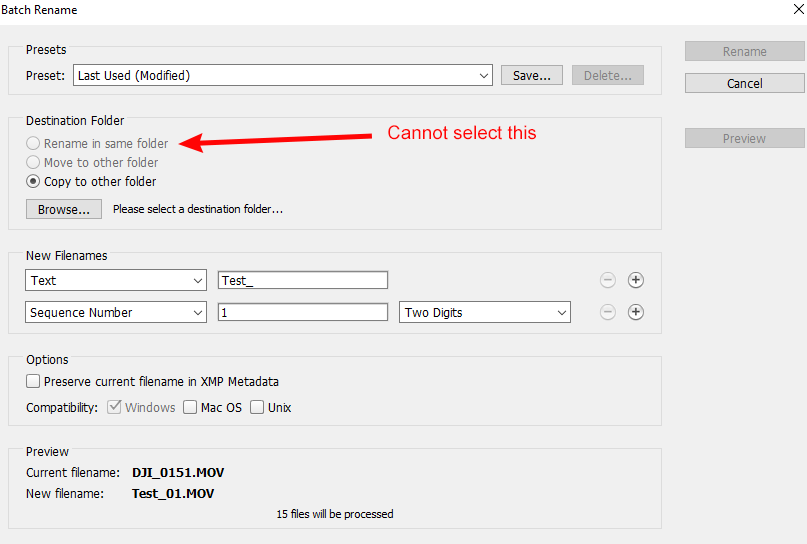
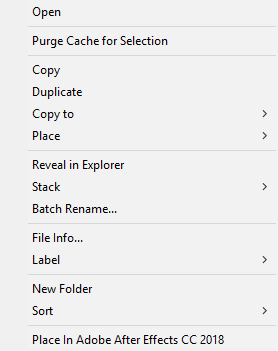
I'm experiencing this very same thing. Worked perfectly for 3 years. No changes to my system whatsoever. Now can't select Rename in Same folder (see below). It's been ongoing for about 2 months now. Invested about 6 hours on the phone with Adobe support. Windows Explorer works fine. I've been through about seven Adobe help sessions. Thought we had it fixed last time (safely eject SD card reader). Now it's back to its old tricks. This is very frustrating when you have 500 images to rename. Adobe needs to address this - and soon. Not happy about this at all. Tried all recommended fixes (reset preferences; cleared cache, deleted and re-installed Bridge, etc, etc., etc.). In addition, the "Rename" option does not even appear (see below).

ceaa0645f3c4963b8449301567f00c7b.png

b56feb19920e0e5d8adbda0df0dd7575.png


Stupid question.

Can you copy the files to a folder on a lo hard drive and try renaming them there.

5 replies

Participating Frequently
April 24, 2022

I am about to pull my hair out. I have made no changes or updates to Bridge, and for several weeks now, I can't batch rename properly.  In my case, I can't get anything besides "text" in the dropdown menus.  I used to rename with several combinations of "text," then "sequential number," and sometimes "text" again.  Now because it won't rename properly, it keeps the original name and adds something like (1), sequentially for all the pictures in the batch. This is a real mess!

gary_sc
Community Expert
Community Expert
April 24, 2022

Hi Soussia,


I can see that you're on a PC. Currently (and for some time now), there has been a dreadful bug on PCs where dropdown menus do not work. There are two options:


1) Drop back to a previous version of Bridge to one where that works,

2) Use your arrow keys to navigate the dropdown menus.


MANY are also waiting for a fix on this.


Let us know if this works for you, good luck!

Participating Frequently
October 11, 2021

I have the same problem. I have been using this function in various versions of Bridge since 2008 and this is beyond frustrating. I have not been able to use batch rename since the last update. It's really hindering my ability to collate  images from different people, we used to just time sync, sort and rename in Bridge. I have tried moving it off the server, doesn't seem to make a difference. whyyyyyyyyyyy........ 🙂 Also using windows 10, updated adobe CC - seem to have had this problem for a couple of updates. 


thanks for anyone who can help or to Adobe if they fix this. 

Stephen Marsh
Community Expert
Community Expert
October 14, 2021

There are alternative software renaming tools if you can't get this working in Bridge.

Participating Frequently
October 14, 2021

I would certainly be interested in trying one at the moment, but it's incredibly disappointing to have have a really useful tool just stop working out of the blue like that. 

Participating Frequently
August 28, 2018

I have the same problem. I've tried all the suggestions but to no avail. Any further advice out there ?

Stephen Marsh
Community Expert
Community Expert
August 28, 2018

Can you provide OS info, Bridge version info, exact steps applied to fix the issue and the exact steps required to reproduce this issue?

You may also wish to post over at (unlike this forum, Adobe employees seem to post with greater frequency over there):

Bridge | Photoshop Family Customer Community

Good luck!

Legend
February 10, 2018

Also make sure you double check the Batch Rename settings (although I'm sure you've already done that), to ensure you don't have it set to create the same name for each file (I've added a screenshot below of how I'd have it set-up), and save a preset (click Save) so you don't have to remember the settings each time you batch rename files, and can select your rename settings from the Presets menu.

Stephen Marsh
Community Expert
Community Expert
February 9, 2018

Perhaps try resetting Bridge preferences (item #2):

Troubleshoot Adobe Bridge for errors and freezes

You should be able to use batch rename to fix the files, this basic rename will fix it:

(However I’d prefer to use a string substitution with regular expression if the file names were not so simple)

Stephen Marsh
Community Expert
Community Expert
February 10, 2018

One possible regular expression based string substitution, presuming 9 files or less:

Find: (?<=IMG_\d{2})\s\(|(?<=IMG_\d{2}\s\(\d)\)

Replace: