


Participating Frequently
March 14, 2019
Answered

Character Animator: Audio Level Too Low

  • March 14, 2019
  • 11 replies
  • 13530 views

Hello,

I'm not able to get any live audio into Character Animator. It has always said "audio level too low". I've been trying it for 2 days and have been searching the help forums, but have had no luck.
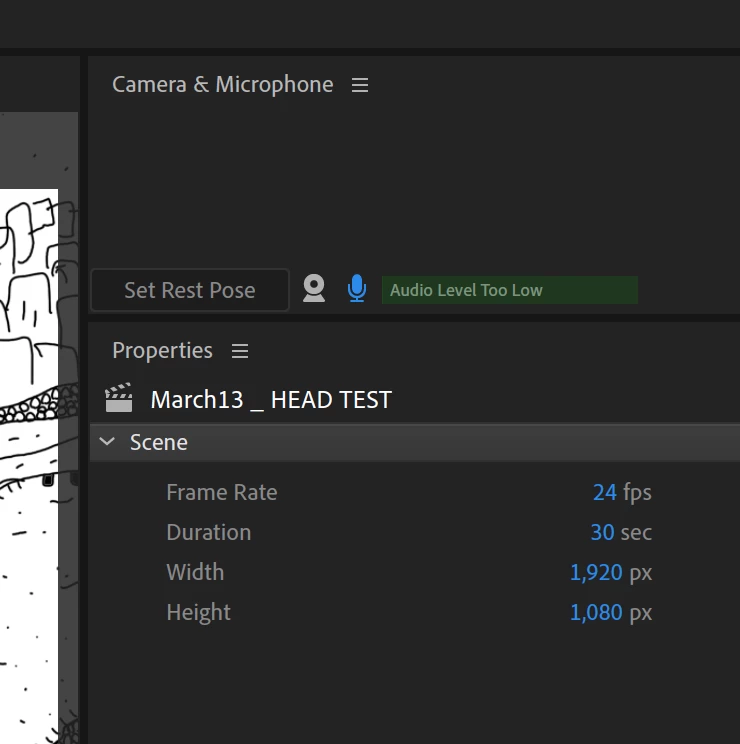
I'm using a Mac Book Pro - OS 10.14.3 and Character Animator 2.0.1. The audio input is set to the same input under system preferences and preferences within Character Animator. I've tried with the built in microphone as well as setting up a microphone with my apollo twin interface.

I get audio input via my system preferences as well as Adobe Audition. I can record fine in both, but CA gets no live input. I've been recording audio in Audition and importing that audio file into CA, but it would be nice if I could do live audio into CA. Not sure what is wrong.

I'm really loving this software so would be nice to get this issue fixed! Any help is appreciated. Thanks. 

Correct answer L.Bo

This solved the problem for me:

Character Animator didn't have permission to use the microphone, despite clicking Allow Access during set up.

System Preferences > Security & Privacy > Microphone - make sure Character Animator is checked.

Hope it solves your problems, too.

11 replies

Participant
October 26, 2023

We have tried all of the following but still can not record sound.

Participant
February 14, 2024

did you find any solution?

Participant
November 2, 2021

If u are using NDI tools then change input to microphone instead of ndi, it will work for me.

this is below MME thing.

Participant
June 17, 2021

I also have a UAD apollo twin interface. It works with all other software. I am trying out CA and I have done the following:

selected the UAD driver in CA preferences

clicked "attempt to force hardware to document sample rate"

manually tried to match the document sample rate

verified that CA has access to the microphone in security and privacy settings


I am on an imac running mojave 10.14.6

The microphone is not that close to me, so I really need to use my audio interface.


I found some similar posts online with people trying to use their apollo with Audition. Does adobe have some kind of problem with UAD hardware?


Participant
December 27, 2019

Go to system preferences / security and privacy and give Adobe permission to use your mic. I saw the answer posted on this page


Participant
October 23, 2019

Hi, one possible solution I haven't seen listed here if you are using an audio interface is to change your device class in Edit > Preferences > Audio Hardware to ASIO instead of MME. I was having a similar issue and this was the solution for me as I am using a Focusrite interface for my microphone. Perhaps this is the solution for someone else out there too.

L.BoCorrect answer
Participant
September 18, 2019

This solved the problem for me:

Character Animator didn't have permission to use the microphone, despite clicking Allow Access during set up.

System Preferences > Security & Privacy > Microphone - make sure Character Animator is checked.

Hope it solves your problems, too.

Participating Frequently
September 21, 2019
yes, despite clicking Allow Access during set up this is needed. thanks
Participant
July 31, 2019

That did not work for me.  Nor did an uninstall/reinstall.  The mic works in other programs.  Any other ideas?

Participant
June 12, 2019

I'm coming into this discussion with the same issue.  I've tried everything suggested to no avail.

I'm running MacOS 10.14.5 and just updated Character Animator to 2.1 (build 140)

My internal microphone is working properly in every other application.

I even tried uninstalling Character Animator and reinstalling, which hasn't worked.

Oddly enough, both times when launching Character Animator (after both installs) I was greeted with the following error:

Not sure if that's related in any way, but the error does not appear again on subsequent app launches.  Only after a new install.

Participant
July 31, 2019

I am having the same problem now with it saying audio levels are too low & cannot detect my built in microphone that works fine everywhere else.

Participant
July 31, 2019

It says "Assumed Answered" on this topic, but I do not have a work around for livestreaming use.

alank99101739
Legend
March 16, 2019

Yes, Audio Hardware is the right section. I am not sure what to suggest here! Usually it is the Audio Hardware settings not correct.

The other thing to try is recording an audio file with another tool and importing it. (I use Adobe AudiTien with all the noise cancelling etc). Does that work better?

There is the good old “install the software” trick as well. Sometimes it learns about newer device drivers or similar. After that I would try mentioning some of the Adobe staff names here like Dan Tull or Jeff with an “@“ reference so they see the thread. Like this: DanTull

Ellipsis9
Participant
March 16, 2019

Hi, I'm having a similar problem. In my case I can record audio into my scene without any problems, however, I can't live monitor the audio, I can only hear the audio on playback. The green bar in the camera pane does not respond at all to my audio input, it continually says "Audio Level Too Low" even though it records the audio perfectly and at a proper level. Everything seems to be configured correctly. I'm running OS X  10.11.6.

Ellipsis9
Participant
March 16, 2019

Hi again, okay, I solved my problem, I don't know if this will help you as well, but here's what I did. In the Character Animator Preferences  audio hardware panel, under 'sample rate' I ticked the box to 'Attempt to Force Hardware to Document Sample Rate'. As soon as I did that, I had live monitoring coming from my audio interface. Hope this helps.