Participant
Jan 15, 2021 7:18 PM UTC
Answered

character animator is not detecting full artwork in layers

Hi All,

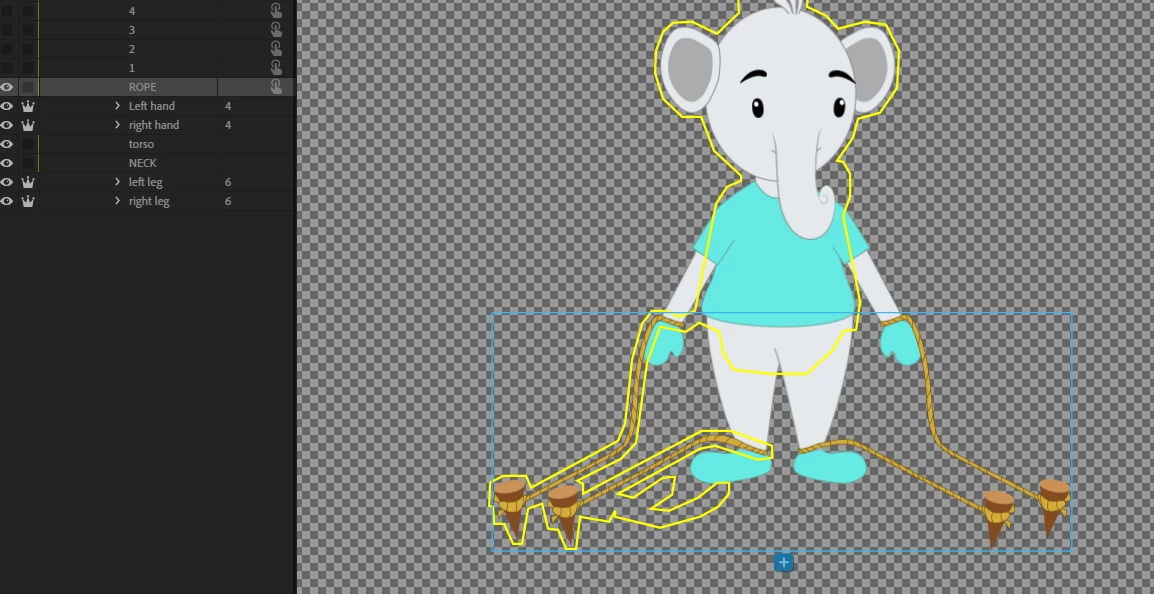
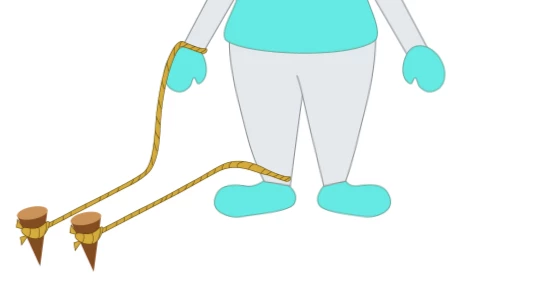
I am using triggers for rope..when i press the trigger,it showing up only the right side of the ropes..i think character animator didn't detect both sides of ropes. can any one help me to fix this issue?


Regards,

RAVI

This topic is closed to new replies. Start a new post to keep the conversation going.
alank99101739
alank99101739Correct answer
Legend
Jan 15, 2021 10:42 PM UTC

Two possibilities - the first is you accidentally drew the rope in the wrong layer in the original artwork file (I have done that many times blush). The other one however is CH looks for contiguous regions. The rope on the right is not connected to the rest of the body, so may have got left out of the mesh. To fix, one way is to add another layer and group it with the current rope layer. In that layer draw a rectangle or similar that overlaps with the different areas. Then hid the layer. CH will consider it present when working out the contiguous region, so will include both ropes. It just needs to overlap the ropes and the main body by a little bit - don't make it too big.


3 replies

Participant
Jan 16, 2021 12:06 PM UTC

Hi Alan,

thanks for your suggestion. it is working fine now

regards.

Ravi

Translate
alank99101739
alank99101739Correct answer
Legend
Jan 15, 2021 10:42 PM UTC

Two possibilities - the first is you accidentally drew the rope in the wrong layer in the original artwork file (I have done that many times blush). The other one however is CH looks for contiguous regions. The rope on the right is not connected to the rest of the body, so may have got left out of the mesh. To fix, one way is to add another layer and group it with the current rope layer. In that layer draw a rectangle or similar that overlaps with the different areas. Then hid the layer. CH will consider it present when working out the contiguous region, so will include both ropes. It just needs to overlap the ropes and the main body by a little bit - don't make it too big.

Translate
alank99101739
Legend
Jan 15, 2021 10:44 PM UTC

Oh, and why did it pick up one side and not the other? Luck? There could be a stray pixel or two between the rope on the left and the torso, enough for the algorithm to think they are connected, but just too much of a gap on the other side.

Translate