


ez76722205
New Participant
July 30, 2017
Answered

Movement Issues with Puppet in Character Animator

  • July 30, 2017
  • 2 replies
  • 12830 views

This is my first time making a puppet in character animator based on a design I created in Illustrator (usually I use photoshop but this time I wanted to work with vectors). I followed the sample Illustrator character model and made sure that I didn't have any extra independent layers that were throwing the movement off. Yet I still have two problems...

1. The head tilt doesn't look natural.  In the past with similar looking characters that I made in Photoshop, the head tilted without any warping in the neck. I also noticed that when I tilt the head, the body moves slightly... I'm not sure why that is.

2. When I move other parts of the body, the whole character moves. As you can see in this video, when I move the arm, the entire body tilts with it, like it is on a hinge. I tried making the arm independent, but then it wasn't recognized in the mesh (even in contour mode). Then when it isn't independent, as it is now, the draggable is moving the entire body with it.

Here is a screenshot of how I set up my character, in case that might help.
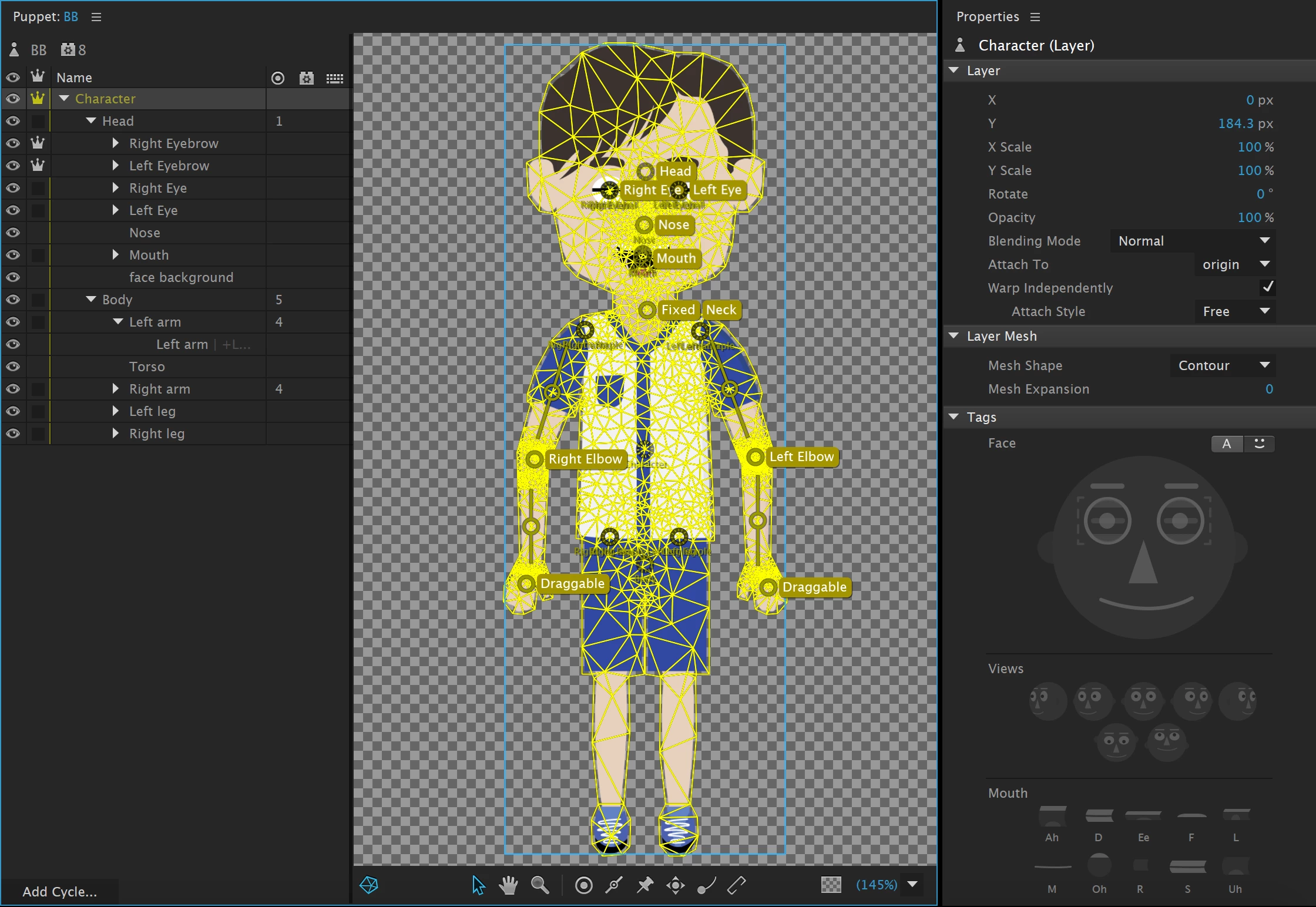
I would appreciate any help, since I hope to make more characters from illustrator and rig them in character animator! Thank you!!

This topic has been closed for replies.
Correct answer oksamurai

Sure, here is the link: Dropbox - BB.puppet

Hopefully that link works

Just a heads up, I tried experimenting with it on my own.  I found that adding a fixed point to the center of the chest didn't make the movement as obvious.  Now only the top half of his torso moves when his head moves.  But feel free to delete the fixed point if you find a better way to solve the issue.


Your solution works pretty well for a more static body I'd say! The only thing I'd change is making the arms independent, since right now when you pull them they pull the whole body with them - but that's more of a minor stylistic choice. Also helpful: you can also tag sticks. So instead of sticks + fixed handles for pinning the body down, you could just do sticks tagged as fixed.

2 replies

New Participant
May 24, 2020

Hello, I'm having trouble with my character's face. When i move around, only the facial features move, such as the eye, eyebrows etc and not the head itself. It results in the facial features flying out of the head. How can I link the features to the head so they both move?

alank99101739
Brainiac
May 24, 2020

I suggest starting a new thread and include screen shots of the rigging hierarchy and screenshot or video of things going wrong. It's pretty hard to diagnose without more details 

oksamurai
Community Manager
Community Manager
July 31, 2017

1. It looks like you have a fixed handle on the neck? That's probably causing some of the tilt issues.

2. Select the Body group and add fixed handles on the shoes. That should keep him grounded.

ez76722205
New Participant
July 31, 2017

I took out the fixed handle on the neck and added fixed handles to the shoes.  The character doesn't swing like that anymore, which is a huge improvement, but it still doesn't seem to move quite right.  When I tilt the head one way, the torso moves the opposite way.  Is there a way to get just the head to move without the body moving as much?  I added some sticks to the body for a spine, which made the torso movement slightly less noticeable, but I'm not sure if there's anything else that could fix it.  Thank you very much for your help!!

oksamurai
Community Manager
Community Manager
July 31, 2017

Could you please File > Export > Puppet and share it as a link (Creative Cloud, Google Drive, Dropbox, etc.) so we could take a closer look?