Participant
January 11, 2022
Answered

Adobe's Subscription & Cancellation Terms

  • January 11, 2022
  • 5 replies
  • 5913 views

I only intended to evaluate this software over others during the free period. I then forgot to end the subscription at the end of the free period - so was happy to pay a monthly charge. HOWEVER, they now want to charge me nearly £90 to cancel, otherwise I have to pay for the full year. Pretty disgraceful. 


[Topic edited for clarity.]

 

This topic has been closed for replies.
Correct answer LinSims

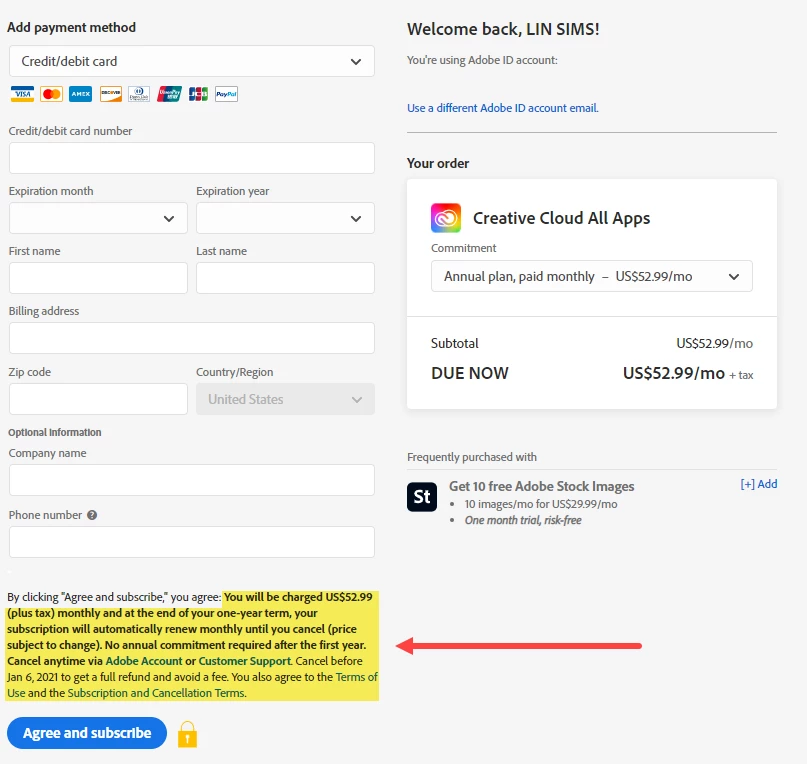
On the subscription page, Adobe specifically gives you a date by which you must cancel to avoid the cancellation field.

The print is not particularly small. See the highlighted text in the screenshot.


5 replies

kglad
Community Expert
Community Expert
December 16, 2022

and to everyone complaining:


go back and click one of the plan offerings (preferrably the same one you subscribe to and think hid the terms of your subscription).  don't subscribe to anything and don't enter any payment info.  just start the process and at that very first step, check what's offered.  you'll see nothing's hidden.


what could (and imo should) be done is after you proceed from that first step after you enter info and click submit, a popup should appear clearly explaining what was one that first page again.  something to slow you down, because, none of you are alone in feeling the terms to which you agreed, were hidden or written in fine print or just not presented, at all.


but as mentioned above, you can go back and look at first thing that appears when you select a plan and before you select annual paid monthly, annual paid yearly, monthly.  ie read those 3 (or two if you selected the photography plan) options.

Participant
September 22, 2023

just cancel the damn card and order another, they keep your card locked on file to recur charges if a replacement is not available

Participant
November 29, 2022

How many time do I need to cancel my Adobe subscription? How many times do I need to contact my banking institution to stop the payments, that I have already cancelled? SEE you in court eventually. Going to write a letter to my elected government representative.

David


John T Smith
Community Expert
Community Expert
November 29, 2022

Nobody here in a public forum can see your account information
What do you see for your account at https://account.adobe.com/
This space is provided by Adobe, but this is not Adobe support
This is a public forum, you need the link to Adobe support, not other users
Help Center https://helpx.adobe.com/support.html is a good place to start
Be sure to remain signed in with your Adobe ID before accessing the link below
Do be aware that wait times are sometimes long before an agent responds
.
You MUST make sure that your browser does NOT block ads, scripts, or pop-ups
You MUST also allow 'cookies' in your web browser for the link to work
This will NOT work if you are using a VPN
.
This link will go directly to the chat option
https://helpx.adobe.com/contact.html?rghtup=autoOpen
Type "Agent" in the chat box to bypass the chatbot and be connected to a person
-Meaning type in the word Agent in the lower right, without the quote " " marks
or
X (aka Twitter) tweet @AdobeCare
.
Adobe does NOT do support by email, so beware of answering anyone who sends you a private message
-click for more information about scammers https://tinyurl.com/10791730


Participant
March 28, 2022

I've experienced the same thing. It's a bait-and-switch tactic accompanied by nonexistent customer service. I would've expected better from Adobe. Guess my standards are too high. It's very misleading. 

Participant
March 28, 2022

Have you tried calling customer service? They accepted by case and refunded in the end. Best of luck.

Participant
March 28, 2022

Thank you! Have had no luck finding any sort of phone number to call customer service. Chatting with an "agent" right now. Guess we'll see. 

LinSims
Community Expert
Community Expert
January 11, 2022

When you clicked "I agree" to the terms and conditions, you acknowledged that Adobe would charge a cancellation fee if you canceled your subscription early. The cancellation fee is actually 1/2 of the remaining cost of the subscription. For example, if there's 6 months remaining on the subscription, the cancellation fee is the equivalent of 3 months.

Participant
January 11, 2022

Yes there was probably some small print somewhere, but my observation is how unusual this is. Other subscription services where I have not used the software have noted the lack of use and issued refund with no question, regardless of terms (fitness apps spring to mind!). I have never been caught out like this before, it seems very unusual and frankly a bit sly. I am the customer, and I was not that I would be charged £90 to cancel the subs. However you cut it thats falling below my expectations for such an established company - either make the charge more obvious, or show some leniancy.   

LinSims
Community Expert
LinSimsCommunity ExpertCorrect answer
Community Expert
January 11, 2022

On the subscription page, Adobe specifically gives you a date by which you must cancel to avoid the cancellation field.

The print is not particularly small. See the highlighted text in the screenshot.


Ged_Traynor
Community Expert
Community Expert
January 11, 2022

Moving thread to the Account, Payment, & Plan forum from Photoshop ecosystem