
Participant
August 23, 2022
Question

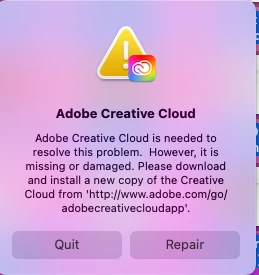
Adobe repair message, happens everytime I start my computer

  • August 23, 2022
  • 2 replies
  • 184 views

I get this message everytime I start my computer and it take two to three hours to finally fix sometime I have to do it twice to get it to work.  I have uninstalled the creative cloud app several times but it doesn't work, I still get the message.  Makes me want to stop using Adobe as there is no place to ask them direcrtly here is the message
 

This topic has been closed for replies.

2 replies

Peru Bob
Community Expert
Community Expert
August 24, 2022

Try resetting the CC App.
To reset the Creative Cloud desktop app, make sure it's in the foreground, then press:
Win: Ctrl + Alt + R
Mac: Cmd + Opt + R

Did you uninstall it this way?
https://helpx.adobe.com/creative-cloud/help/uninstall-creative-cloud-desktop-app.html
https://helpx.adobe.com/download-install/kb/creative-cloud-desktop-app-download.html

Ged_Traynor
Community Expert
Community Expert
August 24, 2022

Moving thread to the Creative Cloud Services forum from Using the Community