
Known Participant
December 31, 2020
Question

Creative Cloud File folder disappeared from Windows 10 sidebar

  • December 31, 2020
  • 1 reply
  • 954 views

Hi, 


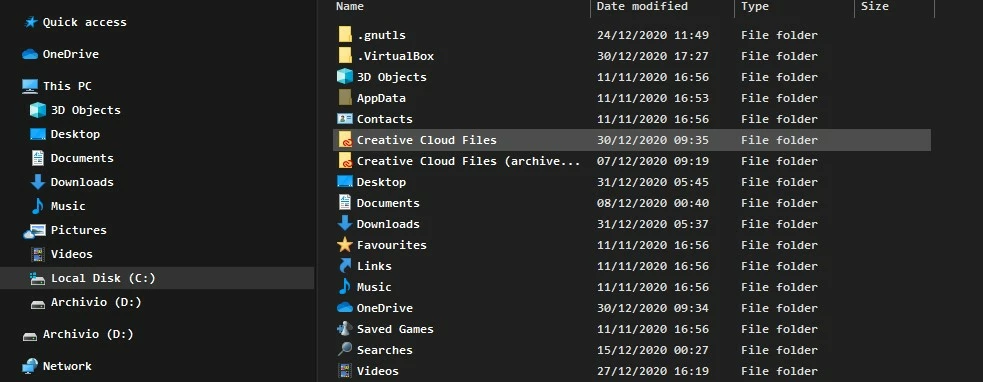
When I firstly installed Adobe, a folder called "Creative Cloud Files" appeared on my sidebar under "OneDrive" icon.


I am now trying to get it back on the sidebar with no luck, checked some online tutorial, all I find is how to remove it and if I try following the method backwards and add the key manually it doesn't work.


I see the file under my "user" folder but I am unable to take it on the sidebar. Is anyone able to help me?

Thanks a lot in advance
 

This topic has been closed for replies.

1 reply

kglad
Community Expert
Community Expert
December 31, 2020

windows 10 doesn't support a sidebar.  if you're using a third-party app to add a sidebar, google it.

Known Participant
January 1, 2021

Thanks for you answer kglad, unfortunately, I have to disagree with you, I am more than sure that the same icon you see now on the right panel called "Creative Cloud File" before it was on the left panel right under the "OneDrive" icon. 

But thanks anyway on taking time to answer.

kglad
Community Expert
Community Expert
January 1, 2021

are you


1. calling the items on the left side of your screenshot "the left panel" and

2. the right side of your screenshot "the right panel" and

3.  thinking something in that screenshot is related to a windows sidebar?