
Inspiring
May 18, 2023
Answered

Syncing Issues with Shared Libraries

  • May 18, 2023
  • 1 reply
  • 2943 views

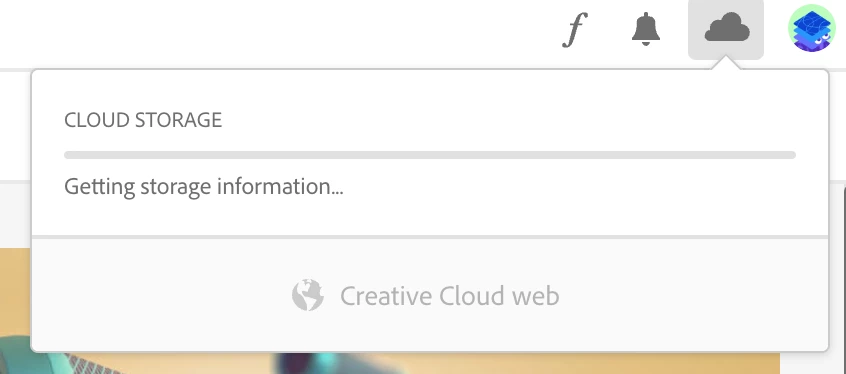
I have a shared library with a co-worker and when they add assets to it, I dont see them on my end in my library. When I go to check my file syncing settings, it just shows a spinning wheel with no movement whatsoever (see screenshot). I've tried logging out of CC, restarting my computer, etc with no sucess.


Any ideas on how to resolve this? 
Correct answer kglad

I cant even get to that stage. It's stuck here ...


reset the cc desktop app by making sure it's in the foreground, then press:

Win: Ctrl + Alt + R
Mac: Cmd + Opt + R

1 reply

Tarun Saini
Community Manager
Community Manager
May 18, 2023

Hi @Enzo5EB8,


We're sorry to hear about your difficulties. Could you please let us know which version of the operating system you're using? Please ensure that you have a stable internet connection. Slow or intermittent internet connectivity can cause syncing issues.  Try refreshing the page or restarting your device to see if it resolves the problem.


You may also confirm that the shared library is set up correctly and that both you and your co-worker have appropriate access permissions & make sure you are using the latest version of the Adobe Creative Cloud desktop app.


Check this article & let us know if that helps: https://helpx.adobe.com/creative-cloud/help/share.html


Regards,

Tarun


Enzo5EB8Author
Inspiring
May 18, 2023

I am using MacOS Monterey 12.6.5. I'm also up to date on the CC app. I've tried refreshing and restarting the CC app multiple times. And I can verify that we have the appropriate access permissions.

Enzo5EB8Author
Inspiring
May 19, 2023

Also, when I click on the cloud icon on the bottom left of the libraries panel, and click "enable" nothing happens. See screenshot.