


Participating Frequently
December 13, 2019
Answered

Adobe Portfolio adding text on Homepage

  • December 13, 2019
  • 3 replies
  • 15499 views

Hi everybody! I want to add some text on our homepage (theme Thomas) but can find a way to add text between the gallery grid and the footer, or under the footer. Does someone know how to do this? 


Thanks in advanced! 


/Marco
This topic has been closed for replies.
Correct answer Nancy OShea

Hi Marco,

If your site's landing page is a Gallery, you cannot add content to it.  You can only add content to  project and/or custom pages.  That said, you could create a custom landing page. See link.

https://help.myportfolio.com/hc/en-us/articles/360037929374-Setting-a-Homepage


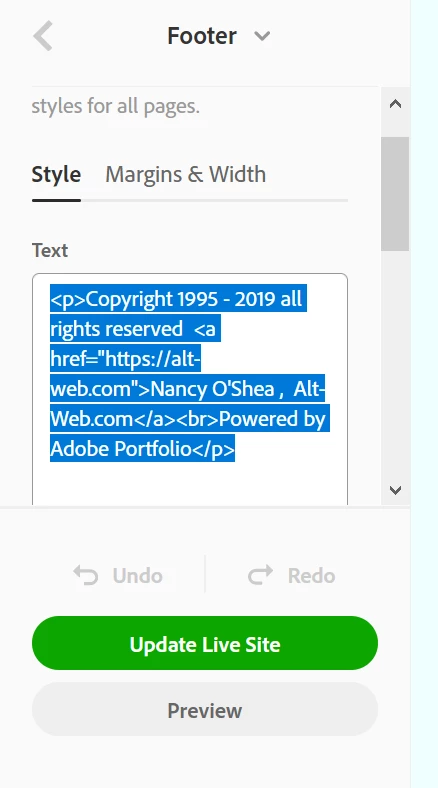
To edit Footer text from left side menu, scroll down to SITE-WIDE. 

Click on Footer.

In this example, I have added a small amount of HTML code to my footer. 


3 replies

Participant
October 23, 2020

If we cannot add text above or below the collections then how this layout got achieved? 

https://robertlicau.com/


Nancy OShea
Community Expert
Community Expert
October 23, 2020

That area for text above content is a Masthead.  You must toggle it on/off from settings.

https://help.myportfolio.com/hc/en-us/articles/360038393233-Adding-a-Masthead


Nancy O'Shea— Product User & Community Expert
Participant
October 26, 2020

Thank you

Nancy OShea
Community Expert
Nancy OSheaCommunity ExpertCorrect answer
Community Expert
December 17, 2019

Hi Marco,

If your site's landing page is a Gallery, you cannot add content to it.  You can only add content to  project and/or custom pages.  That said, you could create a custom landing page. See link.

https://help.myportfolio.com/hc/en-us/articles/360037929374-Setting-a-Homepage


To edit Footer text from left side menu, scroll down to SITE-WIDE. 

Click on Footer.

In this example, I have added a small amount of HTML code to my footer. 


Nancy O'Shea— Product User & Community Expert
Participating Frequently
December 20, 2019

Hi Nancy,

Thanks for your reply! That is exactly what I want to do. Place some HTML code (in the footer). But the case is that I already have text in the footer that has the color cray. The HTML code I want to hide = white color, and that is not possible. You need to select one color for all te text.


/Marco

Nancy OShea
Community Expert
Community Expert
December 20, 2019

That's right.  CSS styles are removed by the system.  Only minimal HTML is allowed and only in the footer. 


Nancy O'Shea— Product User & Community Expert
Participating Frequently
December 13, 2019

Thanks John for your reply! I already rearched there for answers, but withour result :-(.

/Marco