


AnScathMarcach
Inspiring
February 24, 2017
Answered

CC Only Offering CS6 Versions instead of CC Versions? What?

  • February 24, 2017
  • 3 replies
  • 633 views

So I just did a factory reset on my laptop recently, running Windows 10. I went to reinstall all of my products on it, only to realize it gave me the CS6 versions of Premiere and Flash, and the CC versions are nowhere to be found in my list of apps. Other apps like Audition and Prelude only have their CS6 versions listed as well (although I never use those). It won't even let me open the CS6 version of Premiere, and my computer can't even find it, even when I do a search for it.
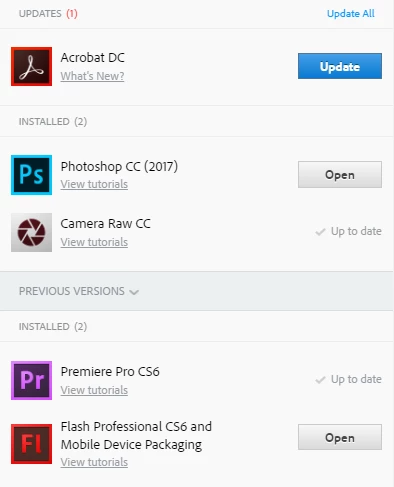
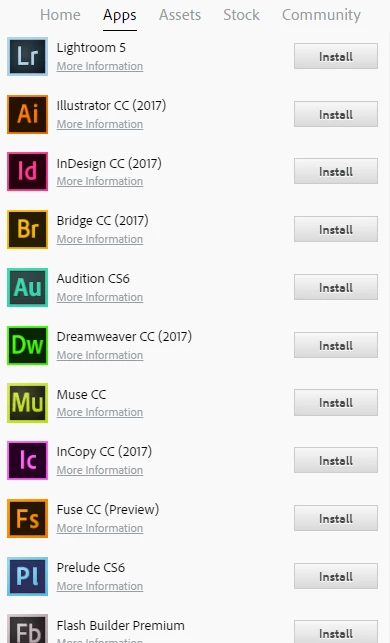
Even when I try to download Premiere Pro CC from the website, it tries to download CS6 instead:
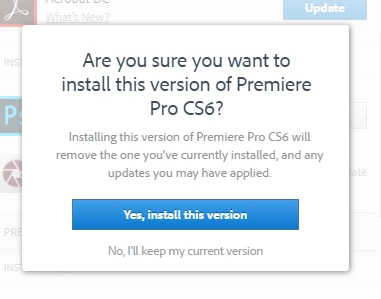
What in the world is happening? I know I most definitely have a CC subscription, because everything works fine on my desktop computer and I have all the CC apps that I need installed and running.

This topic has been closed for replies.
Correct answer Himanshu*Gupta

Hi AnScathMarcach ,

This is correct. The apps in question are not compatible with 32 bit OS machine as already mentioned in the above provided link for system requirements  Premiere Pro System Requirements for Mac OS and Windows .

Please upgrade your machine and then it will be good to go. Thanks!

Regards

Himanshu Gupta

3 replies

Himanshu*GuptaCorrect answer
Adobe Employee
February 24, 2017

Hi AnScathMarcach ,

This is correct. The apps in question are not compatible with 32 bit OS machine as already mentioned in the above provided link for system requirements  Premiere Pro System Requirements for Mac OS and Windows .

Please upgrade your machine and then it will be good to go. Thanks!

Regards

Himanshu Gupta

Adobe Employee
February 24, 2017

Hi AnScathMarcach,

Please check if you are able to install Premiere pro from here Download Creative Cloud apps

Also please try to change the language in your CC Desktop app once and then check Change the language setting of your Creative Cloud apps . If this is currently English (international), change it to English (North America) or vice versa and then check if you see any difference.

You may also refer Not all apps displayed for download | Adobe Creative Cloud desktop app

Regards

Himanshu Gupta

AnScathMarcach
Inspiring
February 24, 2017

I think I've discovered the problem.

When I had windows reinstalled, the disk must have been the 32-bit version instead of 64-bit.

Adobe Employee
February 24, 2017

Hi AnScathMarcach,

I understand that you are not getting Premiere Pro CC in your CC Desktop app. Firstly please make sure if your machine meets the minimum system requirements required for this app

Premiere Pro System Requirements for Mac OS and Windows

Also I would like to inform you that Flash Professional is now called Adobe Animate so please check in your CC Desktop app if you find Animate CC. Adobe Animate - Wikipedia

Please let me know if any further assistance is required. Thanks!

Regards

Himanshu Gupta

AnScathMarcach
Inspiring
February 24, 2017

The only requirement that is not met on my laptop is that I only have 6GB of RAM on it, however I don't aim to be doing anything fancy on this computer when I have my better one at home.

The system requirements shouldn't be an issue here considering I had all of these programs installed before the factory reset. I did run into several issues after the reset, so it's possible that something was changed, but I don't see how.

I'm also aware that Flash is called Animate now, and it's not showing up in my list either.