Rudy CH
Inspiring
November 22, 2021
Answered

Custom settings

  • November 22, 2021
  • 3 replies
  • 2160 views

Getting new PC, how can I transfer my settings & preferences?


[Edited by moderator for clarity.]


This topic has been closed for replies.
Correct answer Nancy OShea
quote

Photoshop, Bridge, Ilustrator, Dreamweaver, Firevorks,

==========

Well Fireworks is discontinued since 2012.  AFAIK, it never had capability to sync settings to the cloud and of course, never will.


Dreamweaver CC stores Settings on the cloud.  Go to Preferences panel > Sync Settings.  See screenshot.
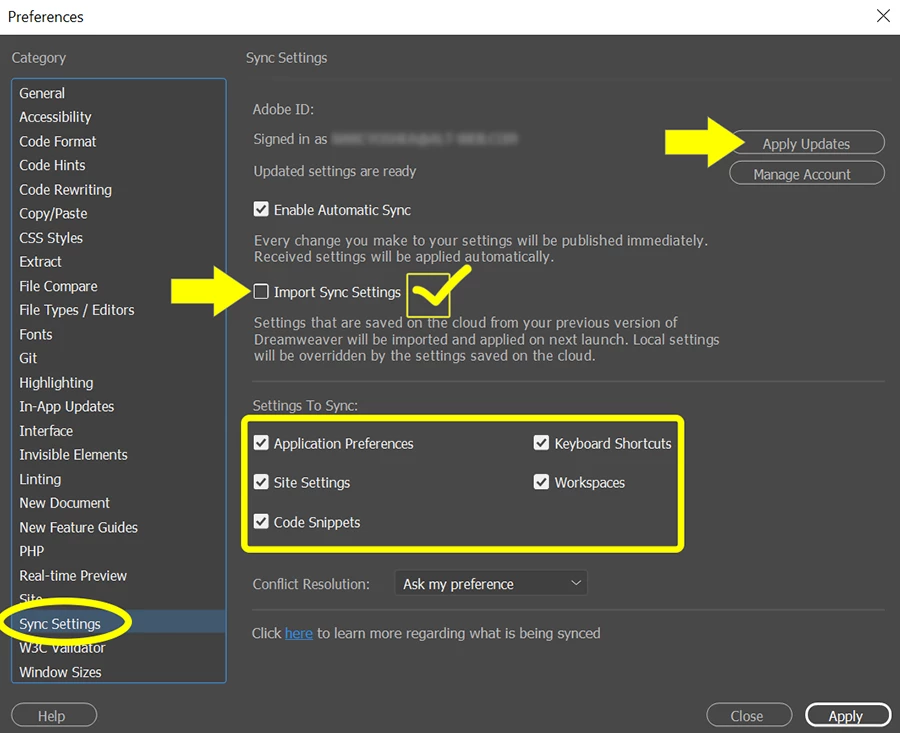


Check box to IMPORT SYNC SETTINGS. 

Click on Apply Updates button.

Restart Dreamweaver and wait for syncing to commence.


Dreamweaver support community:

https://community.adobe.com/t5/dreamweaver/ct-p/ct-dreamweaver


Illustrator support community:

https://community.adobe.com/t5/illustrator/ct-p/ct-illustrator


Bridge support community:

https://community.adobe.com/t5/bridge/ct-p/ct-bridge


Hope that helps.

 

3 replies

Nancy OShea
Community Expert
Community Expert
November 22, 2021

Often times you can migrate saved preferences & workspaces by copying them from your previous version's folder to the new version's folder with your operating system's file manager (Mac Finder or Win File Explorer).


For better answers, we need to know which OS and apps you're working with.


Nancy O'Shea— Product User & Community Expert
Rudy CH
Rudy CHAuthor
Inspiring
November 22, 2021

Widows 10pro,...... new one will be Windows 11

Photoshop, Bridge, Illustrator, Dreamweaver, Fireworks, latest version,...

I thought , It not matter what OS I running, somehow, I figure, Adobe Cloud, has some place for backup of preferences,...if they don't, I will suggest to make it,

I know, I can copy and past all preferences from Roaming folder, but sometimes you copy garbage too,.....
Should be more simple as that, for such a "professional" program


Nancy OShea
Community Expert
Community Expert
November 22, 2021

I would not be too quick to jump onto Windows 11 yet.  There are some known issues with it.

https://helpx.adobe.com/download-install/kb/windows-11.html


Just saying... 😕😕


Nancy O'Shea— Product User & Community Expert
Govardhan.V
Participating Frequently
November 22, 2021

Photoshop : https://helpx.adobe.com/photoshop/using/preset-migration.html


Lightroom : https://helpx.adobe.com/lightroom-classic/help/back-catalog.html


You can search for respective applications presets backup and import, For further assistance, mentioned particular Adobe app and its version,

Rudy CH
Rudy CHAuthor
Inspiring
November 22, 2021

this link is for updating Photoshop, on same computer

Govardhan.V
Participating Frequently
November 22, 2021

Please refer below section:


Peru Bob
Community Expert
Community Expert
November 22, 2021

Which applications?

Rudy CH
Rudy CHAuthor
Inspiring
November 22, 2021

Photoshop, Bridge, Ilustrator, Dreamweaver, Firevorks,

Nancy OShea
Community Expert
Nancy OSheaCommunity ExpertCorrect answer
Community Expert
November 22, 2021
quote

Photoshop, Bridge, Ilustrator, Dreamweaver, Firevorks,

==========

Well Fireworks is discontinued since 2012.  AFAIK, it never had capability to sync settings to the cloud and of course, never will.


Dreamweaver CC stores Settings on the cloud.  Go to Preferences panel > Sync Settings.  See screenshot.


Check box to IMPORT SYNC SETTINGS. 

Click on Apply Updates button.

Restart Dreamweaver and wait for syncing to commence.


Dreamweaver support community:

https://community.adobe.com/t5/dreamweaver/ct-p/ct-dreamweaver


Illustrator support community:

https://community.adobe.com/t5/illustrator/ct-p/ct-illustrator


Bridge support community:

https://community.adobe.com/t5/bridge/ct-p/ct-bridge


Hope that helps.

 

Nancy O'Shea— Product User & Community Expert