cocooue
New Participant
August 18, 2018
Answered

Install Adobe CC on external hard drive

  • August 18, 2018
  • 2 replies
  • 5218 views

Hi,

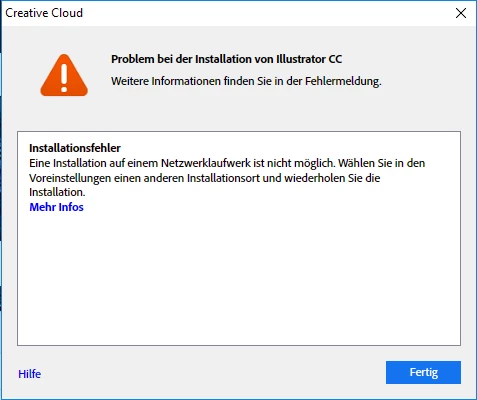
I want to install the Adobe CC on an external hard drive because my internal hard drive is nearly full. When ever I try to install an App I get this error:

But as far as I know, my external hard drive is not an network drive?! So whats worng?

    This topic has been closed for replies.
    Correct answer kglad

    Adobe doesn't let me install on external drive. I get the red box message: Unable to install at this location. I am going to try to clean out my mac. I just read an article that may help. Thanks for your help.


    you're welcome.


    p.s. erase your external hard drive and format it to ExFAT.


    you can find what format your external hard drive by:


    disk utility > your external hard-drive name > below the icon and the name of your drive will say a format type like AFFS or Mac OS Extended (Journaled).


    to change your external hard drive format follow these steps:


    disk utility > your external hard drive name > right click > click erase ( this will get rid of everything on the external drive so make sure to back-up somewhere else ) > under format choose ExFAT > erase


    2 replies

    John T Smith
    Community Expert
    August 18, 2018

    As far as I know, Adobe programs will not install to an external drive, since disconnecting that drive would then break the install

    Participating Frequently
    August 19, 2018

    MAKES NO SENSE I AM ALSO OUT OFC drive space

    Peru Bob
    Community Expert
    August 19, 2018

    How large is your drive(s)?

    Peru Bob
    Community Expert
    August 18, 2018

    Get a larger internal hard drive.

    Participating Frequently
    May 3, 2023

    I wish it was that easy. I have a Mac Studio and you cannot upgradeteh memory or storage.


    kglad
    kgladCorrect answer
    Community Expert
    May 3, 2023

    Adobe doesn't let me install on external drive. I get the red box message: Unable to install at this location. I am going to try to clean out my mac. I just read an article that may help. Thanks for your help.


    you're welcome.


    p.s. erase your external hard drive and format it to ExFAT.


    you can find what format your external hard drive by:


    disk utility > your external hard-drive name > below the icon and the name of your drive will say a format type like AFFS or Mac OS Extended (Journaled).


    to change your external hard drive format follow these steps:


    disk utility > your external hard drive name > right click > click erase ( this will get rid of everything on the external drive so make sure to back-up somewhere else ) > under format choose ExFAT > erase