piagetblix
Inspiring
April 24, 2018
Answered

RUM issues

  • April 24, 2018
  • 3 replies
  • 8295 views

Hi

Im trying to update a lab of Adobe 2018 CS installed PC's. 

RUM 2.1.0.11 will return a list of needed updates but fails on most.

I updated a test target to RUM 2.2 . ( the latest I could get from the admin console) and it returns no updates needed.

Any advice?

Cheers,
    This topic has been closed for replies.
    Correct answer acjuelich


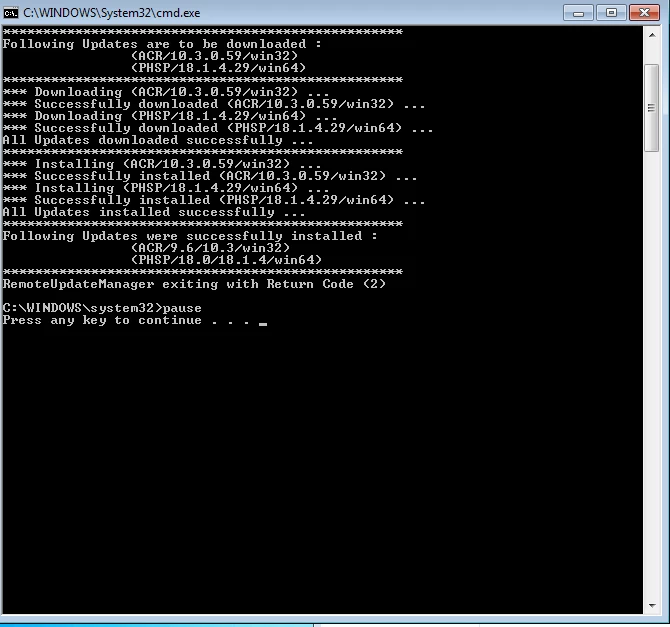
    I worked with Adobe Support and we confirmed that updating the Core Components (or installing the Desktop App) would allow RUM to run correctly.  The only remaining issue is that the Return Codes it gives are incorrect.  Even though it shows that downloads and installs were successful, the Return Code given is for failure.  This wouldn't be good if we are deploying the RUM command syntax via ConfigMgr or any other management tool.

    He was reaching out to engineering to get further answers.  Will update as I know more.

    3 replies

    babeers
    Participating Frequently
    April 25, 2018

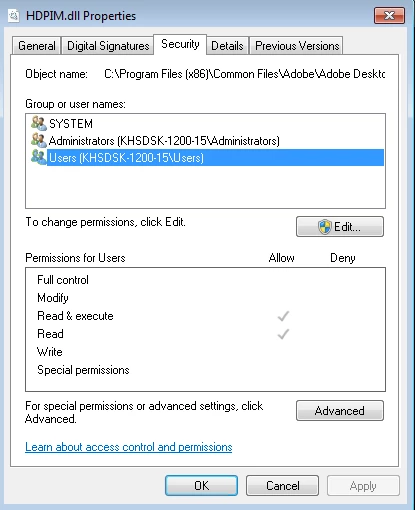
    I may be having a similar issue here. I've deployed CC 2018 Apps this past semester, but I just updated our RUM to the latest. My logs indicate that the updater is looking for DLL files (HDPMI, HDZIP, etc) in "C:\Program Files (x86)\Common Files\Adobe\Adobe Desktop Common\HDBox". This directory does not exist on any of our machines. The required DLL's exist in the following directory though...."C:\Program Files (x86)\Adobe\Adobe Creative Cloud\HDCore".

    Am I missing something here? Do I simply have to copy these files over to a new HDBox directory for this to function properly?

    alisterblack
    Community Manager
    Community Manager
    April 26, 2018

    Hi All,

    There are a few responses in this thread now and we shouldn't assume they are all the same issue. For example you may not all be updating on the same platform or using the same methods (is an internal update server being used for example).

    I ran a successful test on Windows and Mac for the current versions of RUM. This simply tells us that there is not a general issue with RUM.

    Some things to look out for:

    • Make sure RUM is run with elevated privileges
    • Ensure that Adobe apps are all closed on the client machine - try a reboot.
    • When updating RUM follow the advice here: Remote Update Manager update
    • Issues such as 'Failed to initialize the HDPIM module' etc are often solved by installing the current version of the Creative Cloud Desktop App. RUM will not update the Desktop App and there have been mandatory updates to it which will affect the other CC applications.

    Logs can be pasted in here. Alternatively you can open a support case with us and send the logs over to us.

    To contact support please use one of the following options.

    Creative Cloud for Enterprise - from the Admin Console go to the support tab to open a case. Phone and chat options are also available here.

    Creative Cloud for Teams - from the CCT Admin Console go to the Help tab for chat and phone options.

    Alternatively please go to  https://helpx.adobe.com/contact.html

    Inspiring
    April 26, 2018

    I've tried a newer version of RUM and it starts and then stops.  Does it actually NEED to be installed on the machine, or the EXE just needs to be run on the machine?  I've tried the latter.  If it's the former, what is the silent syntax to install this on those machines?

    Thanks.

    Inspiring
    April 25, 2018

    I have the same thing except for Adobe CC 2017.  It fails on most with the default 'Unable to install update.'

    A complete pain since this tool is supposed to make our lives easier but we can't depend on it.

    alisterblack
    Community Manager
    Community Manager
    April 25, 2018

    Hi,

    Is there a code returned ?

    The codes are explained in more detail here: Use Adobe Remote Update Manager

    This could tell us if updates were not installed, for example because the applications were running at the time of use.

    To look at more detail would require the logs.

    The log file is named RemoteUpdateManager.log and is located as follows:

    • In Windows, the log file is in the %temp% location.
    • In Mac OS, the log file is in the folder ~/Library/Logs
    piagetblix
    Inspiring
    April 25, 2018

    Hi

    I'll check the log and get back here this afternoon.

    Thanks