


Known Participant
August 29, 2017
Answered

Adding info to footer of master page

  • August 29, 2017
  • 1 reply
  • 1015 views

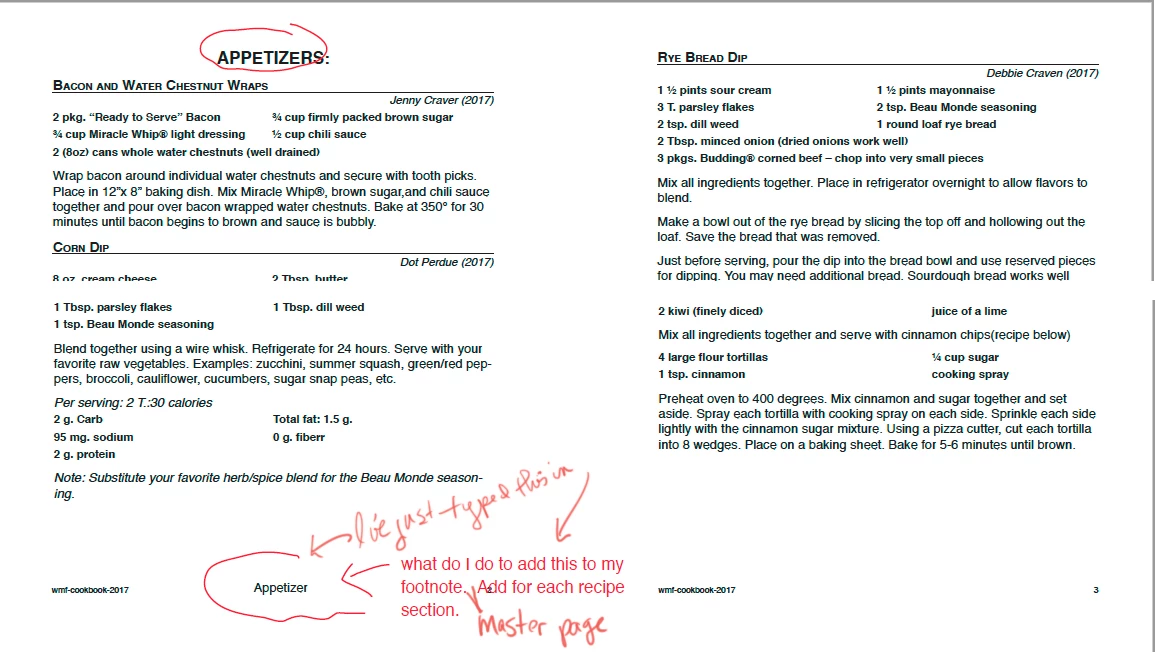
I'm working on a cookbook of recipes.  I want the footer to include the section name for the Recipe section.  Example my sections are beverages, bread, cakes, cookies, meats...etc.   I want the running footer established on the master page to have that info.  I haven't figured out what I need to do. 

I feel sure I have to assign those paragraph style something to get it to do it. 

If some one can help me here I will greatly appreciate it.
This topic has been closed for replies.
Correct answer Obi-wan Kenobi

Variable on master page!

(^/)

1 reply

Obi-wan Kenobi
Obi-wan KenobiCorrect answer
Legend
August 29, 2017

Variable on master page!

(^/)

carreneAuthor
Known Participant
August 29, 2017

Thank you so much....it worked...   Could you tell me how to hide that footer on the blank pages which are intentionally left blank?

Barb Binder
Community Expert
Community Expert
August 29, 2017

Could you tell me how to hide that footer on the blank pages which are intentionally left blank?

Navigate to an TPILB page. Control Shift click on the footer with the Selection tool and delete it. Or make a linked master without the variable and assign it to the TPILB pages.

~Barb at Rocky Mountain Training