


Inspiring
February 9, 2021
Answered

Adjusting line height in table so each cell looks the same

  • February 9, 2021
  • 3 replies
  • 740 views

I have the problem that the content of the cells in my tables will be at different heights. Probably something simple I'm overlooking, but I can't find a solution.


When I mark all cells InDesign shows an option to adjust the text vertically but that does not fix the issue. As you can see in the picture, the table simply looks out of order. Any solutions much appreciated!
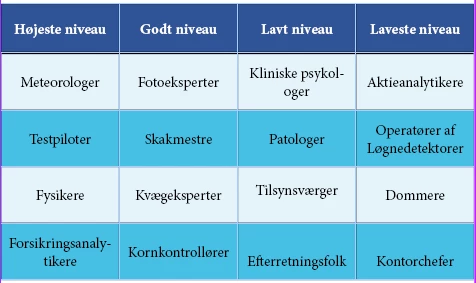


[ attachment inserted as inline image by moderator ]
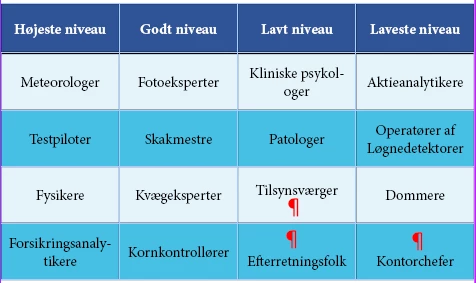


This topic has been closed for replies.
Correct answer Barb Binder

Actually, I think the vertical justification is already set to middle. Instead, I think you have some extra returns that you are contending with. Go to Type > Show Hidden Characters so that you can see them, and then delete them. At that point, you might play with the vertical justification commands: top, middle and bottom and pick your favorite.


~Barb


3 replies

Barb Binder
Community Expert
Community Expert
February 9, 2021

as someone told me: there are many ways to do each thing in InDesign.


So many ways, @simon5CD0! As I tell my students, my job is to know all of them. Your job is to just pick one and stick with it. 😊


~Barb

~Barb at Rocky Mountain Training
Barb Binder
Community Expert
Barb BinderCommunity ExpertCorrect answer
Community Expert
February 9, 2021

Actually, I think the vertical justification is already set to middle. Instead, I think you have some extra returns that you are contending with. Go to Type > Show Hidden Characters so that you can see them, and then delete them. At that point, you might play with the vertical justification commands: top, middle and bottom and pick your favorite.


~Barb


~Barb at Rocky Mountain Training
simon5CD0Author
Inspiring
February 9, 2021

I agree. This was also my diagnosis when I had a second look at it. And I think I had already set it to the center position vertically. I was just a bit confused that I could only make that option show when I selected multiple cells. But now I know where to find the menu - as someone told me: there are many ways to do each thing in InDesign.


Thanks again, your help is always right on point for me!

jmlevy
Community Expert
Community Expert
February 9, 2021

Go to the Cell options panel > Text tab and choose “center ” for the vertical justification