


Inspiring
November 6, 2020
Answered

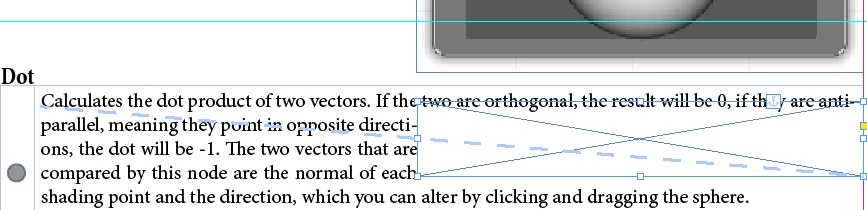
Anchoring an image does not make the first line respect the wrapping text
  • November 6, 2020
  • 6 replies
  • 5209 views


I am trying to insert a blank Frame into my table so I can fake wrap the text inside the table around the image which is in the main frame (there are several tables, as well as an introductory text, so I cannot just insert the image into the table). The blank frame gets ignored by the first line of text. With the other images I put the anchor inside the heading, so it didn't matter, but the is no 0 Line inside the table.

 

Correct answer Frans v.d. Geest

A blank line isn't an option, bc. it's the field of a table that's supposed to be aligned top. If you can man an invisible line or paragraph, please let me know how.


Create a new line and give it 0 pt leading and 0,1 pt size.

6 replies

tlmurray23
Inspiring
September 20, 2024

FrameMaker would let you do it. Just sayin'.

James Gifford—NitroPress
Legend
September 20, 2024

ID and Word probably share more DNA than ID and FM. 🙂


BTW, you're correct as to my venerability — I used all these apps when they were new, and came to them from blueline work. But I don't look back at some wonderful feature ID doesn't have, because for all the usefulness of, say, Ventura's ability to tag independent paragraphs, I wouldn't go back to it for that.

Participant
August 23, 2023

Adobe: Create a new “feature” and sell it as an improvement, but make it so that the first line ignores and a hack is required to make it work. Easier to skip this anchor system and do it the “old fashioned” way. 

Participating Frequently
September 18, 2024

I just had to deal with this for the first time (well... it happened a while back, but I just gave up that time), and I have to say, this makes me sick to my stomach how much we pay for half-a**ed applications like this. Acrobat is unusable now. Photoshop is barely better. Now ID is starting to crumble. How are they able to get away with this?

James Gifford—NitroPress
Legend
September 18, 2024

Text flow has to follow an anchor point. It's just a basic rule of the layout process and not really any flaw or bug or lack of a feature. Sorry you tripped over it.


It's even right in the detailed help for text wrapping —

https://helpx.adobe.com/indesign/using/text-wrap.html


So come on back if you have questions you need answered or help with anything and don't care to read online help and tutorials.. Not much point in logging into a user-to-user forum to make a generic (and largely off-target) complaint when help is just a post away.

Community Expert
January 22, 2021

Hi FrederikSt,

you are right. A point size of 0 is not possible.

0.1 Pt is one option.

Also change the width and height of the text to 1% with character scaling and you are at an effective text size of 0.001 Pt.


Regards,
Uwe Laubender

( ACP )

Frans v.d. Geest
Community Expert
Community Expert
January 22, 2021

Yeah, sorry, 0,1 of course, my bad. But you can scale and/or use baseline shift if needed.

Inspiring
January 15, 2021

How did this answer get marked as correct? I tried it and you can't use 0pt size, you need 0.1 at least, which creates an awkward space above the first line of my table.

Community Expert
November 11, 2020

Hi Frederik,

I think we have to see more of the layout to give better advice.

Also: What should the anchored frame with the text wrap contain?


Regards,
Uwe Laubender

( ACP )

Inspiring
November 12, 2020

Nothing. It should be hidden under the actual image. I can only make the text wrap around an image, or the text in a table, so I insterted a blank frame with the same width into my table to make it wrap. Doesn't wrap with the first line, though.

BobLevine
Community Expert
Community Expert
November 6, 2020

That's how it works. The wrap only applies to the next line and after. Create an empty paragraph above it and anchor it there.

Inspiring
November 6, 2020

Do you mean a blank line? Or can you create an invisible paragraph?

BobLevine
Community Expert
Community Expert
November 6, 2020
Whatever works for you, but you need to get that anchor above the first line you want wrap applied to.