Hi @default8so4bus0pmvq, I've had a try to make a script to do what you describe. I've made it work with your supplied sample file. It is a little bit complex to understand in some places, but hopefully you will be able to see, at least where I have put comments in the code.
There is one important thing that you need to change in your document however: you need to put your text story into the Primary Text Frame. You can set up a Primary Text Frame by going to your master page (the one with the main story sized text frame), selecting it, and then clicking the icon that appears near the top left of the text frame (hover your cursor over the icon to read what it will do). It is very useful to use a Primary Text Frame in this case because it means that when we set the paragraph style "startParagraph" setting to Next Page, it will automatically add pages to accommodate.
Here is the script:
/**
 * Break Document By Paragraph Styles
 * Important requirements:
 *   1. Paragraph Styles should be in a single Story.
 *   2. Story is in the document's Primary Text Frame.
 * @author m1b
 * @discussion https://community.adobe.com/t5/indesign-discussions/automatically-export-pdfs-broken-into-h1-then-h2-then-h3-sections/m-p/13822018
 */
function main() {

    var settings = {
        breakStyleNames: ['Heading 1', 'Heading 2', 'Heading 3'],
        pdfPresetName: '[Press Quality]',
    }

    if (app.documents.length == 0) {
        alert('Please open the master document and try again.');
        return;
    }

    var doc = app.activeDocument,
        path = doc.fullName.fsName,
        paragraphStyles = [];

    // get the paragraph styles
    for (var i = 0; i < settings.breakStyleNames.length; i++) {
        var paragraphStyle = getByName(doc.allParagraphStyles, settings.breakStyleNames[i]);
        if (
            paragraphStyle != undefined
            && paragraphStyle.isValid
        )
            paragraphStyles.push(paragraphStyle);
    }

    // we want document to automatically
    // add extra pages when the text overflows
    doc.textPreferences.addPages = AddPageOptions.END_OF_STORY;

    // for each of the paragraph styles:
    for (var i = 0; i < paragraphStyles.length; i++) {

        var paragraphStyle = paragraphStyles[i];

        // save as new document with style name
        var exportPath = path.replace(/(\.[^\.]+)$/, '_' + paragraphStyle.name + '_##_$1');

        // set current paragraph style to start on next page
        paragraphStyle.startParagraph = StartParagraph.NEXT_PAGE;
        doc.recompose();

        // find the paragraphs
        var found = findParagraphStyle(doc, paragraphStyle);

        // remove blank pages from end of document
        var frames = found[0].parentStory.textContainers;
        for (var j = frames.length - 1; j >= 0; j--)
            if (frames[j].contents == '')
                frames[j].parentPage.remove();

        // save as new document
        doc = doc.save(File(exportPath.replace('_##', '')));

        // get the pages of the found text
        var pages = [];
        for (var f = 0; f < found.length; f++)
            if (found[f].parentTextFrames[0].parentPage.isValid)
                pages.push(found[f].parentTextFrames[0].parentPage);

        if (pages.length == 0)
            continue;

        // for each found page
        for (var p1, p2, p = 1; p <= pages.length; p++) {

            // get the first and last page offset of this range
            p1 = pages[p - 1].documentOffset;
            p2 = (p < pages.length)
                ? p2 = pages[p].documentOffset - 1
                : p2 = doc.pages[-1].documentOffset;

            // convert to a string of page names
            var rangeString = doc.pages.itemByRange(p1, p2).name;

            // export the document
            exportDocumentAsPDF(doc, exportPath.replace('##', ('0' + p).slice(-2)), settings.pdfPresetName, rangeString);

        }

        // remove all text using this style
        for (var f = found.length - 1; f >= 0; f--)
            found[f].remove();

    }

    doc.close(SaveOptions.NO);

}

app.doScript(main, ScriptLanguage.JAVASCRIPT, undefined, UndoModes.ENTIRE_SCRIPT, 'Break Document By Paragraph Styles');


/**
 * Find text set in a paragraph style.
 * @param {Document|Story|TextFrame} findWhere - the object to search.
 * @param {ParagraphStyle} paragraphStyle - the paragraphStyle to search for.
 * @returns {Array<Text>}
 */
function findParagraphStyle(findWhere, paragraphStyle) {

    if (typeof findWhere.findGrep !== 'function')
        return [];

    app.findGrepPreferences = NothingEnum.NOTHING;
    app.changeGrepPreferences = NothingEnum.NOTHING;
    app.findGrepPreferences.appliedParagraphStyle = paragraphStyle;

    return findWhere.findGrep();

}

/**
 * Returns element of things with matching name.
 * @param {Array<any>} things - the things to search through.
 * @param {String} name - the name to match.
 * @returns {any}
 */
function getByName(things, name) {

    for (var i = 0; i < things.length; i++)
        if (things[i].name == name)
            return things[i];

};


/**
 * Export a document as PDF.
 * @param {Document} doc - an Indesign Document.
 * @param {String} exportPath - the path to the exported file.
 * @param {String} pdfExportPreset - the name of the pdf preset to use.
 * @param {String} pageRange - the range of pages to export.
 */
function exportDocumentAsPDF(doc, exportPath, pdfExportPreset, pageRange) {

    app.pdfExportPreferences.pageRange = String(pageRange);

    exportPath = File(String(exportPath).replace(/\.[^\.]+$/, '.pdf'));

    // create the folder if necessary
    if (!exportPath.parent.exists)
        exportPath.parent.create();

    doc.exportFile(
        ExportFormat.pdfType,
        exportPath,
        false,
        pdfExportPreset
    );

};
Here's what I suggest you do.
1. Put a copy of your "master" document into a new folder (I called it "testing").
2. Open that document.
3. Run script.
This is what I get after running the script:
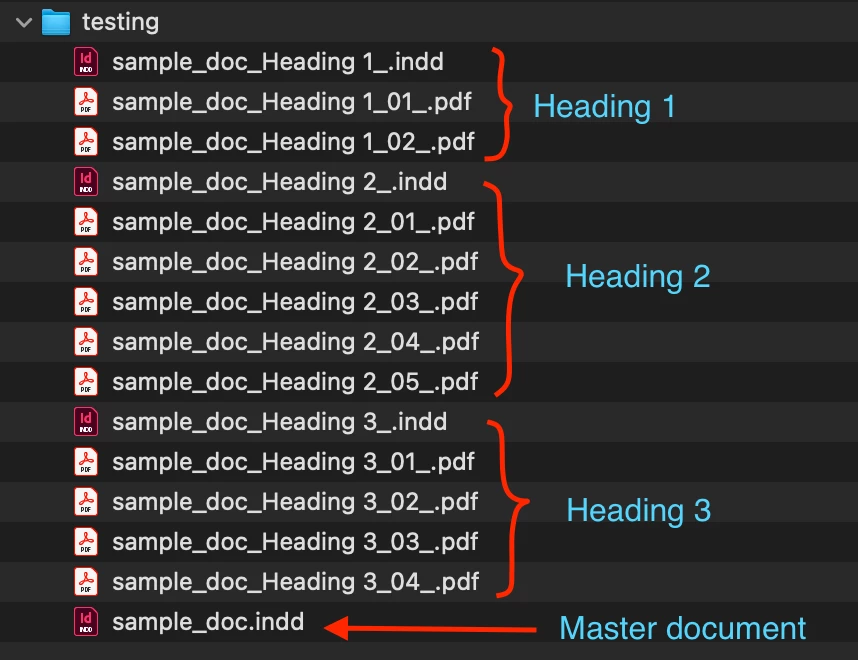
I hope that will get you moving forward with your project. Let me know how it goes.
- Mark
Edit: attached my slightly-modified version of your sample document, so you can see the primary text frame change.
 AdChoices