


Participant
February 6, 2022
Question

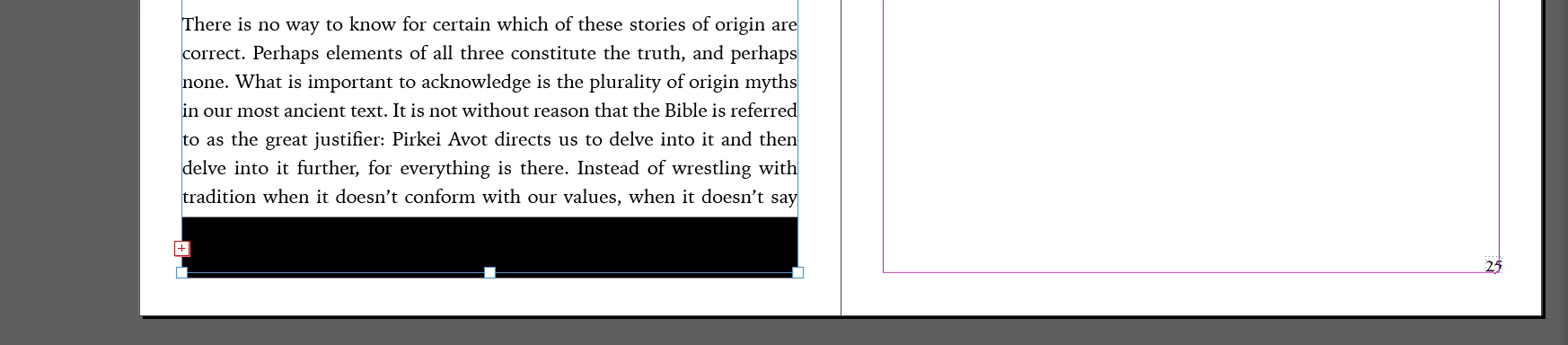
Black Bar suddenly appears in bottom of text boxes, placed word file

  • February 6, 2022
  • 1 reply
  • 2077 views

I placed a microsoft word file into a new indesign document for the purposes of laying out a book. Everything seemed to be fine until a large horizontal black box started to appear at the bottom of each new continued flowing text box, obscuring the text in that area. It moves if i adjust the bottom end point of the text box; I thought at first it would just affect one box and was a glitch to do with the word file. so i simply stretched the text box beyond the page edge to hide it from being on the actual spread... however when i continued creating new text boxes on subsequent pages, this black bar now appears in every one!


For context, this is a brand new 2021 macbook pro running the latest version of indesign. very few items are installed on it yet so i dont think this is a clearing space issue as other posts suggest... nor is it to do with a previous bug that caused vertical black bars to appear when variable font was in use; that bug was fixed on a later indesign release and anyway this black bar is horizontal. 


any insight as so whats going on?
This topic has been closed for replies.

1 reply

Steve Werner
Community Expert
Community Expert
February 6, 2022

You may be importing some Word "junk" by retaining its formatting.


When you place the Word document (File > Place) check the Show Import Options check box.


When you see the Microsoft Word Import Options dialog, in the Formatting section, choose Remove Styles and Formatting from Text and Tables.


Participant
February 6, 2022

Thanks Steve.

However if there are indents, bolded fonts and other time-saving formatting elements that the author of the text had done in word... will those be lost in this case?

also, if i've made some changes already, is there a way for me to check these boxes off for a file thats already been imported? I'd rather not lose the hours of work I already put in 😞

Steve Werner
Community Expert
Community Expert
February 6, 2022

I'm really trying to think of what would cause the addition of a thick rule to the bottom of a text frame. And for the rule to stay attached when you resize that frame.


Just to make sure it's not some kind of document corruption, does this happen if you place the Word file into a new document and then add new pages by continuing the document flow?