rob day
Community Expert
Community Expert
December 24, 2019
Question

Branding Color Guide

  • December 24, 2019
  • 4 replies
  • 11465 views

Recently I’ve been working on a client project that creates branding guides via scripting. Questions about Pantone CMYK and RGB color simulations of the solid inks come up occasionally from users wanting there to be an "official" set of conversion values. There are various conversion charts available on the web—including Pantone’s own Bridge libraries—all of which have color management problems because they usually assume the appearance of RGB and CMYK values is the same for all devices. For the Pantone + Bridge process CMYK simulation libraries Pantone doesn’t provide any information on what the expected press conditions are, and the Bridge CMYK values display inconsistently relative to the more accurate solid ink Lab color display.

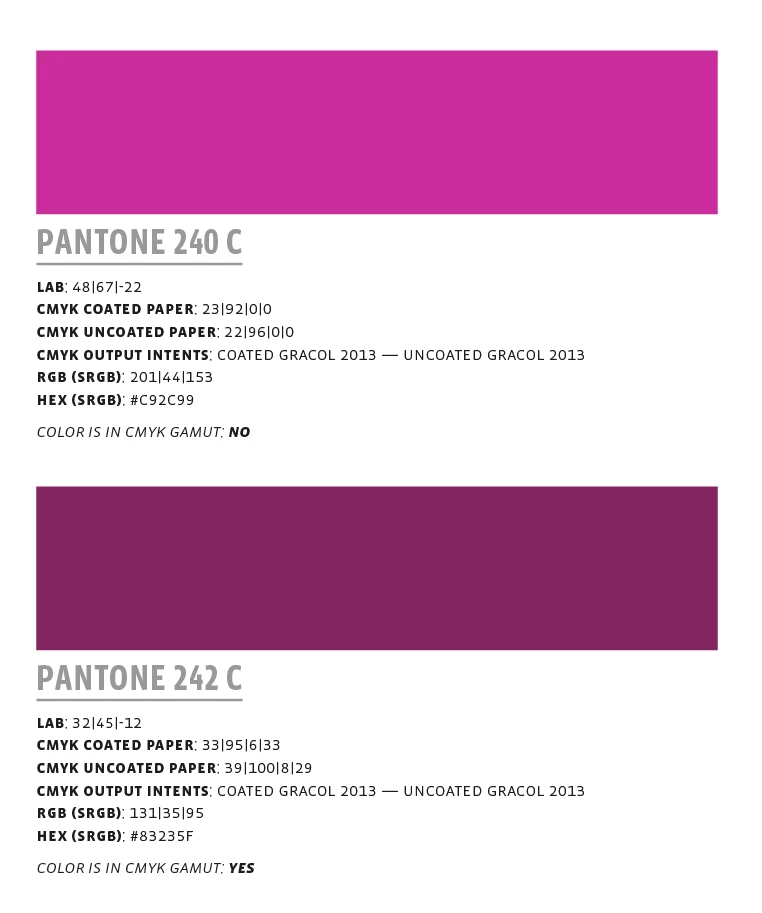
For the scripted guide I have defined the expected CMYK and RGB destinations for the converted values—only Lab defined swatches are addded to the guide. Each swatch label includes two CMYK values—the default conversions are to Coated GRACol 2013 and Uncoated GRACol 2013. There is also a conversion from Lab to sRGB, the sRGB’s HEX value, and a note on whether the solid ink color is outside of the coated CMYK color space’s gamut.

The format is this:
You can download a zip archive of the InDesign Pantone swatch book (2443 colors) along with more detailed notes, the default GRACol 2013 profiles, and the JavaScript here. The guide’s fonts are the Vista Sans family available from Adobe Type—there are also a PDF/X-4 versions for different press conditions:


https://adobe.ly/39gljX4


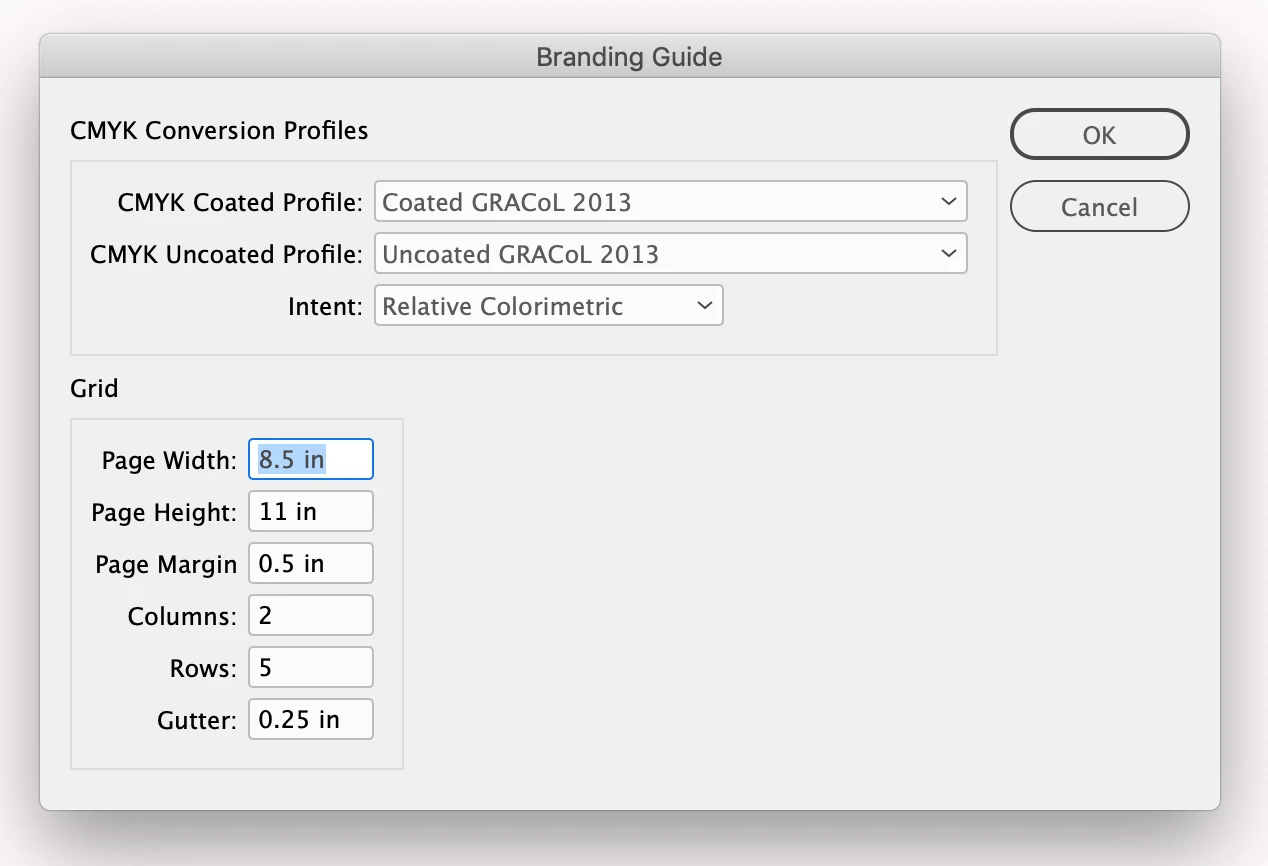
The script dialog


https://adobe.ly/39gljX4

4 replies

rob day
Community Expert
rob dayCommunity ExpertAuthor
Community Expert
September 28, 2020

There was a minor problem that I fixed in the linked script—it should be working in 2020, but I have not tested with Catalina. I also ran the chart using ISO Coated and uncoated, the ID document and PDF are in a new folder named ISO Coated Charts.


The script expects an open front document containing the Lab defined Pantone swatches you want to get conversions for.


Same address:

https://adobe.ly/39gljX4


Jens Trost
Inspiring
September 29, 2020

Thanks rob, it's working now 🙂
Although it's pretty dead slow – around 70 pages/700 swatches took nearly 30 minutes?!
Guess it's a task to run over night with a liberary with over 2000 swatches...

And fyi – you mixed old and new profiles:
new: "PSO coated v3" & "PSO uncoated v3"
OR
old: "ISO coated v2" & "PSO uncoated ISO12647"

rob day
Community Expert
rob dayCommunity ExpertAuthor
Community Expert
September 29, 2020

Yes, you’ll have to run it over night for 2000 swatches. Not sure why but it gets progressively slower, so splitting the swatches up and combining docs would be faster. 

schroef
Inspiring
January 22, 2020

What does this script actually intend to do?

I tried it on a blank document and get the error "There are no user defined swatches in theis document"
Then added a PMS color and stiill got the same error, also added a rectangle with that color. Still i keeps returning the error.

EDIT
i got it, colors need to be added as LAB

rob day
Community Expert
rob dayCommunity ExpertAuthor
Community Expert
January 22, 2020

Yes, if the task is a branding color you would want to start with the device independent Lab color space, and get the process colors from the master Lab color. Starting with an RGB or CMYK swatch would not work because the appearance of those device dependent spaces changes depending on the color profile assignment.


The PANTONE+ Solid libraries have been defined as Lab since CS6, and other solid ink libraries like ANPA, TOYO, HKS, and DIC are  defined as Lab. A solid ink swatch could be a physical reference for the master brand color. One could also use a colorimeter to get a Lab reading from any paint swatch or color object.


If you don’t want to use GRACol, the CMYK conversion profiles can be changed via the variables at the top of the script—the profile names would be case sensitive.

Jens Trost
Inspiring
September 26, 2020

Really neat, Rob!
I'm responsible for the whole prepress/color workflow within our company (agency+offset printing) and curious how you get the values.

If I understand correctly you use the LAB values defined in the PANTONE swatches to do all color conversions?
So
LAB -> CMYK coated/uncoated
LAB -> sRGB -> HEX

How do you identify if a color is within range?


And last question: how would you change the used profile in your script? In Europe we use PSO (un)coated v3 (or resp. the previous ISO coated v2).
If I open the script in Apple's script editor, script editor crashes. Plain text/code editor shows just gibberish. I downloaded the *.scrpt multiple times but I think something is broken here...

schroef
Inspiring
January 21, 2020

Many thanks for all the work done!

Frans v.d. Geest
Community Expert
Community Expert
December 24, 2019

Great! Thanks Rob 🙂