
Inspiring
November 4, 2025
Question

Can't find styles in exported CSS

  • November 4, 2025
  • 1 reply
  • 162 views

I have all the settings turned on to generate CSS, and even provided specific class names for a bunch of styles in my document.


In the files generated by HTML export, they aren't defined. They're not in idGeneratedStyles.css. The names only appear in the HTML files themselves, as:

<p class="Step-A ParaOverride-1">
<p class="Step-1 ParaOverride-1">
 
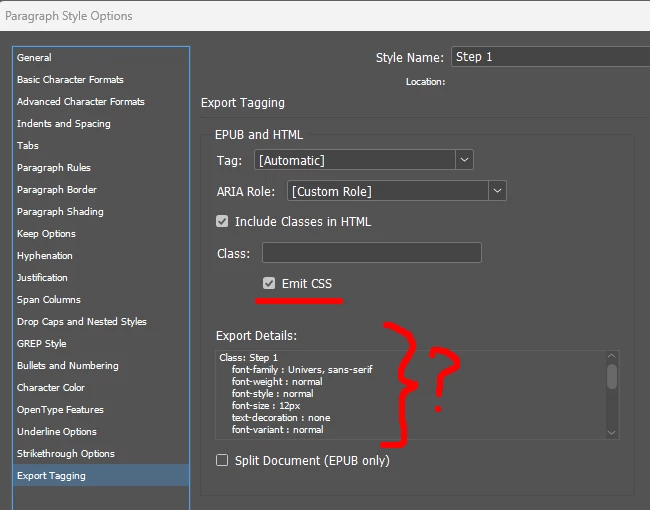
I see no definition of attributes anywhere, any of the stuff you see in the Export Tagging dialog. And heaven forbid this text even be selectable in the dialog. What gives?
 

1 reply

Community Expert
November 5, 2025

I thnk that's how InDesign’s HTML export is working as designed it only outputs CSS for styles that actually change appearance. The “Export Tagging” classes you set are structural, not stylistic, so InDesign just names them in the HTML without generating matching CSS. If you need full style definitions, add real formatting to each style,  maybe try the EPUB, or switch to a plugin like in5, Mag+ or PubCoder for more control.

Inspiring
November 5, 2025

Thanks for the reply. I don't know where you get that idea, though. I have plenty of styles that change appearance. Some apply bold, underline, alignment, indentation, numbering, bullets, text size...


It shows the alleged CSS attributes right there, specifying a font.

Community Expert
November 5, 2025

Hmm sorry about that - I don't know either let me go a bit deeper see if it makes sense.

Well I'm no an epub/or HTML/CSS exporting guy - very rarely do it, so I'm trying to help and maybe some of what I say will point you in a direction.

Lets understand this a bit more


Styles that visibly change appearance aren’t showing up in idGeneratedStyles.css - is this part right?


Does this make sense to you InDesign will only output CSS for styles it recognises as authored paragraph/character/object styles or explicit exported overrides. If formatting is applied as a local override, as part of a nested object, or via features InDesign doesn’t translate to CSS on export, you’ll see class names in the HTML but no matching rules in the generated CSS.... ----> Is this what you're seeing?


If so

Confirm they’re real styles, not local overrides.

Select the text and open the Paragraph/Character Styles panel. If it shows “+” or “Override” next to the style name, click the menu Clear Overrides (or Redefine Style if you want the override baked into the style). Re-export and check idGeneratedStyles.css.


Verify the style actually contains CSS-exportable attributes.

Some features (anchored objects, certain glyph/typographic features, nested bullets, anchored images) don’t always become CSS properties. Try adding a simple, clearly exportable change (e.g., font-size or color) to one style and re-export to see if it appears.


Check Export Tagging vs Exported CSS settings.

Export Tagging assigns class names (structural). Export preferences control whether CSS definitions are written. In the HTML export dialog, ensure “Generate CSS” / “Include Style Definitions” are checked and that “Preserve Local Overrides” is OFF if you want clean style rules.


Look for ParaOverride-* origin.

Those come from local formatting that wasn’t saved into the style. Clearing/redefining the style or removing overrides will remove ParaOverride-* and let InDesign output the canonical style rule.


Try an EPUB export as a test.

Export to EPUB (Fixed or Reflowable) and inspect the CSS inside the EPUB package (OEBPS/Styles). EPUB export often produces more complete CSS rules and can help pinpoint what’s being lost in the HTML export path.

Minimal test file.


Create a tiny test doc: one paragraph style, apply it to text, give it a single property (font-size or color), export HTML. If the rule appears, incrementally add the real formatting from your production doc until something drops it  that reveals the problematic attribute.


If none of the above explains it

You might need to drop a sample indesign file to see what's going on.