"Left hand side on the grid numbers" is 'to the left of the vertical ruler'? Then, have you accustomed yourself to exclusively working in Preview mode?
Preview Mode hides "boxes as if you selected them", whereas the Normal mode always shows them (yes it's actually considered the 'normal' working mode'), and it also hides the colorful hints that InDesign gives you about missing fonts - the pink highlight the other posters refer to. "Not being able to change the colours", though, is unrelated to this, unless you mean you attempted to change the pink warning color to something else.
Look at the difference: Preview mode, no problem in sight. No boxes, no strange blue lines, no mysterious background colors.
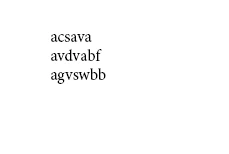
"Normal" mode: ground! pull up!
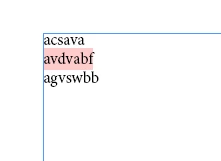
The second line is highlighted to indicate that it is set in a font that is not available. The text will still print and export nicely, but not with the correct font!
The thingy that you happened to click on is Toggle Preview. I'd gladly refer to the online help, but the only description of the toolbox discusses the tools, and forgets to mention the use of the bits and bobs at the very bottom (Use the tools in the InDesign Toolbox ). Well ... this is what it does.
I strongly recommend you to not working (exclusively) in Preview Mode. Yes, that 'normal' view may look cluttered, but it's actually littered with helpful lines, frames, placeholders, hints, errors pointed out to you, and other otherwise invisible stuff that anybody would surely need to create a good looking and technically correct document.
Point in case: without this, you would never have seen that the fonts that you think you are using are actually generic replacement fonts for the missing ones.




 AdChoices