



ytgyuhijiokpl
Participant
January 28, 2026
Answered

Creating guides with fixed row/column sizes.
  • January 28, 2026
  • 3 replies
  • 46 views

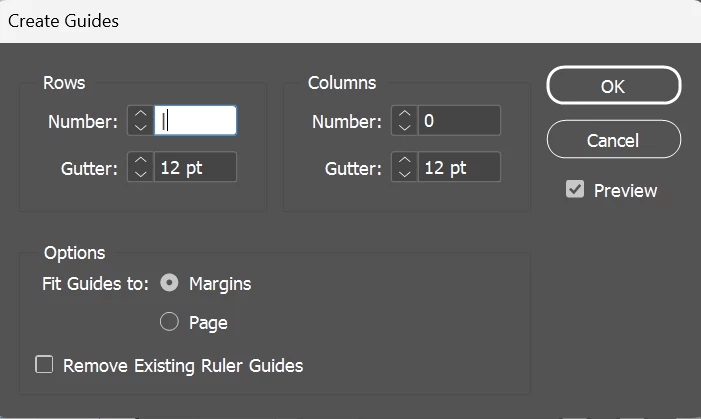
I want to create a guide where the rows have fixed height, in order to align with my baseline grid. However, Layout>Create Guides only gives the option to choose how many rows there are. Is it possible to choose row height?

Correct answer rob day

I want to create a guide where the rows have fixed height, in order to align with my baseline grid


Hi ​@ytgyuhijiokpl , Guide creation can be scripted, so it should be possible to add guides at each baseline grid position on a page via a script.


3 replies

davecourtemanche
Inspiring
January 29, 2026

You can also turn on the Baseline Grid guides: View / Grids & Guides / Show Baseline Grid. Does that not suit your needs?

rob day
Community Expert
rob dayCommunity ExpertCorrect answer
Community Expert
January 29, 2026

I want to create a guide where the rows have fixed height, in order to align with my baseline grid


Hi ​@ytgyuhijiokpl , Guide creation can be scripted, so it should be possible to add guides at each baseline grid position on a page via a script.


rob day
Community Expert
Community Expert
January 29, 2026

Here’s a sample:


var gi = app.activeDocument.gridPreferences.baselineDivision
var ap = app.activeWindow.activePage
var bb = ap.bounds[2]-gi
var st = 0;
if (app.activeDocument.gridPreferences.baselineGridRelativeOption == BaselineGridRelativeOption.TOP_OF_MARGIN_OF_BASELINE_GRID_RELATIVE_OPTION) {
st = ap.marginPreferences.top;
bb = (ap.bounds[2]-ap.marginPreferences.bottom)-gi
}

ap.guides.add(undefined, {orientation:HorizontalOrVertical.horizontal,location:st});
while (st < bb) {
st += gi
ap.guides.add(undefined, {orientation:HorizontalOrVertical.horizontal,location:st});
}


ytgyuhijiokpl
Participant
January 29, 2026

Thank you so much!

Abhishek Rao
Community Manager
Community Manager
January 28, 2026

Hi ​@ytgyuhijiokpl,


I understand how important it is for you to create guides with a fixed row height to match your baseline grid, and I’m sorry that this option isn’t available in InDesign right now. Would you mind submitting this as a feature request on UserVoice here: https://indesign.uservoice.com/forums/601180-adobe-indesign-feature-requests? Adding your use case and comments there will help the team better understand the need and prioritize it accordingly, and you’ll be notified if there are any updates.

Please feel free to reach out if you have more questions in the meantime. I’m happy to help.

Abhishek