



Difference blend mode question
Hello!
First time poster here. I just started doing Adobe InDesign tutorials the other day.
I'm working on this one: https://helpx.adobe.com/indesign/how-to/ebook-cover-design.html?playlist=/services/playlist.helpx/products:SG_INDESIGN_1_1/learn-path:key-techniques/set-header:indesign-projects-more/playlist:topic/en_us.json
I want to create the same blend as seen here in the word "Emerge". I see they selected the "Difference" blend option with 100% opacity, but I tried it and it didn't do what their tutorial shows. I tried messing with the opacity and nothing worked. 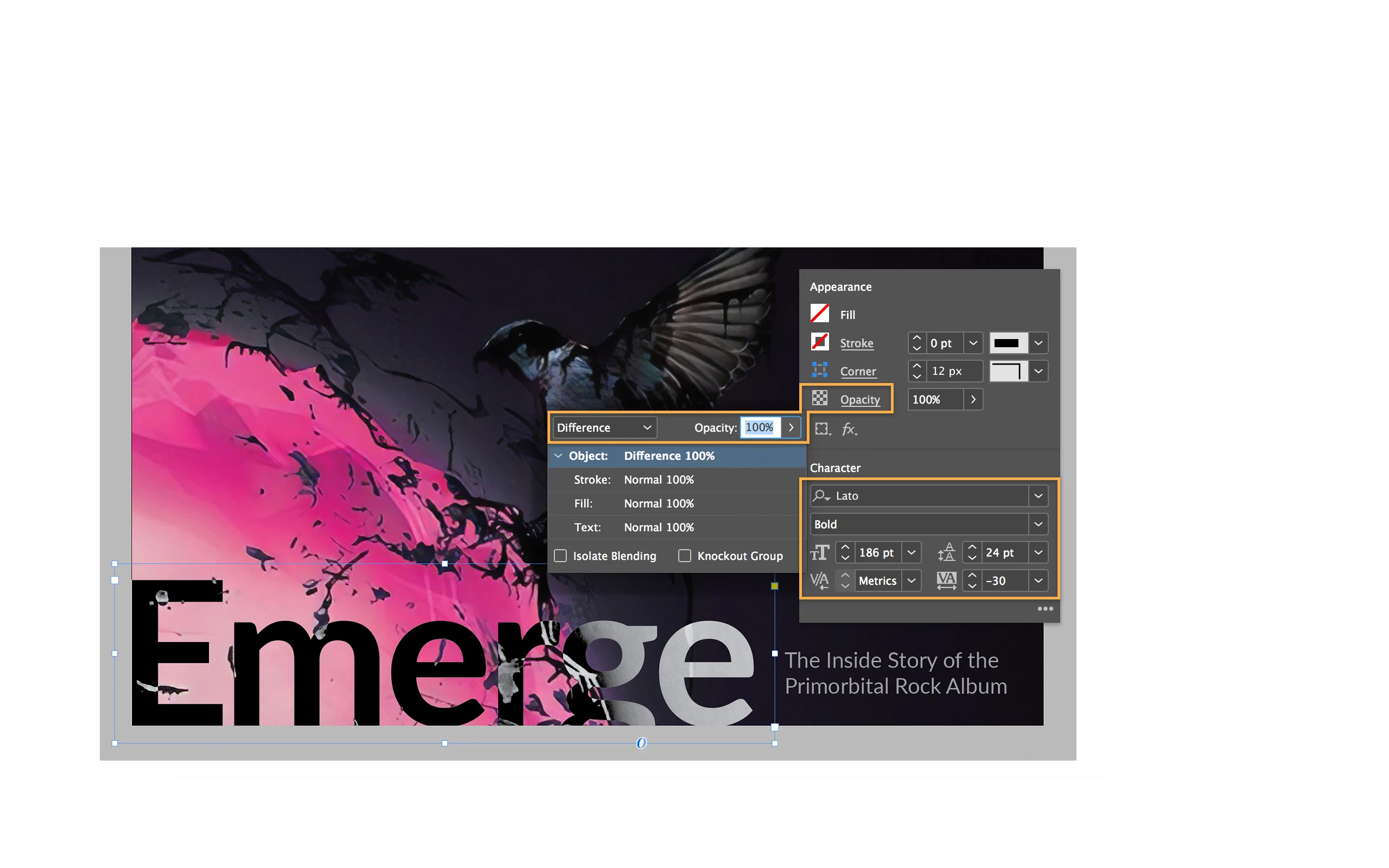
I can't figure out how to make the word look "inverted" or like an X-ray, with the white and black colors inverted.
Attached is a screenshot of what it looks like in the tutorial and how I want it to look.
Any help would be appreciated.
Thanks!
 AdChoices