



Chris Tammar
Participating Frequently
Jan 23, 2024 4:54 PM UTC
Answered

Error when updating share for review link - There Was an Error Updating the Artifact

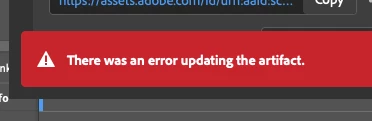
When I go to update a review link in InDesign, I keep getting this error message "there was an error updating the artifact". After that, the link does not work for most people. I am signed in to Adobe. Everything is up-to-date.... But this issue still persists. Can Adobe please fix this issue? It's emarassing when I go to send the review link to my leaders and they just get an error message when they try opening it.
 

<Title renamed by moderator>

Abhishek Rao
Abhishek RaoCorrect answer
Community Manager
Apr 23, 2026 4:16 PM UTC

Hi everyone,


Thanks for your continued patience and for sharing all the detailed findings here. I understand how disruptive this has been, especially when it affects your review workflow.

I wanted to share an update that the issue related to “There was an error updating the artifact” for larger or more complex documents has been fixed in the latest InDesign Prerelease build 21.4.0.49.

Could you please try this latest Prerelease version from Creative Cloud Desktop under the Apps tab and test the Share for Review update workflow again? This will help confirm if the fix resolves the issue in your case.

If you are not part of the Prerelease program, you can join following the links below:
https://blog.developer.adobe.com/how-to-join-creative-cloud-prerelease-programs-ccecc10ae7d3
https://www.adobeprerelease.com/beta/C6DFA254-C40C-4EEB-8F6D-F4AEDA2E6171
https://community.adobe.com/t5/indesign-discussions/invitation-to-indesign-prerelease/td-p/12371924

Once installed, please test and share your observations. If you still notice the issue, let me know with your document details so I can take it further with the team.


Looking forward to your update.

Abhishek


251 replies

Participant
Nov 7, 2025 9:31 AM UTC

I have this bug for several years now, happening randomly.
Now again in v21.0
Sometimes it even kills the app.
Happens with or without unmapped comments (which happen if the object related to the comment is moved outside the visible board)
I'm trying to guess what happens with the background task panel, and it seems to break at 99%. Not sure why it breaks at that moment.
What would be helpful, before a fix is eventually published, would be to display logs in this background task panel.
At least, we could understand what works, and what breaks in our file...
@Abhishek Rao ?

Translate
Participant
Oct 30, 2025 3:17 AM UTC

Getting this issue a lot. I've found if I only have one file open at a time then it doesn't error. Maybe that will help others get around the bug until Adobe gets around to fixing it (seems like its been years and years).

Translate
NOcreationsBE
Known Participant
Oct 30, 2025 4:52 PM UTC

@sungkhum don't bother: I hardly ever have more than one document open in InDesign and I get the error anyway. It is quite random, but usually happens only after multiple updates of the Share for Review file and after that the error usually persists.

Translate
Participating Frequently
Nov 4, 2025 4:04 PM UTC

I am unable to update the content in Share for Review. It keeps giving me an error message: There was an error updating the artifact.

Also, it says that I last updated 4 days ago. So it is not pushing the updated content to the cloud.


I have tried closing the application and restarting. 


I am on OS 15.5 and the latest Indesign 2026.


Translate
Abhishek Rao
Community Manager
Community Manager
Oct 14, 2025 4:53 PM UTC

Hi everyone,


Thanks for your continued patience while we looked into this. I checked with the product team, and they've tested multiple files (including those shared by some of you) but weren’t able to reproduce the issue on their end, even after several tries. It seems to be intermittent, and in many cases, retrying the Update Content option works successfully on subsequent attempts.

The team also noticed in one of the shared recordings that unmapped comments were present, which might be contributing to the error. They're reviewing this further, but for now, please try updating the content again and let us know if it works. If the error persists, kindly check if you notice any unmapped comments and share your observations so we can dig deeper.


Looking forward to your updates.

Abhishek

Translate
NOcreationsBE
Known Participant
Oct 14, 2025 5:06 PM UTC

@Abhishek Rao we already established that this error is not related to unmapped comments. See my comment on July 31 2024. 

Translate
Abhishek Rao
Community Manager
Community Manager
May 19, 2025 11:30 AM UTC

Hello everyone,


Thanks for sharing the details. I've escalated this to the product team, and they are currently investigating the issue. I'll keep you posted and share an update as soon as I hear back.


Thanks for your patience. 

Abhishek

Translate
SteveU65
Participating Frequently
Oct 11, 2025 10:37 AM UTC

Seems to me havign experienced this issue on a regular basis and having read the Adobe replies where they test user documents and cannot replicate the error... HAVE they thought of leaving the Adobe building and Intranet and tried testing it as if they were a subscriber and not an Adobe employee - maybe then it might be reproducible?

2020 - 2025 and it still happens to many, many users it is an ADOBE end issue not the users as this period will cover mulititudes of hardware, software versions etc. BUT all into the same Adobe network so the common factor is...

Translate
NOcreationsBE
Known Participant
Oct 11, 2025 7:41 PM UTC

Exactly what I was thinking @SteveU65! It happens so often that they say they cannot reproduce the problem/error, also with other issues, while seemingly every user outside Adobe is experiencing the same issue on multiple platforms and multiple versions. How do they work??

Translate
Participating Frequently
May 16, 2025 4:06 PM UTC

Yes, we're all still getting these errors, we're just tired of reporting them. The links typically do work (not always) even when the error is present which took me a long time to figure out. If you do a lot of back and forth edits with clients on a particular document though, you will eventually have to create a new share since it will stop working. This sucks because it erases all of your history. 

Translate
Participating Frequently
May 16, 2025 4:29 PM UTC

Also, "It probably updated correctly even though it says it didn't" just doesn't cut it when you're sharing complicated documents for review and final approval.

Translate
NOcreationsBE
Known Participant
May 16, 2025 7:30 PM UTC

@tom_cog, I completely understand! You can't check 100+ updates in large or complicated documents when you are working with deadlines. The only thing I can tell you, is that I never noticed any changes not updating, even after getting the error. You just have to refresh the page or come back a little later (and refresh the page). It is not a guarantee, but maybe a minor assurance if you have no choice but to work this way and no time to check all upates online.


  • I would love to hear from others if they ever experienced that a change in the document was not visible after updating the online version, getting the error message and refreshing the page.
Translate
Abhishek Rao
Community Manager
Community Manager
May 16, 2025 9:21 AM UTC

Hi Henrik Engedal Nissen, 


I'm really sorry to hear that you're still experiencing this issue. I completely understand how frustrating this must be.

To help us investigate further and report this to the product team, could you please share the following:

 - A screen recording of the issue you're encountering on version 20.3.1. 

 - A sample InDesign file where this problem occurs.

This will help us reproduce the issue on our end and work toward a resolution more efficiently.


Thanks so much for your patience and cooperation, I really appreciate it!

Abhishek 


Translate
Henrik Engedal Nissen
Known Participant
May 16, 2025 9:56 AM UTC

The screenshot is exactly the same as several people have posted in the thread already.

It's just a normal indesign file with text and images like most indesign files.

Translate
Abhishek Rao
Community Manager
Community Manager
May 16, 2025 10:43 AM UTC

Hi @Henrik Engedal Nissen,


Thanks for the update. Could you confirm if this issue happens consistently every time you try to update the Share for Review link, or is it more random and intermittent? 

I know it might feel repetitive, but any extra detail you can share helps us bring more clarity to the product team. I'm here and following up with them closely, so please feel free to share whatever you observe.


Looking forward to hearing from you.

Abhishek

Translate
Henrik Engedal Nissen
Known Participant
May 15, 2025 10:20 AM UTC

I have exactly this error. Is there still no solution? 


MAC OS 15.4.1

Indesign 20.3.1

Translate
Participating Frequently
May 15, 2025 5:02 PM UTC

I think it's fair to say that Adobe is not concerned with this problem and is not working to fix it.

It's simply not possible that a company with Adobe's resources would be unable to fix a bug in its software over this length of time if they were actually trying.

About a year ago, some dude from Adobe popped in to say, "Well it just worked for us so are you SURE it's actually happening and also maybe you're all just doing it wrong" then disappeared back into the mist...never to be heard from again.

This suggests to me that Adobe does not even officially recognize the issue, isn't tracking it, and certainly isn't trying to fix it.

Adobe made like $5.5 billion (with a b) in profit last year. Which is apparently not quite enough profit to devote any more of it to making its products work correctly.

But please, keep using that cash to develop more tools to put artists and designers out of work.

I just paid for the full Affinity suite, and will transition away from Adobe as quickly as possible. I recommend anyone who can avoid using Adobe products, do so, until they realize they have to actually provide value for the money they collect (rather than rely on lack of other viable options).

https://affinity.serif.com/en-us/

Oh, for fun, here's *another bug* related to this apparently totally unimportant feature (screenshot attached).

Translate
Participating Frequently
May 15, 2025 5:03 PM UTC

Oh and also...

Translate
Participant
Mar 24, 2025 9:14 PM UTC

In case this helps anyone else: I get this error when I update the content before saving the file. Once I save the file, it seems to update the content automatically. I got the error, saved my file and jumped online to figure out a solve. I found this thread, gave up and went back to my file and was about to try one more time when I noticed it said 'Updated 3 minutes ago' (while I was looking for answers). I tried this a few times and the same thing happened. 

Translate
NOcreationsBE
Known Participant
Mar 24, 2025 9:50 PM UTC

@lydiao2438454Interesting, I thought I always saved before updating, but I am not sure. I am going to try that out!

Translate
Participant
Feb 17, 2025 1:36 PM UTC

Is there any solution for this? I just tried this reveiw feature for the first time and - bam - it doesn't work.

I get the Artifact Error as well.


Indesign 20.1 x64


I mean, isn't this a core functionality that teams rely on? 

Or how do you out there let others review the current state of documents?

Translate
Participating Frequently
Feb 18, 2025 4:31 PM UTC

And it's an actual problem (you listening, Adobe?) because it's not feasible, or even possible, in most settings to send around native InDesign files for others to review. PDF is the way to go. Y'all invented the damned format, yet you can't figure out how to properly handle them now?

Look, if you're simply never going to fix this feature just remove it. Stop being a bunch of jerks about it.

Sure, we'll have to get accustomed to exporting PDFs and sharing them via other methods, but at least we'll have a reliable process folks can get accustomed to.

Translate
NOcreationsBE
Known Participant
Feb 19, 2025 11:32 AM UTC

@tom_cog I understand your frustration (let's hope Adobe will have more meaningful competition in the near future)! In the meantime, would you check to see if it works despite the error message? Because I noticed that the document actually always updates, just a little later sometimes. If a customer does not see the update, it is often because they react very quickly. Refreshing the screen usually helps so far.

Translate
Participating Frequently
Jan 31, 2025 8:36 PM UTC

This is STILL broken.

Translate
Participating Frequently
Feb 3, 2025 4:53 PM UTC

Yeah, but you can ask Photoshop to put a santa hat on a photo of a chipmunk!

So cute!

Translate