
Known Participant
November 15, 2025
Question

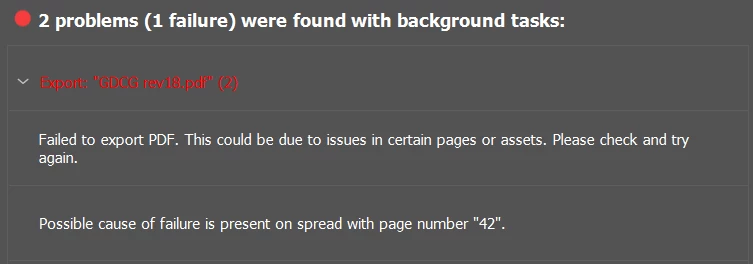
Exporting gives error and fails.

  • November 15, 2025
  • 2 replies
  • 186 views

Sad that I can't get this document to create a PDF today.  What could be the possible issue? 

Worked through other suggestions and from here the solutions is to copy over all pages to a new file and try again?  Is this a serious solution?  
 

2 replies

Peter Spier
Community Expert
Community Expert
November 16, 2025

Have you examined page 42? Are you able to export that page alone? Can you export pages 1-41? 43-?

MaradrXAuthor
Known Participant
November 16, 2025

Yes, and went back to previous versions to test what was wrong.  Since this software is remedial at best, I have been saving a new version every few days and just reverted back to the previous from 5 days ago that doesn't give issues.  

Peter Spier
Community Expert
Community Expert
November 16, 2025

Your answers to my questions are unclear. Were you able to do the exports I asked about successfully?

You say you reverted to an earlier version. What changes had you made since then up to the point where export failed? Any on the spread metioned in the error message?

Community Expert
November 16, 2025


In terms of the serious solution question yes, if you start a new document with the same page size, margins, etc., you can use the Move Tool from the Pages Panel and select the new document as the target. This works for some things, but not always.


Another thing is - maybe just restarting InDesign - or rebooting your computer can free up resources without any major cleanup of files etc. necessary. It might work after trying this, it might not.


Your other option is to try File>Export and IDML (first thing I'd try) see if opening that and resave as a new name solves the issue (try export after saving as a new file).


If the issue continues

Duplicate your document (always test on a copy)

Divide and Conquer

  • Try exporting half the pages, then export the other half.
  • If one half fails but the other succeeds, keep splitting the failing half in two and export each section.
  • If both halves fail, start by exporting page ranges say 1-20 at the start and 230-250 at the end for example, then keep dividing until you isolate the problem pages.
  • Once you’ve found the troublesome page(s), try exporting them on their own.
  • If they don’t export, remove elements one by one  text frames, images, shapes, or anything unusual  and test the export after each removal.

Whatever element allows the export to succeed is your culprit.

This sounds long, but the process goes surprisingly fast.

MaradrXAuthor
Known Participant
November 16, 2025

No way I want to go through moving from one to the next.  I've been saving new versions and doing daily restarts as well, as I don't trust this software tool at all, so reverting back one version and going forward was easier especially since I got an AI tool to sift through the changes.  
Thanks on the IDML, I'll give that a go as the basic first step.  

Community Expert
November 16, 2025

No idea what is going on in your file or why it is acting up for you. I was only offering the approaches that usually work for people when InDesign decides to have one of its moods.


In my twenty five years on this software I very rarely need to use any of these fixes. Most documents export without drama. When they do not, the steps I mentioned are the quickest way to pin down the culprit.


All I can do is point you toward what has been proven to work. If something is wrong in the file, these methods will reveal it.


Hopefully the IDML route sorts it out for you, because that is always the first thing I try before getting into the heavier detective work.