m1b
Community Expert
Community Expert
December 5, 2023
Answered

[ExtendScript] How to use "afterNew" event

  • December 5, 2023
  • 7 replies
  • 3352 views

Hi all, I'm trying to run some ExtendScript code when the user creates a new document but I'm not getting it to work. I've probably made a basic mistake, which someone can point out, but otherwise, could anyone test my script on their system?


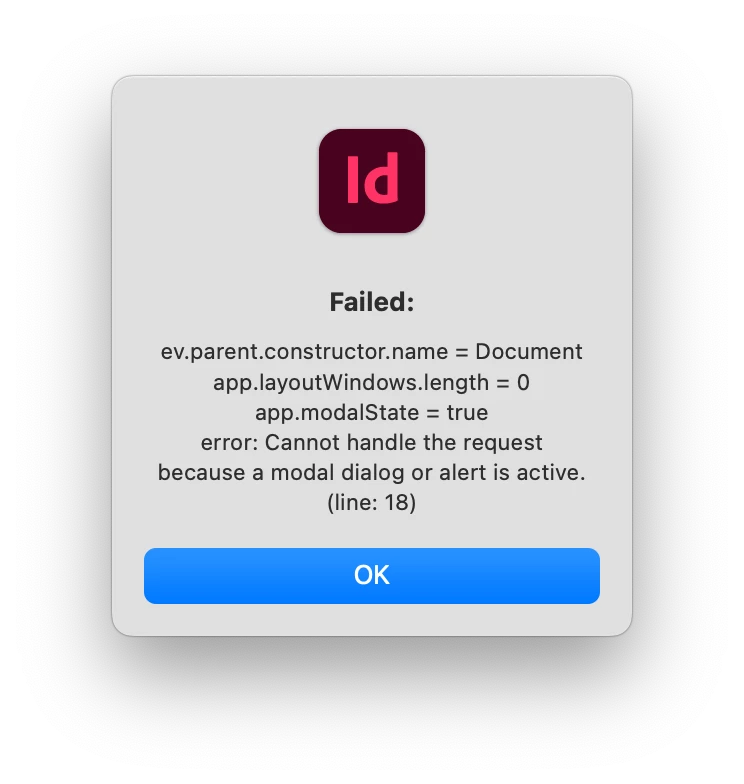
I expect it to name the first Layer "TEST" but for me it throws an error (which the script handles and displays in an alert).


I'm using Indesign 19.0.1 and MacOS 14.1.2.


Here is my test case, whch I run from the Startup Scripts folder:


//@targetengine "test"

if (app.eventListeners.item("afterNew").isValid)
    app.eventListeners.item("afterNew").remove();

app.eventListeners.add("afterNew", myHandler);

function myHandler(ev) {

    var messages = [
        'ev.parent.constructor.name = ' + ev.parent.constructor.name,
        'app.layoutWindows.length = ' + app.layoutWindows.length,
        'app.modalState = ' + app.modalState,
    ];

    try {
        // do something to the DOM
        ev.parent.layers[0].name = 'TEST';
        messages.unshift('Success');
    }
    catch (error) {
        messages.unshift('Failed:');
        messages.push('error: ' + error.message + ' (line: ' + error.line + ')');
    }
    finally {
        alert(messages.join('\n'));
    }

};


This is what I see every time I create a new document:
Thanks in advance.

- Mark


Edit 2023-12-05: added an alert even if the test was successful, added screenshot.
This topic has been closed for replies.
Correct answer Marc Autret

Hi Mark,


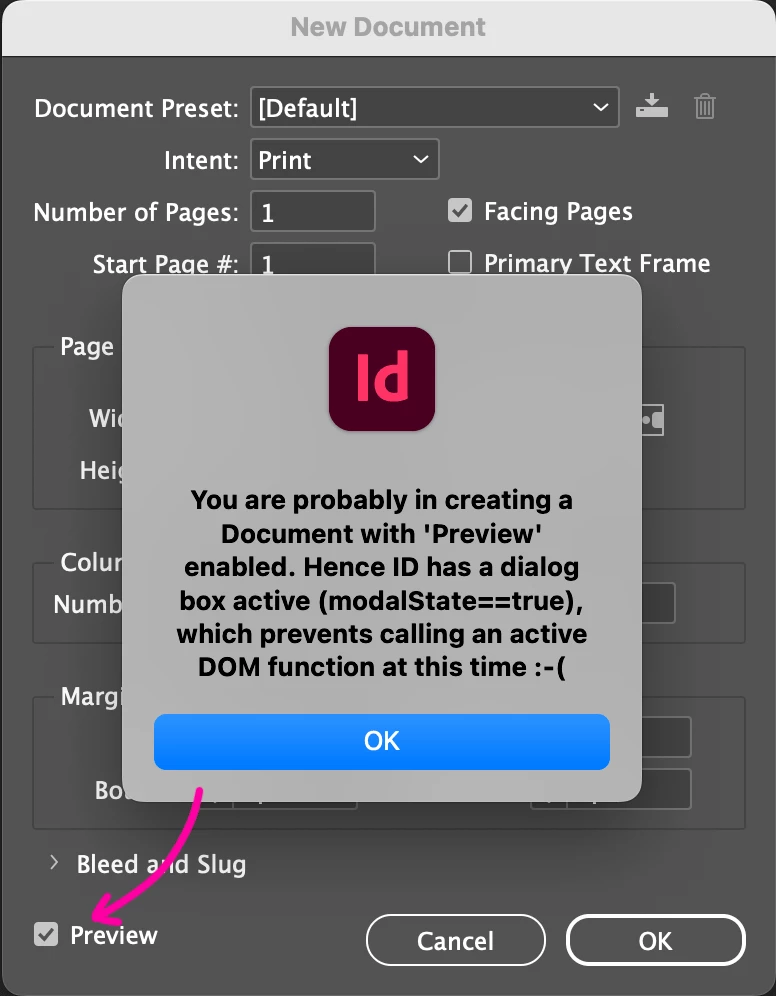
Since afterNew is triggered whenever a document is created, it can occur in various circumstances including when a modal dialog is active, due e.g. to the Preview checkbox of the New document dialog. (Maybe this also occurs under other conditions…)


The script below helps clarify this.


//----------------------------------
// TEST AFTER_NEW
// [REM] This script does not require a persistent engine,
// run it once to install the event handler.
//----------------------------------

(function(/*any*/ev,  doc,msg,ff,t)
{
   if( !(ev||0).isValid )
   {
      // Install the event listener (if not yet installed!)
      // ---
      const UID = 'myAfterNewHandler';
      (ff=File($.fileName)).exists
      && !((t=app.eventListeners).itemByName(UID)).isValid
      && ((t.add('afterNew',ff)).name=UID);
      return;
   }

   // Checkpoint.
   // ---
   if( 'afterNew' != ev.eventType ) return; // Make sure this is the right event.
   doc = ev.target||0;
   if( 'Document' != doc.constructor.name ) return; // Make sure you're targeting a Doc.

   // Process.
   // ---
   if( app.modalState )
   {
      msg = "You are probably in creating a Document with 'Preview' enabled. "
      + "Hence ID has a dialog box active (modalState==true), which prevents "
      + "calling an active DOM function at this time :-(";
   }
   else
   {
      try
      {
         doc.layers[0].name = 'TEST';
         msg = "Worked fine."
      }
      catch(e)
      {
         msg = "An error occured:\r" + e.message + " [" + e.line + "]";
      }
   }

   alert( msg );

})($.global.evt);


The crucial parameter is app.modalState. As expressed in the original error message you've encountered, you can't send an active DOM command when a modal window is active. That's is a golden rule of the scripting system. Depending on how the New document box is used, the app might be in “modal state” at the exact moment the document is generated. In particular, this happens when the Preview checkbox is turned on, making a document being created in the background (afterNew is fired then).


Apart from these situations, the script seems to work as expected in both macOS and Windows. The behavior of InDesign is consistent. I also observed that the document may be created (and the event notified) even before the "New document" dialog is opened, in which case it does not yet have an associated LayoutWindow. (But this is not an obstacle to renaming a layer)


Anyway, that background document remains an annoying problem when you want to achieve an afterNew handler that sends DOM commands. I haven't studied the issue further but I guess we may have to target another event…


Best,

Marc

7 replies

Robert at ID-Tasker
Legend
December 8, 2023

Out of curiosity - what exactly do you want / need to do AFTER a new document has been created? 


There is always more than one way to skin the cat... 


m1b
Community Expert
m1bCommunity ExpertAuthor
Community Expert
December 10, 2023

Robert, the goal was to perform a DOM operation (specifically. one that isn't allowed when a modal window is present) on new documents.

Robert at ID-Tasker
Legend
December 10, 2023

What kind? Does it have to be executed immediately? 


Marc Autret
Marc AutretCorrect answer
Legend
December 7, 2023

Hi Mark,


Since afterNew is triggered whenever a document is created, it can occur in various circumstances including when a modal dialog is active, due e.g. to the Preview checkbox of the New document dialog. (Maybe this also occurs under other conditions…)


The script below helps clarify this.


//----------------------------------
// TEST AFTER_NEW
// [REM] This script does not require a persistent engine,
// run it once to install the event handler.
//----------------------------------

(function(/*any*/ev,  doc,msg,ff,t)
{
   if( !(ev||0).isValid )
   {
      // Install the event listener (if not yet installed!)
      // ---
      const UID = 'myAfterNewHandler';
      (ff=File($.fileName)).exists
      && !((t=app.eventListeners).itemByName(UID)).isValid
      && ((t.add('afterNew',ff)).name=UID);
      return;
   }

   // Checkpoint.
   // ---
   if( 'afterNew' != ev.eventType ) return; // Make sure this is the right event.
   doc = ev.target||0;
   if( 'Document' != doc.constructor.name ) return; // Make sure you're targeting a Doc.

   // Process.
   // ---
   if( app.modalState )
   {
      msg = "You are probably in creating a Document with 'Preview' enabled. "
      + "Hence ID has a dialog box active (modalState==true), which prevents "
      + "calling an active DOM function at this time :-(";
   }
   else
   {
      try
      {
         doc.layers[0].name = 'TEST';
         msg = "Worked fine."
      }
      catch(e)
      {
         msg = "An error occured:\r" + e.message + " [" + e.line + "]";
      }
   }

   alert( msg );

})($.global.evt);


The crucial parameter is app.modalState. As expressed in the original error message you've encountered, you can't send an active DOM command when a modal window is active. That's is a golden rule of the scripting system. Depending on how the New document box is used, the app might be in “modal state” at the exact moment the document is generated. In particular, this happens when the Preview checkbox is turned on, making a document being created in the background (afterNew is fired then).


Apart from these situations, the script seems to work as expected in both macOS and Windows. The behavior of InDesign is consistent. I also observed that the document may be created (and the event notified) even before the "New document" dialog is opened, in which case it does not yet have an associated LayoutWindow. (But this is not an obstacle to renaming a layer)


Anyway, that background document remains an annoying problem when you want to achieve an afterNew handler that sends DOM commands. I haven't studied the issue further but I guess we may have to target another event…


Best,

Marc

m1b
Community Expert
m1bCommunity ExpertAuthor
Community Expert
December 7, 2023

This is terrific, Marc, thanks for taking the time to put together the demo script which is instructive and fascinating.


I had no inkling of $.global.evt and couldn't find it in the docs. What is it? The single active event of any type?


You've also shown me that you can pass a File to the app.eventlisteners.add method! It is documented but I've never noticed. Is that the reason that a persistent engine is not required? Amazing.


One strange thing: both myself and @sttk3 shows app.modalState == true even when the script succeeds without the modal dialog error. Edit: to report further, I had to remove the app.modalState == true conditional and code in your demo script or the test never succeeded (except in a single case of invoking the legacy New Document Dialog for which Preview checkbox was already checked—this is what you referred to: that the document is created before the modal dialog)


As for a workaround to the problems, would it be reasonable to continue the DOM-modifying code in an IdleTask that removes itself after performing once? EDIT: after trying this out, it seems that adding an IdleTask triggers the same modal state error. 😞


Thanks again for your help, it's much appreciated.

- Mark

rob day
Community Expert
Community Expert
December 8, 2023

Hi Mark, I was going to post an idle task example that seems to work but haven't had a the chance to test in different situations.  What did you set the sleep parameter to? My quick test failed with 10ms, but worked with 100ms.

Legend
December 6, 2023

Tried with InDesign 19.0.1 and macOS 12.6.7.


It always succeeds when in the legacy new document  dialog. New format new document dialog causes errors. Even when it succeeds, the modalState is true, and it seems to be executed before it finishes creating the document.


m1b
Community Expert
m1bCommunity ExpertAuthor
Community Expert
December 7, 2023

Yes @sttk3, this is the salient feature for me! I was using the "new" New Document Dialog. When I switch to the "legacy" New Document Dialog (which I now notice that @rob day is using) I get success like you did. Well that sheds some light on the problem. Thanks very much.

- Mark

rob day
Community Expert
Community Expert
December 5, 2023

Hi Mark, I haven‘t had a chance to test your code, but this works for me with CC2021 on Mojave directly from VSC:


#targetengine "namelayer"

var an = app.eventListeners.add("afterNew", setLayer);

function setLayer(e){
    var d = e.parent;
    e.parent.layers[0].name = 'TEST';
    an.remove()
    alert("Hello\r" + d.name + "\r" + d.layers[0].name)
}


Others have suggested that you don’t need a #targetengine line, but I always include one when using event listeners—not sure if that might be your problem?


m1b
Community Expert
m1bCommunity ExpertAuthor
Community Expert
December 5, 2023

Thanks for the test @rob day. Here's what I get, from VSCode:

Oh well. I'm hoping someone will be able to test using Indesign 19.0.1 and MacOS 14.1.2.

I still don't know if it's a new bug/incompatibility or something particular to my setup. Thanks for helping.

- Mark

Robert at ID-Tasker
Legend
December 5, 2023

You are on Sonoma, right? 


m1b
Community Expert
m1bCommunity ExpertAuthor
Community Expert
December 5, 2023

Yep.

Robert at ID-Tasker
Legend
December 5, 2023

So maybe another incompatibility? 


Peter Kahrel
Community Expert
Community Expert
December 5, 2023

I get the same result as Kas, Mark. Works fine (Windows 10, ID 19.0.1)

Kasyan Servetsky
Legend
December 5, 2023

Hi Mark,

I tested it on Windows 10, in InDesign 18.4 and 19.0.  It works as expected: without any errors.

In the catch block, besides the error message, I recommend you to include the error line to know where exactly the error occurs:

catch(err) {
	alert("Something went wrong: " + err.message + ", line: " + err.line);
}

— Kas

m1b
Community Expert
m1bCommunity ExpertAuthor
Community Expert
December 5, 2023

Thanks Kasyan, that's good to know it works on Windows, so it's probably not my technique.

Maybe it's a MacOS issue ( @rob day? ).

- Mark


P.S. Kasyan, I agree with you about adding the error.line—very useful!—but in the case there is only one line! 🙂

Kasyan Servetsky
Legend
December 5, 2023

I see a comma after the last element in the messages array: after app.modalState. I think that's a mistake.

— Kas