



Extra spaces between words after applying a text wrap.
I am attempting to apply a text wrap to an image inside a text frame. When the text wrap is not applied the text looks and acts normal. However, as soon as I apply the text wrap to the image, the words obey the text wrap, but develop weird extra spaces between some of the words. When I attempt to erase these spaces the cursor only recognizes one space between each word, even though the gap is visually much larger.
Here is a screen-shot for visual aid:

As you can see, the highlighted areas appear to be 2 or more spaces wide, even though there is only one space character present.
Here are the text wrap settings:
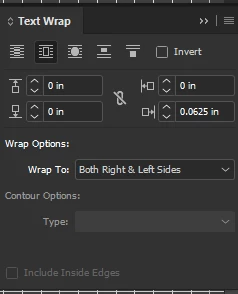
I currently have the text wrap set to bounding box, changing it to object shape changes where the extra gaps appear but does not solve the problem. I have changed the settings in every way that still allows the text wrap to do what I want and nothing fixes the problem. Please keep your answers as novice-friendly as possible. I use Indesign often and I am familiar with the aspects I use but I am by no means an expert.
Please and thank you!
-Hanna

 AdChoices