Participant
December 13, 2024
Answered

Find/Change Color doesn't find BLACK on text

  • December 13, 2024
  • 3 replies
  • 335 views

Hi,

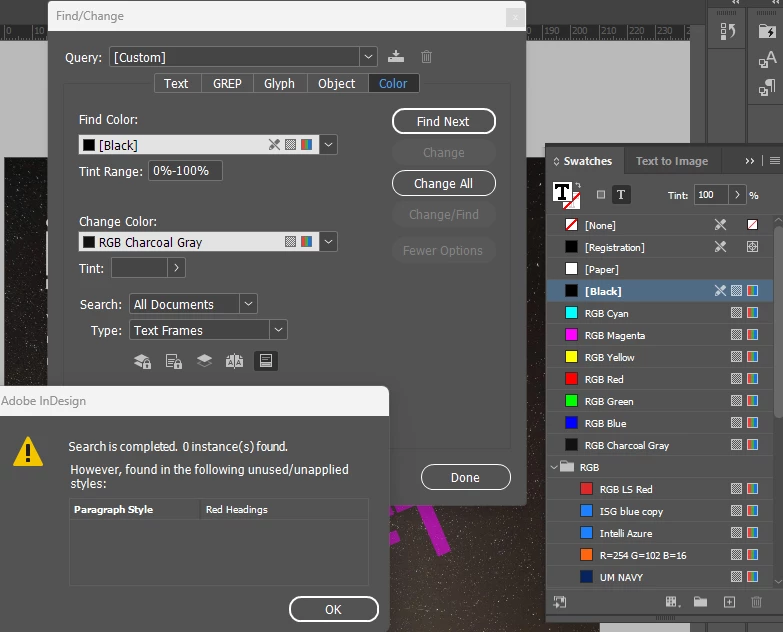
The text in my document in the standard BLACK and I want to change to another color.

I have over 30 pages of text in the standar BLACK but the Find/Change tool does not find it. I have made sure nothing is selected.
Any help?

Thanks
This topic has been closed for replies.
Correct answer Eugene Tyson

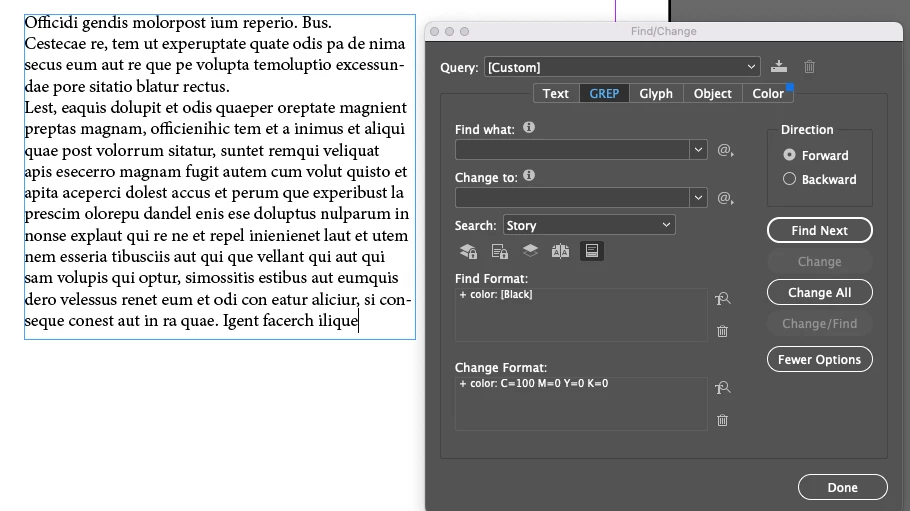
 You need to Find Format - not frame

It's look for a text frame with fill colour

You need to find the text


use the Text find or GREP find


Like this


As you can see I have never touched that Color tab it still has blue dot on it 😄

and it's InDesign 2022 😄 😄


3 replies

Robert at ID-Tasker
Legend
December 13, 2024

@chloe_9734


In the Type, you've selected "Text Frames" - it's not the same as "text".


Text Frame is a graphic object. 


Eugene TysonCommunity ExpertCorrect answer
Community Expert
December 13, 2024

 You need to Find Format - not frame

It's look for a text frame with fill colour

You need to find the text


use the Text find or GREP find


Like this


As you can see I have never touched that Color tab it still has blue dot on it 😄

and it's InDesign 2022 😄 😄


Participant
December 16, 2024

Thank you! It worked 🙂

Willi Adelberger
Community Expert
Community Expert
December 13, 2024

If you want to change text color, change the color in Paragraph and Character Styles, not frame colors.