


Participant
November 14, 2019
Answered

Hide or close the Creative Cloud frame/window

  • November 14, 2019
  • 2 replies
  • 2156 views

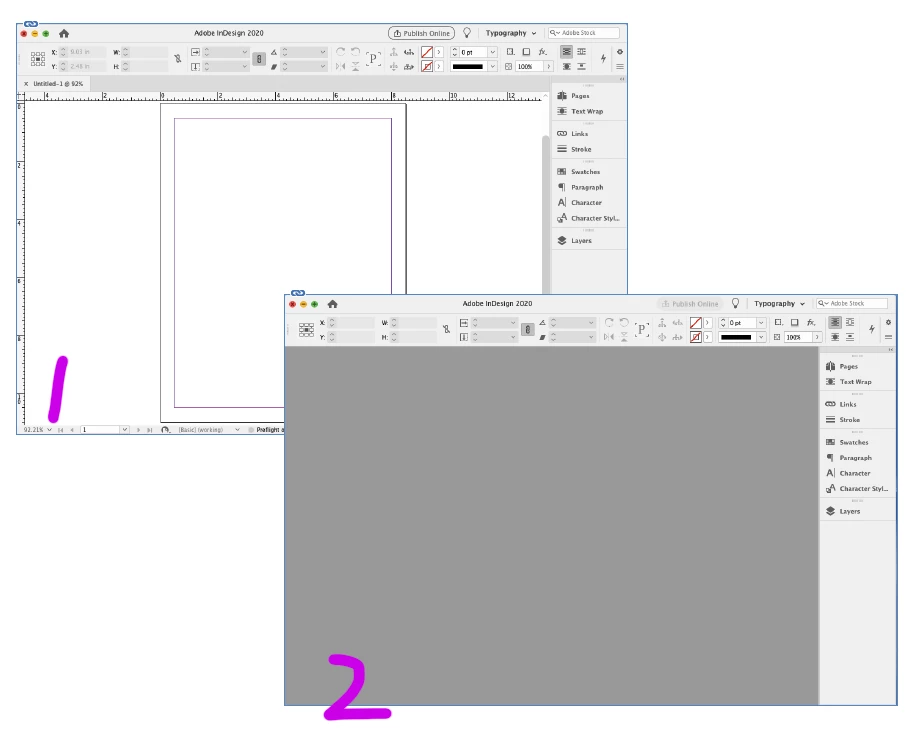
Hello. I am not sure what the frame/window is called, so bare with me. I am working on a project in inDesign. I close the project, but the grey background frame/window is still open. I have to click it closed or hide it each time I am done using inDesign. The same things applies to Photoshop or Illustrator. This is NOT the home screen. Here is what I want: when I close a file, inDesign hides/closes. The grey frame box does not stay around for me to have to manually close it each time. Thank you.
This topic has been closed for replies.
Correct answer D4v3

Thank you for sticking with me on this. I think we are as close as its going to get. You are on it... When I untick the Application Frame without a file open, from then on the Application Frame closes when I close a file. The Control bar at the top and the tools remain, but then I click on the visible desktop and good to go. That is a pretty good compromise... one click on the desktop.


BTW... I am surprised this is not a thing for others. Its kind of a (small) pain.


No problem, I am glad I was of some help.

2 replies

DDURSAuthor
Participant
November 15, 2019

Thank you for the reply. This will close the Application Frame when I am in the application. I want it to close when I close a file. Right now when I close a file, the Application Frame is still opened. The only option I see is to close it manually (per your suggestion), or hide it (command H).

D4v3
Inspiring
November 15, 2019

I may have misunderstood what is happeneing.

Let's see if I can clarify:

When you launch InDesign without a project open, the Application Frame (grey background) is not visible and the option in the drop down menu is not ticked.

When you open a project, the Application Frame is turned back on and once you close the project, the Application Frame is still there and you are having to manually turn it off or hide InDesign. Is this correct?

DDURSAuthor
Participant
November 15, 2019

yes

D4v3
Inspiring
November 15, 2019

Hi, the grey background is the 'Application Frame'. This can be turned on or off in all CC apps. Window > Application Frame.

I hope this helps.