Participating Frequently
August 21, 2022
Answered

How can I sort a list of number

  • August 21, 2022
  • 1 reply
  • 1405 views

Hi All, 


I have list of 50 numbers, they are automatically generated and saved as a txt file.


When I place the list into InDesign is there a way to order them numerically?


Example - When I place the list it looks like this 


12870

1456

153

167

1891215


There are just examples 


but I want it ordered with the 3 digit numbers first, followed by the 4 digit and so on 

152

167

1456

12870

1891215


Is this possible? 
This topic has been closed for replies.
Correct answer Marc Autret

Hi all,


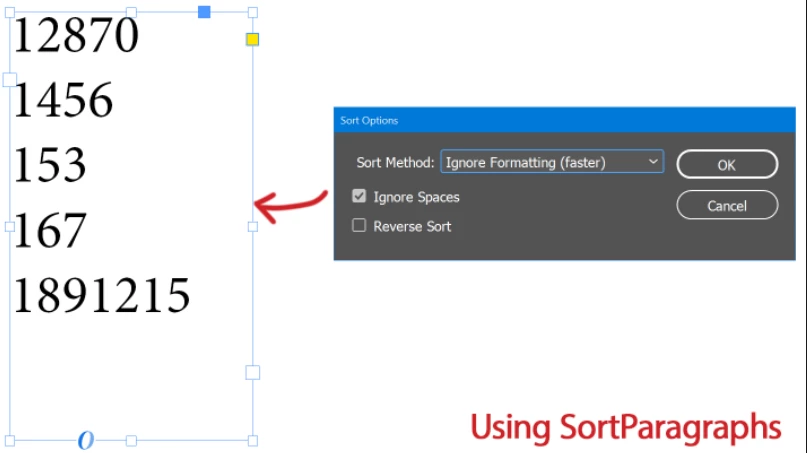
The ol'good SortParagraphs script from Adobe only performs alphabetic sort (in fact UTF16 sort) so it's a bit confusing to mark the original question as answered. A quick test shows that numbers will remain ordered like this:


So you need to hack the script to properly handle numbers. A basic patch is to add a third option (say Numeric Sort) in the Sort Method dropdown and to link it to a numeric callback function that would—schematically—return parseFloat(a)-parseFloat(b). (Some validation steps are still required though.)


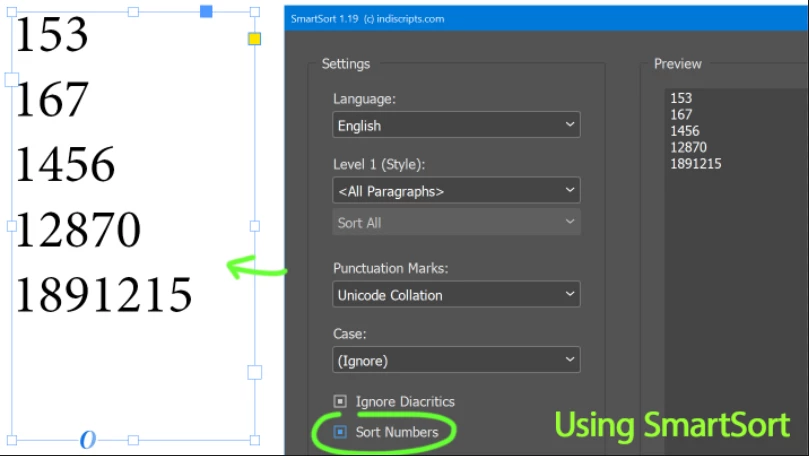
Or, you can use SmartSort with Sort Numbers turned on:


Best,

Marc

1 reply

Community Expert
September 22, 2022
Marc Autret
Marc AutretCorrect answer
Legend
September 26, 2022

Hi all,


The ol'good SortParagraphs script from Adobe only performs alphabetic sort (in fact UTF16 sort) so it's a bit confusing to mark the original question as answered. A quick test shows that numbers will remain ordered like this:


So you need to hack the script to properly handle numbers. A basic patch is to add a third option (say Numeric Sort) in the Sort Method dropdown and to link it to a numeric callback function that would—schematically—return parseFloat(a)-parseFloat(b). (Some validation steps are still required though.)


Or, you can use SmartSort with Sort Numbers turned on:


Best,

Marc