dublove
Legend
June 19, 2025
Answered

How do I get the smaller page number to come first when multiple index entries are merged?

  • June 19, 2025
  • 1 reply
  • 301 views

I am using Excel to process the catalog, sort it and turn it into an index.
In the catalog these entries with the same name must have appeared in sequential order, although not in the same position.

After sorting with Excel, 76 might just be bigger than 1(20)? And then it changed.
Can it be set up in Execl to resolve this?
Or is there a script in ID to fix it?


The catalog looks like this:

Overview24

Overview 36

Overview76

Overview120


After sorting in excel, removing duplicates and then merging:

It might look like this:

(         content followed by ~y      spaces between pages ~(        )

Overview  120 76  24 36


It should be a small page number in front:

Overview   24 36 76 120


Correct answer m1b

Hi @dublove try this script. - Mark

/**
 * @file Sort Index Titles.js
 *
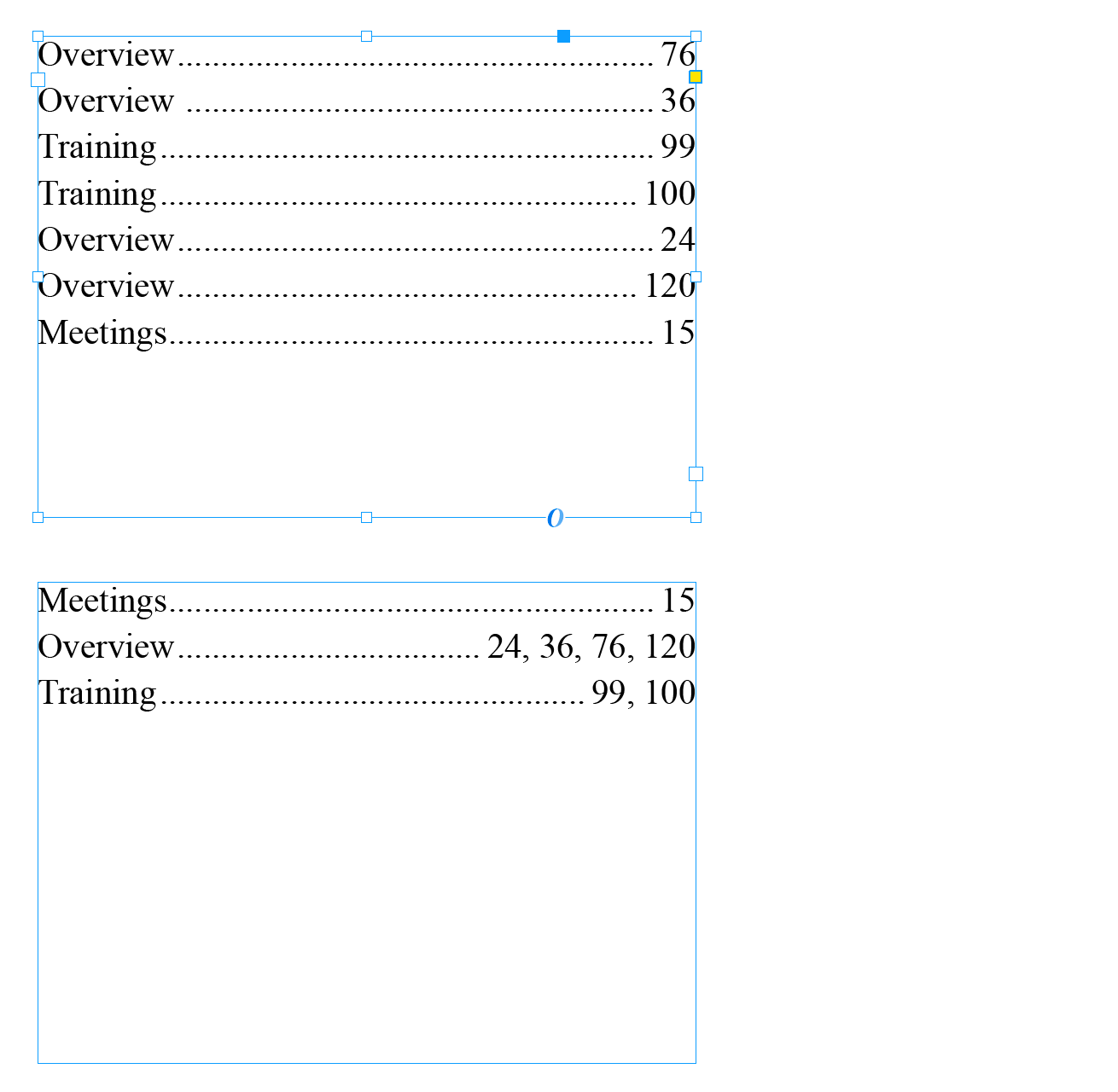
 * Given selected text like this:
 *   "Overview	76
 *    Overview 	36
 *    Training	100
 *    Training	99
 *    Overview	24
 *    Overview	120
 *    Meetings	15"
 *
 * Will change to this:
 *
 *   "Meetings	15
 *    Overview	24, 36, 76, 120
 *    Training	99, 100"
 *
 * @author m1b
 * @version 2025-06-25
 * @discussion https://community.adobe.com/t5/indesign-discussions/how-do-i-get-the-smaller-page-number-to-come-first-when-multiple-index-entries-are-merged/m-p/15386109
 */
function main() {

    // the character between title and number (right-indent-tab is \u0008)
    const DELIM = '\u0008',
        // the character between each line
        LINE_END = '\r';

    var doc = app.activeDocument,
        text = doc.selection[0];

    if (
        !text
        || !text.hasOwnProperty('characters')
    )
        return alert('Please select some text and try again.');

    var allContents = text.paragraphs.everyItem().contents;
    var pairs = [];
    var matcher = /(.*?)(\h)?([\d\s,]+)+\s*$/;

    for (var i = 0, match, nums, title; i < allContents.length; i++) {

        match = allContents[i].match(matcher);

        if (!match || match.length < 4)
            continue;

        title = match[1].replace(/[\h\s]+$/, '');
        nums = match[3].split(/[\s,]+/);

        for (var j = 0; j < nums.length; j++) {
            if (nums[j].length)
                // collect the title and the number
                pairs.push([title, Number(nums[j])]);
        }

    }

    if (0 === pairs.length)
        return alert('No title/number pairs found.');

    // sort by title, then number
    pairs.sort(function (a, b) {
        if (a[0] < b[0]) return 0;
        if (a[0] > b[0]) return 1;
        return a[1] - b[1];
    });

    var contents = '';

    for (var i = 0, title, previousTitle, nums = []; i < pairs.length; i++) {

        title = pairs[i][0];

        if (
            previousTitle !== title
        ) {
            if (nums.length)
                contents += nums.join(', ') + LINE_END;
            nums = [];
            contents += title + DELIM;
        }

        if (pairs.length - 1 === i) {
            nums.push(pairs[i][1]);
            contents += nums.join(', ') + LINE_END;
        }

        nums.push(pairs[i][1]);
        previousTitle = title;

    }

    if (contents.length)
        text.contents = contents;

};
app.doScript(main, ScriptLanguage.JAVASCRIPT, undefined, UndoModes.ENTIRE_SCRIPT, 'Sort Index Titles');
Edit 2025-06-25: added ability to sort multiple numbers on a single line, eg. "Overview 76, 24, 120, 32".


1 reply

m1b
Community Expert
Community Expert
June 24, 2025

Did you solve this @dublove ?


If not, please try again to explain it, and perhaps show examples. Your question as it stands is impossible to understand.

- Mark

dublove
dubloveAuthor
Legend
June 24, 2025

@m1b 

Thank you for not forgetting.

I have provided samples below.


m1b
Community Expert
m1bCommunity ExpertCorrect answer
Community Expert
June 25, 2025

Hi @dublove try this script. - Mark

/**
 * @file Sort Index Titles.js
 *
 * Given selected text like this:
 *   "Overview	76
 *    Overview 	36
 *    Training	100
 *    Training	99
 *    Overview	24
 *    Overview	120
 *    Meetings	15"
 *
 * Will change to this:
 *
 *   "Meetings	15
 *    Overview	24, 36, 76, 120
 *    Training	99, 100"
 *
 * @author m1b
 * @version 2025-06-25
 * @discussion https://community.adobe.com/t5/indesign-discussions/how-do-i-get-the-smaller-page-number-to-come-first-when-multiple-index-entries-are-merged/m-p/15386109
 */
function main() {

    // the character between title and number (right-indent-tab is \u0008)
    const DELIM = '\u0008',
        // the character between each line
        LINE_END = '\r';

    var doc = app.activeDocument,
        text = doc.selection[0];

    if (
        !text
        || !text.hasOwnProperty('characters')
    )
        return alert('Please select some text and try again.');

    var allContents = text.paragraphs.everyItem().contents;
    var pairs = [];
    var matcher = /(.*?)(\h)?([\d\s,]+)+\s*$/;

    for (var i = 0, match, nums, title; i < allContents.length; i++) {

        match = allContents[i].match(matcher);

        if (!match || match.length < 4)
            continue;

        title = match[1].replace(/[\h\s]+$/, '');
        nums = match[3].split(/[\s,]+/);

        for (var j = 0; j < nums.length; j++) {
            if (nums[j].length)
                // collect the title and the number
                pairs.push([title, Number(nums[j])]);
        }

    }

    if (0 === pairs.length)
        return alert('No title/number pairs found.');

    // sort by title, then number
    pairs.sort(function (a, b) {
        if (a[0] < b[0]) return 0;
        if (a[0] > b[0]) return 1;
        return a[1] - b[1];
    });

    var contents = '';

    for (var i = 0, title, previousTitle, nums = []; i < pairs.length; i++) {

        title = pairs[i][0];

        if (
            previousTitle !== title
        ) {
            if (nums.length)
                contents += nums.join(', ') + LINE_END;
            nums = [];
            contents += title + DELIM;
        }

        if (pairs.length - 1 === i) {
            nums.push(pairs[i][1]);
            contents += nums.join(', ') + LINE_END;
        }

        nums.push(pairs[i][1]);
        previousTitle = title;

    }

    if (contents.length)
        text.contents = contents;

};
app.doScript(main, ScriptLanguage.JAVASCRIPT, undefined, UndoModes.ENTIRE_SCRIPT, 'Sort Index Titles');

Edit 2025-06-25: added ability to sort multiple numbers on a single line, eg. "Overview 76, 24, 120, 32".

