



dublove
Brainiac
January 20, 2021
Question

How to align names?For example: front position, back name

  • January 20, 2021
  • 5 replies
  • 3843 views

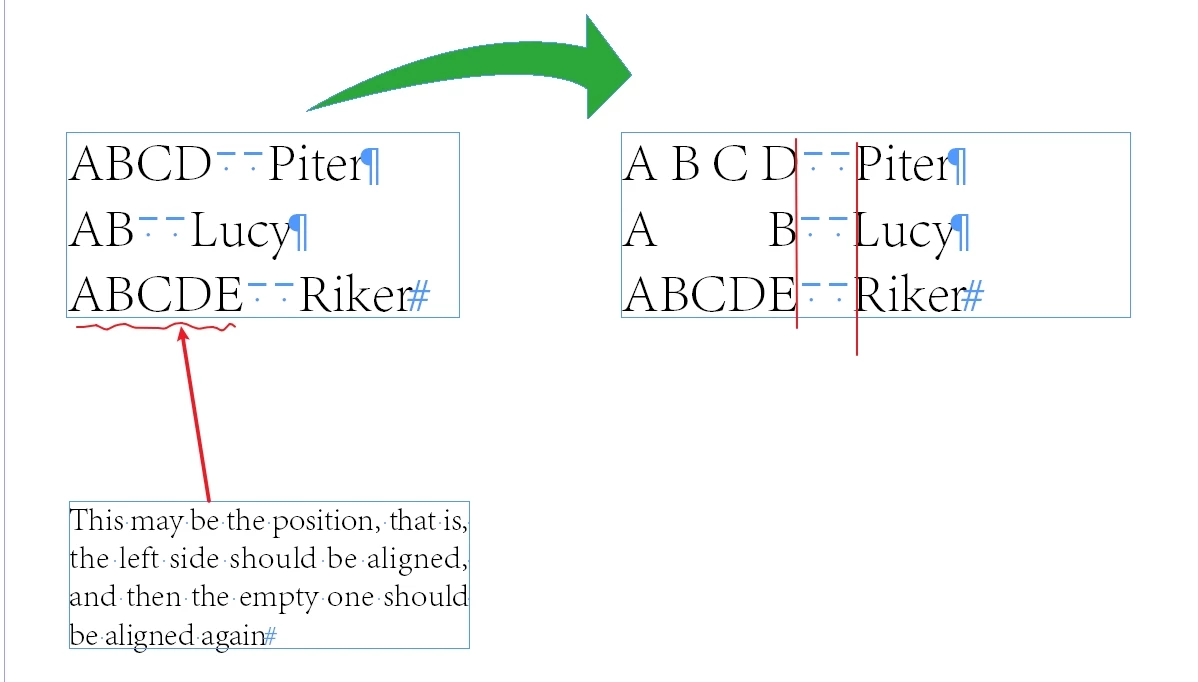
How to align names?

for example:

I saw that others said there was alignment to the grid, but I didn't realize it.

The method I'm using now is to adjust the word spacing to align. What better method do you have? It's better to demonstrate with examples.

Thank you~


--------------Sample text-----------------

ABCD  Piter
AB  Lucy
ABCDE  Riker

-------------------------------------------
This topic has been closed for replies.

5 replies

FRIdNGE
Inspiring
January 22, 2021

Just 2 para styles and 2 Grep Find/Replace!


(^/)  The Jedi

dublove
dubloveAuthor
Brainiac
January 25, 2021

And what's the picture?

Is it a form?

I don't want to use a form?

I think the best is paragraph style + grep, calling character style

rob day
Community Expert
January 25, 2021

The line is two paragraphs with a baseline shift applied to the second paragraph to align it with the first paragraph. You could do it but I think a table is going to be easier to edit:


Set the first paragraph to fully justify with a Right Indent to clear the width of the second paragraph:


Set the 2nd paragraph to Align Left with a Baseline Shift equal to the Leading, and a Left Indent large enough to clear the first paragraph:


Participating Frequently
January 22, 2021

I would recommend using tabs. Create a paragraph style for this text, then in the options for it, go to Tabs. There you can set places for where you want each name to line up. The example I set up for you below shows the first tab as being right aligned (look very closely at the top of the arrow shortly before the 6) and the second one being left aligned (currently hightlighed in blue because it's selected). So you will need to put a tab character in before the first name and between the first name and the second name to get them to line up at the tab stops you created. You can drag and drop these tab stops to modify them, but I find it easier to do once you have your text on the page and can watch it move. If you want to have dots going between them, that's what the Leader box is for. You can just do a "." or you can do " ." (space then period) to have it spaced out more, etc.


Hope this helps!

Participating Frequently
January 22, 2021

Sorry, if you're new to tabs, you click on the gray arrows above the ruler to pick which alignment you want (see the example above) and then click where you want it on the ruler. You can adjust the alignment of whichever tab you have highlighted in blue by clicking on a different grey arrow. You can adjust the tab position by dragging and dropping it elsewhere on the ruler. And if you no longer want that tab, drag it off the ruler and it will go away.

Sunil Yadav
Brainiac
January 20, 2021

If you are looking for scripting help, try this below sample snippet:

var myDoc = app.documents[0];
var textFrame = myDoc.pages[0].textFrames[0];
app.findGrepPreferences = NothingEnum.nothing;
app.changeGrepPreferences = NothingEnum.nothing;
app.findChangeGrepOptions.includeFootnotes = false;
app.findChangeGrepOptions.includeHiddenLayers = false;
app.findChangeGrepOptions.includeLockedLayersForFind = true;
app.findChangeGrepOptions.includeLockedStoriesForFind = true;
app.findChangeGrepOptions.includeMasterPages = false;
app.findGrepPreferences.findWhat = "~>~>";
var allEnSpace = textFrame.insertionPoints[0].parent.findGrep();
var maximumHorizontalDistance = null;
for(var i = 0; i < allEnSpace.length; i++){
    if(maximumHorizontalDistance == null){
        maximumHorizontalDistance = allEnSpace[i].insertionPoints[0].horizontalOffset;
        }
    else if(maximumHorizontalDistance < allEnSpace[i].insertionPoints[0].horizontalOffset){
        maximumHorizontalDistance = allEnSpace[i].insertionPoints[0].horizontalOffset;
        }
    }
for(var i = 0; i < allEnSpace.length; i++){
    var tempPara = allEnSpace[i].paragraphs[0];
    while(maximumHorizontalDistance > allEnSpace[i].insertionPoints[0].horizontalOffset){
        var characterLength = allEnSpace[i].insertionPoints[0].index - tempPara.characters[0].index;
        var leftSpace = maximumHorizontalDistance - allEnSpace[i].insertionPoints[0].horizontalOffset;
        var defaultSpace = allEnSpace[i].insertionPoints[0].paragraphs[0].characters[0].insertionPoints[-1].kerningValue;
        for(var c = tempPara.characters[0].index; c < allEnSpace[i].insertionPoints[0].index-1; c++){
            allEnSpace[i].insertionPoints[0].parent.characters[c].select();
            allEnSpace[i].insertionPoints[0].parent.characters[c].insertionPoints[-1].kerningValue = parseInt(defaultSpace+10);
            myDoc.recompose();
            }
        }
    }

Sunil

dublove
dubloveAuthor
Brainiac
January 20, 2021

The script doesn't seem to work properly.

Sometimes it's the same position, only the first one is marked, and the last one is not written.

There is no "~ > ~ >" between them

It's with '\ t'

For example:

------------------------

ABCD Piter1

     Piter1

     Piter3
AB  Lucy
ABCDE  Riker

Scott Citron
Brainiac
January 20, 2021

dublove
dubloveAuthor
Brainiac
January 20, 2021

It's a good idea.

But here, forms are not suitable

Because the information provided by the customer is non form, there is no need to add form

JonathanArias
Brainiac
January 20, 2021

what you mean by forms? 

Scott Citron
Brainiac
January 20, 2021

The first thing I would do is create a table for this text. Doing so would allow you to delete the En or Em Spaces you've used to separate the two columns.